Unlock a world of possibilities! Login now and discover the exclusive benefits awaiting you.

- Qlik Community
- :
- Forums
- :
- Analytics & AI
- :
- Products & Topics
- :
- App Development
- :
- Color logic in pivot table not working
- Subscribe to RSS Feed
- Mark Topic as New
- Mark Topic as Read
- Float this Topic for Current User
- Bookmark
- Subscribe
- Mute
- Printer Friendly Page

 kavita25
- Mark as New
- Bookmark
- Subscribe
- Mute
- Subscribe to RSS Feed
- Permalink
- Report Inappropriate Content
Color logic in pivot table not working
Hello Everyone,
I want to color the column if my Actual is equal and greater than the Forecast in pivot table.
As shown in the below screenshot, on click of Jan-2020 its working for some category and for some category its not working. For e.g. Adj EBITA Actuals and Forecast is same, then too its not showing in green.
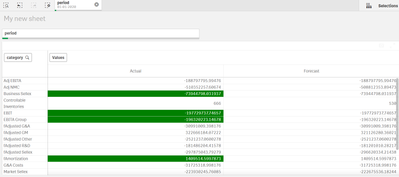
Color logic: =if(aggr(sum(forecast_bmc), category,period)=aggr(sum(actual_bmc), category,period),Green()).
Please look into the issue.
@sunny_talwar @Gysbert_Wassenaar
Thanks & Regards,
Kavita
Accepted Solutions

 sunny_talwar
- Mark as New
- Bookmark
- Subscribe
- Mute
- Subscribe to RSS Feed
- Permalink
- Report Inappropriate Content
Equal seems to be related to rounding issue and greater, you just didn't use greater or less sign... try this
=If(Round(Sum(forecast_bmc), 0.00001) <= Round(Sum(actual_bmc), 0.00001), Green())- Mark as New
- Bookmark
- Subscribe
- Mute
- Subscribe to RSS Feed
- Permalink
- Report Inappropriate Content
Equal seems to be related to rounding issue and greater, you just didn't use greater or less sign... try this
=If(Round(Sum(forecast_bmc), 0.00001) <= Round(Sum(actual_bmc), 0.00001), Green())- Mark as New
- Bookmark
- Subscribe
- Mute
- Subscribe to RSS Feed
- Permalink
- Report Inappropriate Content
Thank You so much.. It worked. I was trying with num and not round function.
Thanks..for your help 🙂
Regards,
Kavita
