Unlock a world of possibilities! Login now and discover the exclusive benefits awaiting you.

- Qlik Community
- :
- Forums
- :
- Analytics & AI
- :
- Products & Topics
- :
- App Development
- :
- Re: Custom Theme Value Label Size and color
- Subscribe to RSS Feed
- Mark Topic as New
- Mark Topic as Read
- Float this Topic for Current User
- Bookmark
- Subscribe
- Mute
- Printer Friendly Page

 gustavomacielCo
- Mark as New
- Bookmark
- Subscribe
- Mute
- Subscribe to RSS Feed
- Permalink
- Report Inappropriate Content
Custom Theme Value Label Size and color
Hi, community.
I working on a custom theme for my dashboard in Qlik Sense.
I made some advance but I'm stuck to change the size for Label Size
I'm trying to update the values on top of the bar.
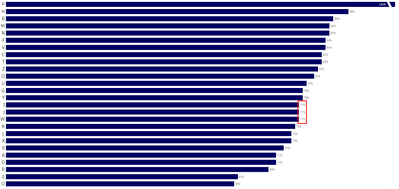
Does anyone know what attributes in the JSON I have to add or modify in order to achieve this result?
My theme JSON:
{
  "_inherit": true,
  "_variables": {
	"@default":"#0033a0",
	"@dark": "#333333",
    "@TitleSize": "18px",
    "@SubtitleSize": "15px",
    "@TextSize": "18px",
    "@FooterSize": "10px",
    "@TitleColor": "#2D67FF",
    "@SubtitleColor": "#888888",
    "@TextColor": "#000000",
    "@FooterColor": "#000000",
    "@BackgroundColor": "#ffffff",
    "@AxisMajorColor": "#eeeeee",
    "@AxisMinorColor": "#eeeeee"
  },
  "customStyles": [
    {
      "cssRef": "theme.css",
      "classRef": "sense-theme"
    }
  ],
  "color": "@TextColor",
  "fontSize": "@TextSize",
  "backgroundColor": "@BackgroundColor",
  "dataColors": {
    "primaryColor": "#000063",
    "othersColor": "#2D67FF",
    "errorColor": "#CC4000",
    "nullColor": "#CCCCCC"
  },
  "barChart": {
  "backgroundColor": "@dark",
  "title": {
    "main": {
      "color": "@default",
      "fontSize": "@font-normal",
      "fontFamily": "sans-serif"
    },
    "subTitle": {
      "color": "@default",
      "fontSize": "@font-normal",
      "fontFamily": "sans-serif"
    },
    "footer": {
      "color": "@default",
      "fontSize": "@font-normal",
      "fontFamily": "sans-serif",
      "backgroundColor": "@light"
    }
  },
  "axis": {
    "title": {
      "fontSize": "32px",
      "fontFamily": "sans-serif",
      "color": "#CEE7E6"
    },
    "label": {
      "name": {
        "color": "@default",
        "fontSize": "@font-normal",
        "fontFamily": "sans-serif"
      },
	    "value": {
		"color": "#CEE7E6",
		"fontSize": "40px",
		"fontFamily": "sans-serif"
  }
    },
    "line": {
      "major": {
        "color": "@default"
      },
      "minor": {
        "color": "@default"
      }
    }
  },
  "legend": {
    "title": {
      "fontSize": "@font-normal",
      "fontFamily": "sans-serif",
      "color": "@default"
    },
    "label": {
      "fontSize": "@font-normal",
      "fontFamily": "sans-serif",
      "color": "@default"
    }
  },
  "label": {
    "value": {
      "color": "#CEE7E6",
      "fontSize": "@font-normal",
      "fontFamily": "sans-serif"
    }
  },
  "outOfRange": {
    "color": "@default"
  }
},
  "object": {
    "title": {
      "main": {
        "color": "@TitleColor",
        "fontSize": "@TitleSize"
      },
      "subTitle": {
        "color": "@SubtitleColor",
        "fontSize": "@SubtitleSize"
      },
      "footer": {
        "color": "@FooterColor",
        "fontSize": "@FooterSize",
        "backgroundColor": "#ffffff"
      }
    },
    "label": {
      "name": {
        "color": "@TextColor",
        "fontSize": "@TextSize"
      },
      "value": {
        "color": "@TextColor",
        "fontSize": "@TextSize"
      }
    },
    "axis": {
      "title": {
        "color": "@TextColor",
        "fontSize": "@TextSize"
      },
      "label": {
        "name": {
          "color": "@TextColor",
          "fontSize": "@TextSize"
        }
      },
      "line": {
        "major": {
          "color": "#eeeeee"
        },
        "minor": {
          "color": "#eeeeee"
        }
      }
    },
    "grid": {
      "line": {
        "highContrast": {
          "color": "#eeeeee"
        },
        "major": {
          "color": "#eeeeee"
        },
        "minor": {
          "color": "#eeeeee"
        }
      }
    },
    "referenceLine": {
      "label": {
        "name": {
          "color": "@TextColor",
          "fontSize": "@TextSize"
        }
      },
      "outOfBounds": {
        "color": "@TextColor",
        "backgroundColor": "#ffffff",
        "fontSize": "@TextSize"
      }
    },
    "legend": {
      "title": {
        "color": "@TextColor",
        "fontSize": "@TextSize"
      },
      "label": {
        "color": "@TextColor",
        "fontSize": "@TextSize"
      }
    }
  },
  "palettes": {
    "data": [
      {
        "name": "New dimension colors",
        "translation": "New dimension colors description",
        "propertyValue": "3ymnyk",
        "type": "row",
        "scale": [
          "#0033A0"
        ]
      }
    ],
    "ui": [
      {
        "name": "New color picker color",
        "colors": [
          "#000063",
          "#2D67FF",
          "#328DFF",
          "#ADD1FF",
          "#0033A0"
        ]
      }
    ]
  },

  "scales": [
    {
      "name": "New measure colors",
      "translation": "New measure colors description",
      "type": "class",
      "propertyValue": "7dwlse",
      "scale": [
        "#000063",
        "#2D67FF"
      ]
    }
  ]

}
 NitinK7
- Mark as New
- Bookmark
- Subscribe
- Mute
- Subscribe to RSS Feed
- Permalink
- Report Inappropriate Content
Hi
try once to adding "@LegendSize": "14px",
gustavomacielCo- Mark as New
- Bookmark
- Subscribe
- Mute
- Subscribe to RSS Feed
- Permalink
- Report Inappropriate Content
Hi,
But in which attribute?
I try to add on legend and label, but I still can't see any difference in the value on top of the bar.
 Ludo_
Ludo_
- Mark as New
- Bookmark
- Subscribe
- Mute
- Subscribe to RSS Feed
- Permalink
- Report Inappropriate Content
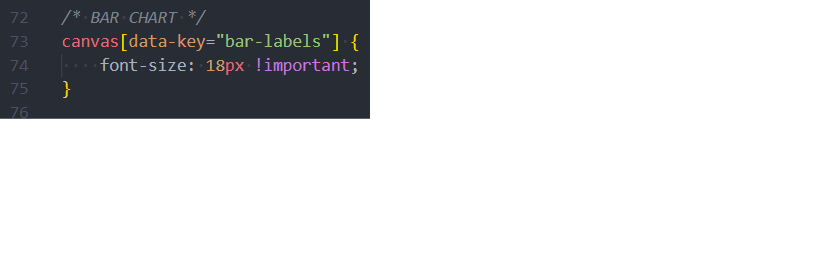
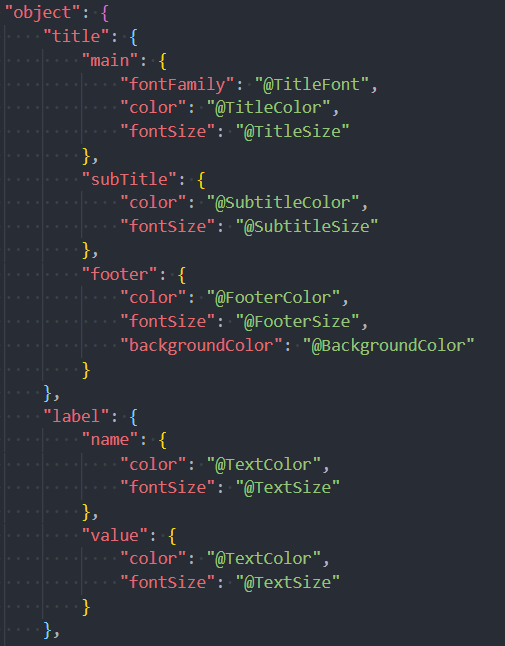
Same problem here, impossible to change label value font size, neither with json nor with CSS !
But it works with label name, so I think it may be a bug...

Ludo_
- Mark as New
- Bookmark
- Subscribe
- Mute
- Subscribe to RSS Feed
- Permalink
- Report Inappropriate Content
Finally succeeded :
...
    "object": {
       "barChart": {
            "label": {
                "value": {
                    "fontSize": "@TitleSize",
                    "fontFamily": "@TitleFont"
                }
            }
        }
    }
... Gabbar
- Mark as New
- Bookmark
- Subscribe
- Mute
- Subscribe to RSS Feed
- Permalink
- Report Inappropriate Content
How and where to use this.
