Unlock a world of possibilities! Login now and discover the exclusive benefits awaiting you.

- Qlik Community
- :
- Forums
- :
- Analytics & AI
- :
- Products & Topics
- :
- App Development
- :
- Re: Datapicker
- Subscribe to RSS Feed
- Mark Topic as New
- Mark Topic as Read
- Float this Topic for Current User
- Bookmark
- Subscribe
- Mute
- Printer Friendly Page

 07mishin
- Mark as New
- Bookmark
- Subscribe
- Mute
- Subscribe to RSS Feed
- Permalink
- Report Inappropriate Content
Datapicker
Good day!
Is it possible to pass the maximum and minimum values of dates from the datepicker to a variable?
Accepted Solutions

.png "Former Employee") hic
hic
- Mark as New
- Bookmark
- Subscribe
- Mute
- Subscribe to RSS Feed
- Permalink
- Report Inappropriate Content
If you define your variable with an expression with an equals sign, you will get that:
=Max(Date)
=Min(Date)
Such a variable will get a new value every time the user clicks.
See also https://community.qlik.com/t5/Qlik-Design-Blog/The-Little-Equals-Sign/ba-p/1475639

 Andrei_Cusnir
- Mark as New
- Bookmark
- Subscribe
- Mute
- Subscribe to RSS Feed
- Permalink
- Report Inappropriate Content
Hello,
If my understanding is correct, you have Date filed with selected dates in Date picker and you want to assign the Min date and Max date to variables. Below are the steps that I have followed to achieve a similar use case scenario. You can take the idea behind it and modify to your needs:
1. We have a dataset with fake dates
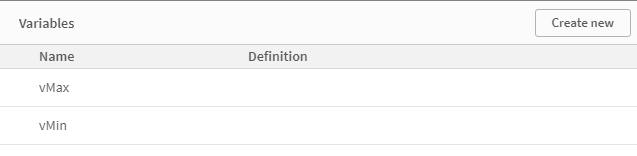
2. Now create 2 variables:
3. Create a Date picker object
4. Create a Button
5. In button's configuration, create 2 actions:
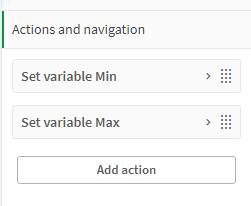
6. Set both actions to "Set variable value"
7. For the first one use vMin and for the second one, use vMax as variables
8. For the expressions use the expressions:
- =SubField(GetFieldSelections(Date), ', ', 1)
- =SubField(GetFieldSelections(Date), ', ', -1)
9. The output is:

As you can see we have selected dates from 2/2/2022 to 4/2/2022 and in the Text & image object you can see the values that are assigned to the variables as soon as the button is clicked.
I hope that this information was helpful. In case I have misunderstood the use case scenario, please elaborate in details by providing additional information. However, if it has helped you resolve the issue, please mark it as accepted solution to give further visibility to other community members.
hic
- Mark as New
- Bookmark
- Subscribe
- Mute
- Subscribe to RSS Feed
- Permalink
- Report Inappropriate Content
If you define your variable with an expression with an equals sign, you will get that:
=Max(Date)
=Min(Date)
Such a variable will get a new value every time the user clicks.
See also https://community.qlik.com/t5/Qlik-Design-Blog/The-Little-Equals-Sign/ba-p/1475639
Andrei_Cusnir
- Mark as New
- Bookmark
- Subscribe
- Mute
- Subscribe to RSS Feed
- Permalink
- Report Inappropriate Content
Hello,
If my understanding is correct, you have Date filed with selected dates in Date picker and you want to assign the Min date and Max date to variables. Below are the steps that I have followed to achieve a similar use case scenario. You can take the idea behind it and modify to your needs:
1. We have a dataset with fake dates
2. Now create 2 variables:
3. Create a Date picker object
4. Create a Button
5. In button's configuration, create 2 actions:
6. Set both actions to "Set variable value"
7. For the first one use vMin and for the second one, use vMax as variables
8. For the expressions use the expressions:
- =SubField(GetFieldSelections(Date), ', ', 1)
- =SubField(GetFieldSelections(Date), ', ', -1)
9. The output is:
As you can see we have selected dates from 2/2/2022 to 4/2/2022 and in the Text & image object you can see the values that are assigned to the variables as soon as the button is clicked.
I hope that this information was helpful. In case I have misunderstood the use case scenario, please elaborate in details by providing additional information. However, if it has helped you resolve the issue, please mark it as accepted solution to give further visibility to other community members.
