Unlock a world of possibilities! Login now and discover the exclusive benefits awaiting you.

- Qlik Community
- :
- Forums
- :
- Analytics & AI
- :
- Products & Topics
- :
- App Development
- :
- Re: Days/Weeks and Total
- Subscribe to RSS Feed
- Mark Topic as New
- Mark Topic as Read
- Float this Topic for Current User
- Bookmark
- Subscribe
- Mute
- Printer Friendly Page

 carlcimino
- Mark as New
- Bookmark
- Subscribe
- Mute
- Subscribe to RSS Feed
- Permalink
- Report Inappropriate Content
Days/Weeks and Total
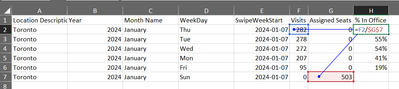
I have daily office visit data and a weekly census for that location. How would I do the following? I'm thinking I need to use a Total function but it doesn't seem to work.
Visits Syntax:
Count({<Year={$(yearselect)},Source-={'PSHR'},[Location Description]-={'Work From Home'},[Pay Status]={'Active'},Visit_Swipe={0}>} distinct [Employee ID])
Assigned Seats Measure Syntax:
Count( {<Year={$(yearselect)},Source={'PSHR'},[Location Description]-={'Work From Home'},[Pay Status]={'Active'}>} distinct [Employee ID])
Attached some sample data for reference.
Accepted Solutions

 igoralcantara
- Mark as New
- Bookmark
- Subscribe
- Mute
- Subscribe to RSS Feed
- Permalink
- Report Inappropriate Content
I believe Aggr can help you. Try something like this:
Sum(
Aggr(NoDistinct
Count({<Year={$(yearselect)},Source={'PSHR'},[Location Description]-={'Work From Home'},[Pay Status]={'Active'}>} distinct [Employee ID])
, [Local Description], Year, [Month Name], SwipeWeekStart
)
igoralcantara
- Mark as New
- Bookmark
- Subscribe
- Mute
- Subscribe to RSS Feed
- Permalink
- Report Inappropriate Content
Can you add more context? What exactly is not working? What do you expect, what calculation? What are you getting instead?
carlcimino
- Mark as New
- Bookmark
- Subscribe
- Mute
- Subscribe to RSS Feed
- Permalink
- Report Inappropriate Content
When I add total to the expression...
Count( total {<Year={$(yearselect)},Source={'PSHR'},[Location Description]-={'Work From Home'},[Pay Status]={'Active'}>} distinct [Employee ID])
The same number is in the expected in office column across all the weeks. I expect that number to be the census for that week but it returns something else.

igoralcantara
- Mark as New
- Bookmark
- Subscribe
- Mute
- Subscribe to RSS Feed
- Permalink
- Report Inappropriate Content
I believe Aggr can help you. Try something like this:
Sum(
Aggr(NoDistinct
Count({<Year={$(yearselect)},Source={'PSHR'},[Location Description]-={'Work From Home'},[Pay Status]={'Active'}>} distinct [Employee ID])
, [Local Description], Year, [Month Name], SwipeWeekStart
)
carlcimino
- Mark as New
- Bookmark
- Subscribe
- Mute
- Subscribe to RSS Feed
- Permalink
- Report Inappropriate Content
hi @igoralcantara thanks for your help that returns even more bizarre results. i'll keep trying lmk if you think of anything else.
Sum( Aggr(NoDistinct Count({<Year={$(yearselect)},Source={'PSHR'},[Location Description]-={'Work From Home'},[Pay Status]={'Active'}>} distinct [Employee ID]) , [Location Description], Year, [Month Name], SwipeWeekStart ) )

igoralcantara
- Mark as New
- Bookmark
- Subscribe
- Mute
- Subscribe to RSS Feed
- Permalink
- Report Inappropriate Content
As an exercise, use my expression but replace the Sum for a Max just to see what we get.
carlcimino
- Mark as New
- Bookmark
- Subscribe
- Mute
- Subscribe to RSS Feed
- Permalink
- Report Inappropriate Content
@igoralcantara This and your other suggestion eventually led to the solution. I switched it to be a weekly view but the concept is the same. Thanks so much for your help!
max(
Aggr(NoDistinct
Count({<WeekYear={'$(vMaxWeekSelect)'},Source={'PSHR'},[Location Description]-={'Work From Home'},[Pay Status]={'Active'}>} distinct [Employee ID])
, [Location Description], SwipeWeekStart
))
 igoralcantara
- Mark as New
- Bookmark
- Subscribe
- Mute
- Subscribe to RSS Feed
- Permalink
- Report Inappropriate Content
Glad to hear!
