Unlock a world of possibilities! Login now and discover the exclusive benefits awaiting you.

- Qlik Community
- :
- Forums
- :
- Analytics & AI
- :
- Products & Topics
- :
- App Development
- :
- Enter Conditional Colours in Bar Chart
- Subscribe to RSS Feed
- Mark Topic as New
- Mark Topic as Read
- Float this Topic for Current User
- Bookmark
- Subscribe
- Mute
- Printer Friendly Page

 Aspiring_Develo
- Mark as New
- Bookmark
- Subscribe
- Mute
- Subscribe to RSS Feed
- Permalink
- Report Inappropriate Content
Enter Conditional Colours in Bar Chart
Hello All,
I have below data visual with buttons :-

Dimension- Month Year
Measure 1-if($(vOrpack)=1,
Count({$<DateType={'Closed'},LOB={'Openreach'}>}ISSUE_NO),
Count({$<DateType={'Closed'},LOB={'Openreach CIU'}>}ISSUE_NO))
Measure 2-
if($(vOrpack)=2,
Count({$<DateType={'Received'},LOB={'Openreach CIU'}>}ISSUE_NO),
Count({$<DateType={'Received'},LOB={'Openreach'}>}ISSUE_NO) )
Now , I need to add colours in the two bars , so , it should be Blue for closed and Green for received .
I tried to add conditional in the colour section under appearance tab but it did not worked.
Can anyone please help me on this one ?
Thanks in advance
Accepted Solutions

 KGalloway
- Mark as New
- Bookmark
- Subscribe
- Mute
- Subscribe to RSS Feed
- Permalink
- Report Inappropriate Content
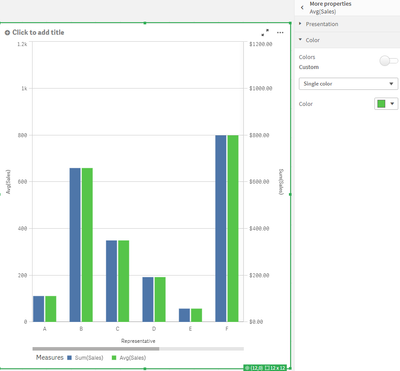
Have you considered using a combo chart where the two measures are bars? The combo chart will allow you set a color for each measure specifically by going into the "More Properties" submenu:

KGalloway
- Mark as New
- Bookmark
- Subscribe
- Mute
- Subscribe to RSS Feed
- Permalink
- Report Inappropriate Content
Have you considered using a combo chart where the two measures are bars? The combo chart will allow you set a color for each measure specifically by going into the "More Properties" submenu:
