Unlock a world of possibilities! Login now and discover the exclusive benefits awaiting you.

Announcements
Want to see what's currently in public preview? We've pulled it all together in one place. Check it out here
- Qlik Community
- :
- Forums
- :
- Analytics & AI
- :
- Products & Topics
- :
- App Development
- :
- Inverse function of Crosstable
Options
- Subscribe to RSS Feed
- Mark Topic as New
- Mark Topic as Read
- Float this Topic for Current User
- Bookmark
- Subscribe
- Mute
- Printer Friendly Page
Turn on suggestions
Auto-suggest helps you quickly narrow down your search results by suggesting possible matches as you type.
Showing results for

 isabelaadelina_
Partner - Contributor
2020-06-29
11:03 PM
- Mark as New
- Bookmark
- Subscribe
- Mute
- Subscribe to RSS Feed
- Permalink
- Report Inappropriate Content
Inverse function of Crosstable
Hi, a have a table like this one:
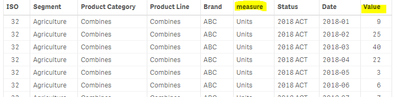
I want the highlighted field named "measure" to be split in different columns with them respective values( secondo field highlighted: so I will have the column named Units with the value 9, 25, 40, 22. Like an inverse function of Cross Table. Can I do it in Qlik Sense?
Thank You!
3,796 Views
3 Replies

2020-06-29
11:21 PM
- Mark as New
- Bookmark
- Subscribe
- Mute
- Subscribe to RSS Feed
- Permalink
- Report Inappropriate Content
Are you looking something like this?
tab1:
LOAD * INLINE [
    ISO, Brand, measure, Date, Value
    32, ABC, Units, 1/1/2018, 9
    32, ABC, Units, 2/1/2018, 25
    32, ABC, Units, 3/1/2018, 40
    32, ABC, Units, 4/1/2018, 22
    32, ABC, Units, 5/1/2018, 3
    32, ABC, Units, 6/1/2018, 6
    32, ABC, Units, 7/1/2018, 9
    32, ABC, Units, 8/1/2018, 40
    32, ABC, Units, 9/1/2018, 9
];

Gen:
Generic
LOAD ISO, Brand, Date, measure&'_'&Value,'X'
Resident tab1;

Drop Table tab1;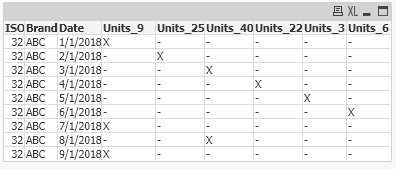

 Vegar
Vegar
MVP
2020-06-30
01:32 AM
- Mark as New
- Bookmark
- Subscribe
- Mute
- Subscribe to RSS Feed
- Permalink
- Report Inappropriate Content
Using generic load can solve your issue as @Saravanan_Desingh wrote in the previous answer. I recommend developers to read this post, The Generic Load by @hic , when introduced to the Generic function.
Vegar
Qlik Community MVP
Qlik Community MVP
2020-07-02
12:03 AM
- Mark as New
- Bookmark
- Subscribe
- Mute
- Subscribe to RSS Feed
- Permalink
- Report Inappropriate Content
Did you look into the above solution provided?
3,731 Views
