Unlock a world of possibilities! Login now and discover the exclusive benefits awaiting you.

- Qlik Community
- :
- Forums
- :
- Analytics & AI
- :
- Products & Topics
- :
- App Development
- :
- Re: KPI is not working
- Subscribe to RSS Feed
- Mark Topic as New
- Mark Topic as Read
- Float this Topic for Current User
- Bookmark
- Subscribe
- Mute
- Printer Friendly Page

- Mark as New
- Bookmark
- Subscribe
- Mute
- Subscribe to RSS Feed
- Permalink
- Report Inappropriate Content
KPI is not working
Hi Folks,
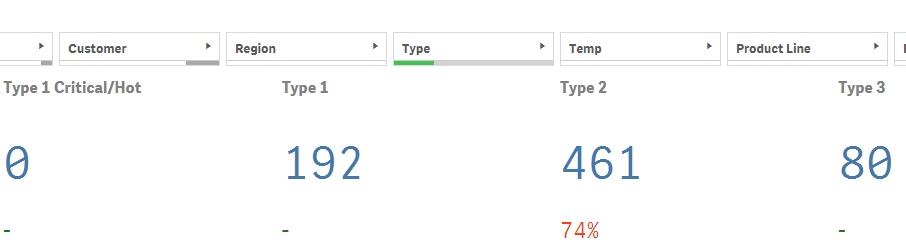
Please find the below QikSene app snippet.
When i am trying to select Type as "Type2", In Type1 and Type3 is shown as "0". But here its showing some value. Its an error.
please correct the below code..
IF(Count({<[Type 1 Count]={'1'},WeekNo={">=$(=Max(WeekNo)-12)<=$(=Max(WeekNo))"}>}Ticket)>0,
Count({<[Type 1 Count]={'1'},WeekNo={">=$(=Max(WeekNo)-12)<=$(=Max(WeekNo))"}>}Ticket),'')
Regards,
Sub2u444
Accepted Solutions
- Mark as New
- Bookmark
- Subscribe
- Mute
- Subscribe to RSS Feed
- Permalink
- Report Inappropriate Content
Try this
=IF(Count({<[Type 1 Count]={'1'},WeekNo={">=$(=Max(WeekNo)-12)<=$(=Max(WeekNo))"}>}Ticket)>0,
Count({<[Type 1 Count]={'1'},WeekNo={">=$(=Max(WeekNo)-12)<=$(=Max(WeekNo))"}>}Ticket))

 awhitfield
- Mark as New
- Bookmark
- Subscribe
- Mute
- Subscribe to RSS Feed
- Permalink
- Report Inappropriate Content
HI Subba,
are you able to upload your QVF please?
Andy

 sunny_talwar
- Mark as New
- Bookmark
- Subscribe
- Mute
- Subscribe to RSS Feed
- Permalink
- Report Inappropriate Content
Not sure, but may be this:
IF(Count({<[Type 1 Count] *={'1'},WeekNo={">=$(=Max(WeekNo)-12)<=$(=Max(WeekNo))"}>}Ticket)>0,
Count({<[Type 1 Count] *={'1'},WeekNo={">=$(=Max(WeekNo)-12)<=$(=Max(WeekNo))"}>}Ticket),'')
- Mark as New
- Bookmark
- Subscribe
- Mute
- Subscribe to RSS Feed
- Permalink
- Report Inappropriate Content
- Mark as New
- Bookmark
- Subscribe
- Mute
- Subscribe to RSS Feed
- Permalink
- Report Inappropriate Content
I am sorry.
- Mark as New
- Bookmark
- Subscribe
- Mute
- Subscribe to RSS Feed
- Permalink
- Report Inappropriate Content
Try this
=IF(Count({<[Type 1 Count]={'1'},WeekNo={">=$(=Max(WeekNo)-12)<=$(=Max(WeekNo))"}>}Ticket)>0,
Count({<[Type 1 Count]={'1'},WeekNo={">=$(=Max(WeekNo)-12)<=$(=Max(WeekNo))"}>}Ticket))
- Mark as New
- Bookmark
- Subscribe
- Mute
- Subscribe to RSS Feed
- Permalink
- Report Inappropriate Content
Thanks Vijay.
Its working fine.