Unlock a world of possibilities! Login now and discover the exclusive benefits awaiting you.

- Qlik Community
- :
- Forums
- :
- Analytics & AI
- :
- Products & Topics
- :
- App Development
- :
- Re: Measuring Two dimensions with same values
- Subscribe to RSS Feed
- Mark Topic as New
- Mark Topic as Read
- Float this Topic for Current User
- Bookmark
- Subscribe
- Mute
- Printer Friendly Page

 sela
sela
- Mark as New
- Bookmark
- Subscribe
- Mute
- Subscribe to RSS Feed
- Permalink
- Report Inappropriate Content
Measuring Two dimensions with same values
Hi my friends
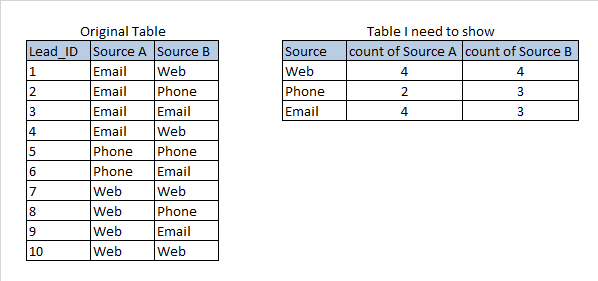
I have a table witch include two dimensions with same values (Not specifically on the same rows ).
I need to count rows for every distinct value on this dimensions, Like the example below.
Any ideas?
Thanks, Sela

 miskinmaz
- Mark as New
- Bookmark
- Subscribe
- Mute
- Subscribe to RSS Feed
- Permalink
- Report Inappropriate Content
You can try below code.
Load
Lead_id,
source A as source,
"A" as flag
from table
concatenate
Load
Lead_id,
source B as source,
"B" as flag
from table
and in expression you can try
count({<flag="A">}lead_id)
sela
- Mark as New
- Bookmark
- Subscribe
- Mute
- Subscribe to RSS Feed
- Permalink
- Report Inappropriate Content
Is there any solution with on-the-fly calculation?
I already tried 'Value list' and Set Analysis, But it didn't worked....

 sunny_talwar
- Mark as New
- Bookmark
- Subscribe
- Mute
- Subscribe to RSS Feed
- Permalink
- Report Inappropriate Content
May be an expression like this
If(ValueList('Web', 'Phone', 'Email') = 'Web',
	Count(DISTINCT {<[Source A] = {'Web'}>} Lead_ID),
If(ValueList('Web', 'Phone', 'Email') = 'Phone',
	Count(DISTINCT {<[Source A] = {'Phone'}>} Lead_ID),
If(ValueList('Web', 'Phone', 'Email') = 'Email',
	Count(DISTINCT {<[Source A] = {'Email'}>} Lead_ID))))
and
If(ValueList('Web', 'Phone', 'Email') = 'Web',
	Count(DISTINCT {<[Source B] = {'Web'}>} Lead_ID),
If(ValueList('Web', 'Phone', 'Email') = 'Phone',
	Count(DISTINCT {<[Source B] = {'Phone'}>} Lead_ID),
If(ValueList('Web', 'Phone', 'Email') = 'Email',
	Count(DISTINCT {<[Source B] = {'Email'}>} Lead_ID))))
With this dimension
=ValueList('Web', 'Phone', 'Email')
sela
- Mark as New
- Bookmark
- Subscribe
- Mute
- Subscribe to RSS Feed
- Permalink
- Report Inappropriate Content
Thank you for your ans 🙂
I have a long and dynamic list.
Because of that, I need some way to do it without "Ifs".
Is there any way to make it sort and dynamic?
sunny_talwar
- Mark as New
- Bookmark
- Subscribe
- Mute
- Subscribe to RSS Feed
- Permalink
- Report Inappropriate Content
Nope, only way is to transform your data using CrossTable load in the script. Can't think of another easy way to do this
