Unlock a world of possibilities! Login now and discover the exclusive benefits awaiting you.

- Qlik Community
- :
- Forums
- :
- Analytics & AI
- :
- Products & Topics
- :
- App Development
- :
- Not able to show Qlik Sense Map
- Subscribe to RSS Feed
- Mark Topic as New
- Mark Topic as Read
- Float this Topic for Current User
- Bookmark
- Subscribe
- Mute
- Printer Friendly Page

- Mark as New
- Bookmark
- Subscribe
- Mute
- Subscribe to RSS Feed
- Permalink
- Report Inappropriate Content
Not able to show Qlik Sense Map
Dear all,
I got a very simple file attached with latitude and longitude data.
I wonder why I'm not able to show data into Map .
Can someone gently to say if the file and format of data are correct ?
Why it don't work ?
Many thanks
Giò

 Masaki_Hamano
- Mark as New
- Bookmark
- Subscribe
- Mute
- Subscribe to RSS Feed
- Permalink
- Report Inappropriate Content
Hi Giovanni,
It would work by adding GetMakePoint function to the load script as follows:
LOAD [CUSTOMER ID],
[ADDRESS],
[LATITUDE],
[LONGITUDE],
GeoMakePoint([LATITUDE],[LONGITUDE]) AS Location
FROM [lib://Downloads/GEO_GPS_TEST_VAL_ENGLISH.xls]
(biff, embedded labels, table is Foglio1$);
- Mark as New
- Bookmark
- Subscribe
- Mute
- Subscribe to RSS Feed
- Permalink
- Report Inappropriate Content
Hi Masaki,
thanks for your reply.
I did the same on my Desktop QSense but still I don't see any point.
Could it be becouse my is a testing license ?? Is it possible ? It sound strange.
On the worksheet is better to format using point or comma ??
XX.YYYYYYY
XX,YYYYYYY
Thanks
- Mark as New
- Bookmark
- Subscribe
- Mute
- Subscribe to RSS Feed
- Permalink
- Report Inappropriate Content
I have checked now in a table the uploaded data and effectively Locaton is empty.
This is the code I got and attached the result. I think there is something wrong 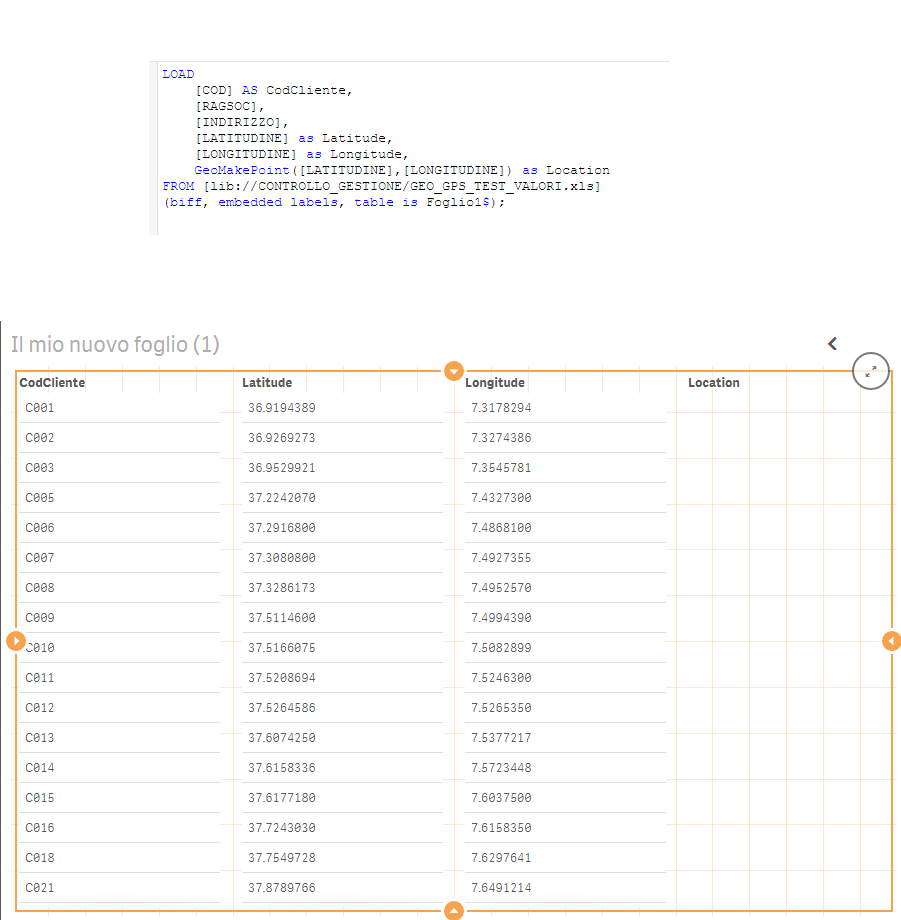 on formatting of latitude an longitude
LOAD
[COD] AS CodCliente,
[RAGSOC],
[INDIRIZZO],
[LATITUDINE] as Latitude,
[LONGITUDINE] as Longitude,
GeoMakePoint([LATITUDINE],[LONGITUDINE]) as Location
FROM [lib://CONTROLLO_GESTIONE/GEO_GPS_TEST_VALORI.xls]
(biff, embedded labels, table is Foglio1$);
- Mark as New
- Bookmark
- Subscribe
- Mute
- Subscribe to RSS Feed
- Permalink
- Report Inappropriate Content
Okey.... I got it !!!!
The only format working is using "," comma.... !!!! Thanks again