Unlock a world of possibilities! Login now and discover the exclusive benefits awaiting you.

Announcements
Want to see what's currently in public preview? We've pulled it all together in one place. Check it out here
- Qlik Community
- :
- Forums
- :
- Analytics & AI
- :
- Products & Topics
- :
- App Development
- :
- Re: Qlik Sense Autocalendar Date Format
Options
- Subscribe to RSS Feed
- Mark Topic as New
- Mark Topic as Read
- Float this Topic for Current User
- Bookmark
- Subscribe
- Mute
- Printer Friendly Page
Turn on suggestions
Auto-suggest helps you quickly narrow down your search results by suggesting possible matches as you type.
Showing results for

Not applicable
2017-07-28
07:38 PM
- Mark as New
- Bookmark
- Subscribe
- Mute
- Subscribe to RSS Feed
- Permalink
- Report Inappropriate Content
Qlik Sense Autocalendar Date Format
I can see in the load script that there is some autocalendar scripting. I haven't touched this however I have changed the following two variables
SET DateFormat='DD/MM/YYYY';
SET TimestampFormat='DD/MM/YYYY h:mm:ss[.fff] TT';
Despite doing this, the autocalendar sill results in showing M/D/YYYY format.
Below we can see that autocalendar is working.
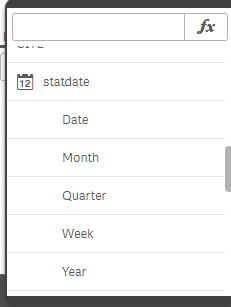
Below we can see that the dates have not changed. I have also attempted to re-load the data. Thanks

- Tags:
- autocalendar
- dates
2 Replies

 pathiqvd
Creator III
2017-07-30
01:21 AM
- Mark as New
- Bookmark
- Subscribe
- Mute
- Subscribe to RSS Feed
- Permalink
- Report Inappropriate Content
Hi,
write date format in auto calendar script like,
Date(Floor($1),'DD/MM/YYYY') AS [Date] Tagged ('$axis', '$date', '$qualified'),
Regards,

 rwunderlich
MVP
2017-07-30
09:15 PM
- Mark as New
- Bookmark
- Subscribe
- Mute
- Subscribe to RSS Feed
- Permalink
- Report Inappropriate Content
And you reloaded after changing the variable?
-Rob