Unlock a world of possibilities! Login now and discover the exclusive benefits awaiting you.

- Qlik Community
- :
- Forums
- :
- Analytics & AI
- :
- Products & Topics
- :
- App Development
- :
- Re: Sales Today expression
- Subscribe to RSS Feed
- Mark Topic as New
- Mark Topic as Read
- Float this Topic for Current User
- Bookmark
- Subscribe
- Mute
- Printer Friendly Page

- Mark as New
- Bookmark
- Subscribe
- Mute
- Subscribe to RSS Feed
- Permalink
- Report Inappropriate Content
Sales Today expression
Hello,
I've been trying to set an expression that locks my sales for today. But after going through these forums and youtube and guides I can't seem to get it to work.
What I need is todays sales numbers in the Business area "Stores" which is called Affärsområde.
This is what I got right now,
sum({<Date={'$(=Date(Today(),'DD/MM/YYYY'))'}, Affärsområde={'80 BUTIK'} >} TB)
TB = Sales
Affärsområde = All the stores we got
HEEEELP!
- « Previous Replies
-
- 1
- 2
- Next Replies »

 sam_grounds
- Mark as New
- Bookmark
- Subscribe
- Mute
- Subscribe to RSS Feed
- Permalink
- Report Inappropriate Content
Go into your table viewer (CTRL + T) and right click on the table with your date and choose to "Preview" that will show a sample of your data, a quick glance at your date field should give you the info you need. Then you can use =date(today(),'DD/MM/YYYY') (or whatever format you want, you could do) =date(today(),'YYYY-MM-DD') if it's a SQL format date.
sam_grounds
- Mark as New
- Bookmark
- Subscribe
- Mute
- Subscribe to RSS Feed
- Permalink
- Report Inappropriate Content
If your date has a time in it, use the floor() function to wrap around the date field to drop it to a flat date with a time of midnight.
- Mark as New
- Bookmark
- Subscribe
- Mute
- Subscribe to RSS Feed
- Permalink
- Report Inappropriate Content
=date(today(),'YYYY-MM-DD') This gives me the correct date. But I can't figure out how to make this combined with todays sales. All the different tests I do give me either nothing or the month.

 sunny_talwar
- Mark as New
- Bookmark
- Subscribe
- Mute
- Subscribe to RSS Feed
- Permalink
- Report Inappropriate Content
Can you post a filter object with date as your dimension so that we can see its formatting
- Mark as New
- Bookmark
- Subscribe
- Mute
- Subscribe to RSS Feed
- Permalink
- Report Inappropriate Content
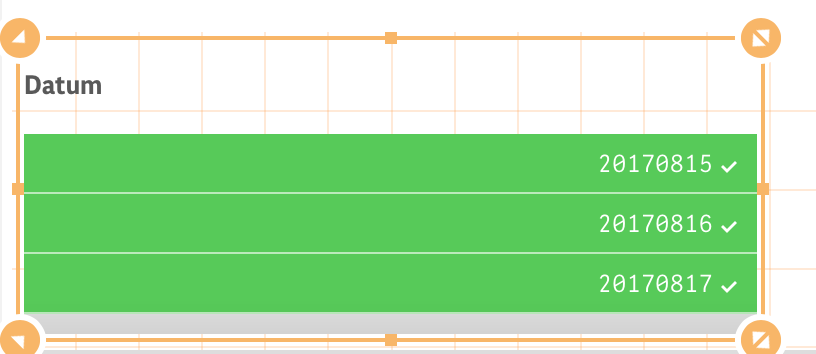
Like this you mean?
sunny_talwar
- Mark as New
- Bookmark
- Subscribe
- Mute
- Subscribe to RSS Feed
- Permalink
- Report Inappropriate Content
Your date format seems to be this: YYYYMMDD, try this
Sum({<Date={"$(=Date(Today(),'YYYYMMDD'))"}, Affärsområde={'80 BUTIK'} >} TB)
- Mark as New
- Bookmark
- Subscribe
- Mute
- Subscribe to RSS Feed
- Permalink
- Report Inappropriate Content
Still appears with the whole "year" of sales. Can it be because "Date" is called "Datum" or what else could be the issue?
sunny_talwar
- Mark as New
- Bookmark
- Subscribe
- Mute
- Subscribe to RSS Feed
- Permalink
- Report Inappropriate Content
Well, I assumed that your date field is called date... but yes, if it is called datum, then try this
Sum({<Datum={"$(=Date(Today(),'YYYYMMDD'))"}, Affärsområde={'80 BUTIK'} >} TB)
- « Previous Replies
-
- 1
- 2
- Next Replies »