Unlock a world of possibilities! Login now and discover the exclusive benefits awaiting you.

- Qlik Community
- :
- Forums
- :
- Analytics & AI
- :
- Products & Topics
- :
- App Development
- :
- Re: Sum Distinct Values in Table Total
- Subscribe to RSS Feed
- Mark Topic as New
- Mark Topic as Read
- Float this Topic for Current User
- Bookmark
- Subscribe
- Mute
- Printer Friendly Page

 waleeed_mahmood
- Mark as New
- Bookmark
- Subscribe
- Mute
- Subscribe to RSS Feed
- Permalink
- Report Inappropriate Content
Sum Distinct Values in Table Total
Hello,
I have a question that i cant seem to solve.
I have the following table:
| Region Coverage | Sales Employee | Targets |
| East | user1 | 1,350,000 |
| East | user2 | 1,350,000 |
| East | user3 | 1,350,000 |
| East | user4 | 1,350,000 |
| Total | 5,400,000 |
Since, the region is the same and the targets are the same, can we have the total to be 1,350,000 since all targets in the regions are the same?
Thank you in advance.
Waleed

 Thiago_Justen_
- Mark as New
- Bookmark
- Subscribe
- Mute
- Subscribe to RSS Feed
- Permalink
- Report Inappropriate Content
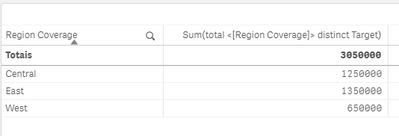
This is the output I have:
Farol BI
WhatsApp: 24 98152-1675
Skype: justen.thiago
waleeed_mahmood
- Mark as New
- Bookmark
- Subscribe
- Mute
- Subscribe to RSS Feed
- Permalink
- Report Inappropriate Content
Hi,
Do you mind sharing the QVF file?
Thank you
Thiago_Justen_
- Mark as New
- Bookmark
- Subscribe
- Mute
- Subscribe to RSS Feed
- Permalink
- Report Inappropriate Content
Here is the script I've used:
Temp:
LOAD * inline [
Region Coverage, Users, Target
Central,User1, 400000
Central,User2, 25000
Central,User3, 75000
Central,User4, 300000
Central,User5, 200000
Central,User6, 0
Central,User7, 250000
East,User8, 1350000
East,User9, 1350000
East,User10, 1350000
East,User11, 1350000
West,User12, 350000
West,User13, 100000
West,User14, 200000
];
Farol BI
WhatsApp: 24 98152-1675
Skype: justen.thiago
 sunny_talwar
- Mark as New
- Bookmark
- Subscribe
- Mute
- Subscribe to RSS Feed
- Permalink
- Report Inappropriate Content
You might be able to use this
Aggr(NODISTINCT Sum(DISTINCT Target), [Region Coverage]))- Mark as New
- Bookmark
- Subscribe
- Mute
- Subscribe to RSS Feed
- Permalink
- Report Inappropriate Content
Great @sunny_talwar!!
Farol BI
WhatsApp: 24 98152-1675
Skype: justen.thiago
waleeed_mahmood
- Mark as New
- Bookmark
- Subscribe
- Mute
- Subscribe to RSS Feed
- Permalink
- Report Inappropriate Content
Hello Sunny, Thiago,
Using your script and expressions, this is what i get.
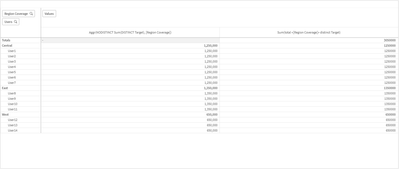
Except East, other regions have their own targets that should appear. Only east is the exception.
Thank you.
sunny_talwar
- Mark as New
- Bookmark
- Subscribe
- Mute
- Subscribe to RSS Feed
- Permalink
- Report Inappropriate Content
I am not entirely sure what you need, but may be this
If([Region Coverage] = 'East',
    Aggr(NODISTINCT Sum(DISTINCT Target),  [Region Coverage])),
    Sum(Target)
)
waleeed_mahmood
- Mark as New
- Bookmark
- Subscribe
- Mute
- Subscribe to RSS Feed
- Permalink
- Report Inappropriate Content
Hi Sunny,
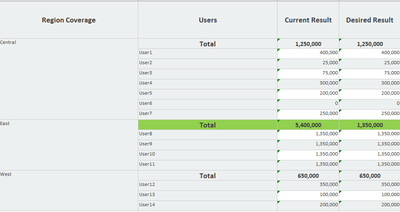
Ill try your expression but please see below for desired result:
Thank you
Thiago_Justen_
- Mark as New
- Bookmark
- Subscribe
- Mute
- Subscribe to RSS Feed
- Permalink
- Report Inappropriate Content
If(Dimensionality()=0,Sum(Targets),Sum(total <[Region Coverage]> distinct Targets))
Farol BI
WhatsApp: 24 98152-1675
Skype: justen.thiago
sunny_talwar
- Mark as New
- Bookmark
- Subscribe
- Mute
- Subscribe to RSS Feed
- Permalink
- Report Inappropriate Content
I am guessing Current Result uses Sum(Target)... if it does, then I think this should work
If([Region Coverage] = 'East',
    Aggr(NODISTINCT Sum(DISTINCT Target),  [Region Coverage])),
    Sum(Target)
)
