Unlock a world of possibilities! Login now and discover the exclusive benefits awaiting you.

- Qlik Community
- :
- Forums
- :
- Analytics & AI
- :
- Products & Topics
- :
- App Development
- :
- Text box showing 0 while data is present
- Subscribe to RSS Feed
- Mark Topic as New
- Mark Topic as Read
- Float this Topic for Current User
- Bookmark
- Subscribe
- Mute
- Printer Friendly Page

 shekkyBoi
- Mark as New
- Bookmark
- Subscribe
- Mute
- Subscribe to RSS Feed
- Permalink
- Report Inappropriate Content
Text box showing 0 while data is present
Hi,
I have a client-based QlikView report which we are hosting.
The report is built at the client's end and hosted by the company i work for.
I am having a issue where the Client is able to see data inside a text object in their environment, but when I run a reload in my environment the text object just shows 0.
I have tried turning the section access off and it didn't help.
I have asked the client to send me the reloaded version from his environment and I am able to view the data without reload.
Can anyone help me with this?
this is the express inside : =Count({<[CAC_InvoiceDate] = {"$(='>=' & Date(MonthStart(Date(Addmonths(Today(),-2)))) & '<=' & Date(MonthEnd(Date(Addmonths(Today(),-2)))))"}>} [CAC_InvoiceDate])
My environment after reload:

Client environment when they do the reload:

The data is in the report, can verify as there is a table in the same report with the data as rows in a table.

 marcus_sommer
- Mark as New
- Bookmark
- Subscribe
- Mute
- Subscribe to RSS Feed
- Permalink
- Report Inappropriate Content
Maybe the invoice date isn't loaded as date else as a string - then the set analysis condition couldn't be resolved.
- Marcus
shekkyBoi
- Mark as New
- Bookmark
- Subscribe
- Mute
- Subscribe to RSS Feed
- Permalink
- Report Inappropriate Content
Hi @marcus_sommer ,
Thank you for reaching out.
I did another test on the same field as =Count(CAC_InvoiceDate) and it populates the count.
But when using the expression it doesn't work and shows 0.
Do you think its a developer version issue?
marcus_sommer
- Mark as New
- Bookmark
- Subscribe
- Mute
- Subscribe to RSS Feed
- Permalink
- Report Inappropriate Content
If the pure counting of: Count(CAC_InvoiceDate) is working but not with your applied condition it means that the condition becomes never true. This might have various causes (and maybe more as one), for example: no relevant data are there, the comparison failed because of comparing numeric statements against a string or the syntax is wrong.
In your case you may start by doing a simplified check with something like:
Count({< CAC_InvoiceDate = {"<=$(=today())"}>} CAC_InvoiceDate)
What happens?
- Marcus
shekkyBoi
- Mark as New
- Bookmark
- Subscribe
- Mute
- Subscribe to RSS Feed
- Permalink
- Report Inappropriate Content
Hi @marcus_sommer ,
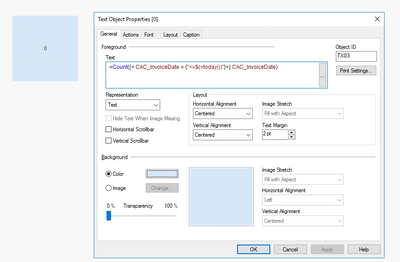
i get a 0 again when using that expression.
=Count({< CAC_InvoiceDate = {"<=$(=today())"}>} CAC_InvoiceDate)
marcus_sommer
- Mark as New
- Bookmark
- Subscribe
- Mute
- Subscribe to RSS Feed
- Permalink
- Report Inappropriate Content
This indicates that your date isn't a date. You could check it within a table-chart with this date-field as dimension and num(YourDateField) as expression - if it's returned NULL it's not date. In this case you need to convert this field within the script, for example with something like:
date(date#(YourDateField, 'YourFormatPattern')) as YourDateField
- Marcus
