Unlock a world of possibilities! Login now and discover the exclusive benefits awaiting you.

- Qlik Community
- :
- Forums
- :
- Analytics & AI
- :
- Products & Topics
- :
- App Development
- :
- Re: Totals function - Auto and Sum
- Subscribe to RSS Feed
- Mark Topic as New
- Mark Topic as Read
- Float this Topic for Current User
- Bookmark
- Subscribe
- Mute
- Printer Friendly Page

- Mark as New
- Bookmark
- Subscribe
- Mute
- Subscribe to RSS Feed
- Permalink
- Report Inappropriate Content
Totals function - Auto and Sum
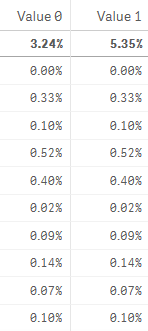
When i use 'Auto' in total fuctions the total value i get is 5.35% but when i choose 'Sum' in Total functions i get 3.24%.
The individual values are same for both Value 0 and Value 1 as formula i am using here is
($(='(1+Sum({<B=Comp,DateField={"' & GetFieldSelections(DateField,'"}>} Sales*0.01)) * (1+Sum({<B=Comp, DateField={"') & '"}>} Sales*0.01))')-1)/100
My question :
i want to get total value using expression, so i put total just before sales in the formula
($(='(1+Sum({<B=Comp,DateField={"' & GetFieldSelections(DateField,'"}>} total Sales*0.01)) * (1+Sum({<B=Comp, DateField={"') & '"}>} total Sales*0.01))')-1)/100
and it gives me 5.35
How do i get 3.24 instead of 5.35 using expression ?
- « Previous Replies
-
- 1
- 2
- Next Replies »

 pradosh_thakur
- Mark as New
- Bookmark
- Subscribe
- Mute
- Subscribe to RSS Feed
- Permalink
- Report Inappropriate Content
This will shed some light perhaps.
https://community.qlik.com/thread/250400
regards
Pradosh
- Mark as New
- Bookmark
- Subscribe
- Mute
- Subscribe to RSS Feed
- Permalink
- Report Inappropriate Content
thanks for replying pradosh ,but that tells me the difference between auto and sum
my question is how do i achieve that sum total using expression because i need to use that total at some other place

 sunny_talwar
- Mark as New
- Bookmark
- Subscribe
- Mute
- Subscribe to RSS Feed
- Permalink
- Report Inappropriate Content
May be this
Sum(Aggr(
($(='(1+Sum({<B=Comp,DateField={"' & GetFieldSelections(DateField,'"}>} Sales*0.01)) * (1+Sum({<B=Comp, DateField={"') & '"}>} Sales*0.01))')-1)/100
, YourDimensionsHere))
pradosh_thakur
- Mark as New
- Bookmark
- Subscribe
- Mute
- Subscribe to RSS Feed
- Permalink
- Report Inappropriate Content
what about
expression:
sum(($(='(1+Sum({<B=Comp,DateField={"' & GetFieldSelections(DateField,'"}>} total Sales*0.01)) * (1+Sum({<B=Comp, DateField={"') & '"}>} total Sales*0.01))')-1)/100)
- Mark as New
- Bookmark
- Subscribe
- Mute
- Subscribe to RSS Feed
- Permalink
- Report Inappropriate Content
Sorry,already tried this but it doesn't work because that formula you enclosed within sum gives a single value 5.35
pradosh_thakur
- Mark as New
- Bookmark
- Subscribe
- Mute
- Subscribe to RSS Feed
- Permalink
- Report Inappropriate Content
you tried sunny's expression? That shall work.
regards
Pradosh
- Mark as New
- Bookmark
- Subscribe
- Mute
- Subscribe to RSS Feed
- Permalink
- Report Inappropriate Content
with that i get 0.00% 
sunny_talwar
- Mark as New
- Bookmark
- Subscribe
- Mute
- Subscribe to RSS Feed
- Permalink
- Report Inappropriate Content
Did you specify your dimensions in there?
sunny_talwar
- Mark as New
- Bookmark
- Subscribe
- Mute
- Subscribe to RSS Feed
- Permalink
- Report Inappropriate Content
Besides did you try the alternative approach to calculating what you intended?
=Exp(Sum(Aggr(Log(1+Sum(Sales)), TimeKey))) - 1
- « Previous Replies
-
- 1
- 2
- Next Replies »