Unlock a world of possibilities! Login now and discover the exclusive benefits awaiting you.

- Qlik Community
- :
- Forums
- :
- Analytics & AI
- :
- Products & Topics
- :
- App Development
- :
- Re: Variable throwing garbage after '=' error
- Subscribe to RSS Feed
- Mark Topic as New
- Mark Topic as Read
- Float this Topic for Current User
- Bookmark
- Subscribe
- Mute
- Printer Friendly Page

 Evan0211
- Mark as New
- Bookmark
- Subscribe
- Mute
- Subscribe to RSS Feed
- Permalink
- Report Inappropriate Content
Variable throwing garbage after '=' error
This functionality works in a KPI but when I am trying to make it a variable, I am getting a garbage error:
{<[PERF_END_DATE] = {">=$(=timestamp(now()))<=$(=timestamp(now() + 180))"} >}
Garbage after expression: '='
Any thoughts? Thanks in advance
Accepted Solutions

 marcus_sommer
- Mark as New
- Bookmark
- Subscribe
- Mute
- Subscribe to RSS Feed
- Permalink
- Report Inappropriate Content
Your variable should look like:
var
{<[PERF_END_DATE] = {">='$(=timestamp(now()))'<='$(=timestamp(now() + 180))'"} >}
with no starting = by creating the variable and you could call it with something like:
sum($(var) [Field])
The additionally single-quotes around the $-sign expansion is to ensure that the content is treated as timestamp and not as any invalid string.
- Marcus
marcus_sommer
- Mark as New
- Bookmark
- Subscribe
- Mute
- Subscribe to RSS Feed
- Permalink
- Report Inappropriate Content
If you put a = before your variable-content the content will be evaluated at once and the result is then assigned to the variable. Because of the fact that your content isn't a complete expression it caused the errors. Solution is just to left the =.
- Marcus
Evan0211
- Mark as New
- Bookmark
- Subscribe
- Mute
- Subscribe to RSS Feed
- Permalink
- Report Inappropriate Content
Sorry, but what does left the = mean?
marcus_sommer
- Mark as New
- Bookmark
- Subscribe
- Mute
- Subscribe to RSS Feed
- Permalink
- Report Inappropriate Content
Your variable should look like:
var
{<[PERF_END_DATE] = {">='$(=timestamp(now()))'<='$(=timestamp(now() + 180))'"} >}
with no starting = by creating the variable and you could call it with something like:
sum($(var) [Field])
The additionally single-quotes around the $-sign expansion is to ensure that the content is treated as timestamp and not as any invalid string.
- Marcus
Evan0211
- Mark as New
- Bookmark
- Subscribe
- Mute
- Subscribe to RSS Feed
- Permalink
- Report Inappropriate Content
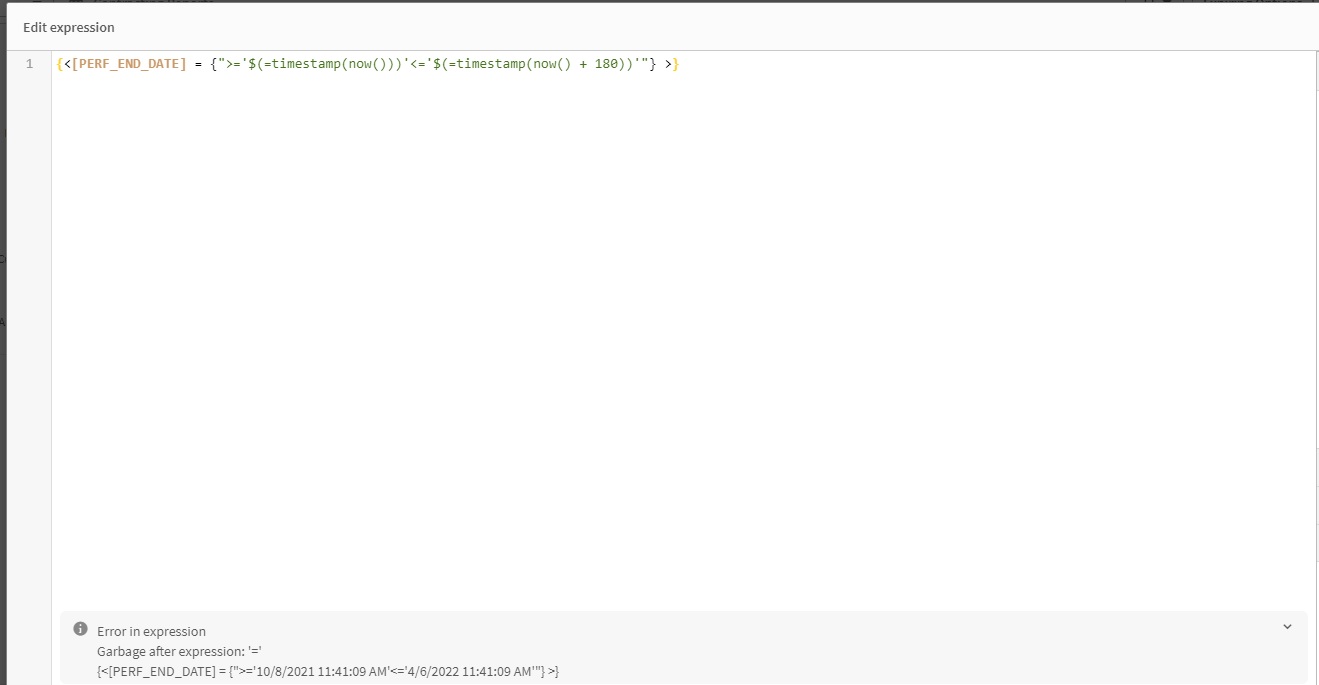
Unfortunately the error is still showing with the new code changes you suggested above. I have posted a screenshot and here is a c/p of the expression.
{<[PERF_END_DATE] = {">='$(=timestamp(now()))'<='$(=timestamp(now() + 180))'"} >}
 marcus_sommer
- Mark as New
- Bookmark
- Subscribe
- Mute
- Subscribe to RSS Feed
- Permalink
- Report Inappropriate Content
You mean that just the expression-editor by creating the variable shows an error. You could simply ignore it. The parser tries to interpret the content but it's not a complete respectively valid expression and therefore displayed the error.
- Marcus
Evan0211
- Mark as New
- Bookmark
- Subscribe
- Mute
- Subscribe to RSS Feed
- Permalink
- Report Inappropriate Content
I am using the variable in a variable input with buttons and it does not filter my table, so I assume there is an error somewhere.
The variable input values are as follows:
='~All|vExpiring_in_30_Days~30 Days|vExpiring_in_90_Days~90 Day|vExpiring_in_180_Days~180 Day'
None of the buttons filter the table. The variable above is vExpiring_in_180_Days, the 90 and 30 day variables are the same with a different duration. None of them are filtering the table when clicked.
marcus_sommer
- Mark as New
- Bookmark
- Subscribe
- Mute
- Subscribe to RSS Feed
- Permalink
- Report Inappropriate Content
Your variables are as parts of an expression just strings - simply calling them couldn't filter the data. There exists no connection between those strings and your datamodel.
This means you need to include the logic within your expressions and/or maybe within a calculated dimension. It depends on your datamodel, the requirements to your views and the number of objects and expressions which way might be more suitable.
Personally I would tend to a bit different approach by creating a calculated dimension with something like:
class(aggr([PERF_END_DATE] - today(), Dim1, Dim2), $(vClusterSize))
whereby the Dim here are just placeholder for the dimensionally context in which the calculation should be done - probably there are some like customers, products or something similar. Class returned equal clusters but they don't need to be static else you could make it dynamically with a variable like vClusterSize.
- Marcus
Evan0211
- Mark as New
- Bookmark
- Subscribe
- Mute
- Subscribe to RSS Feed
- Permalink
- Report Inappropriate Content
I have attached it to a KPI and it appears that the values there are correct upon the button clicks, but how do I wire it up to have the table filter on the button click? The data in the table is not updating. I am sure I am missing something simple.
Evan0211
- Mark as New
- Bookmark
- Subscribe
- Mute
- Subscribe to RSS Feed
- Permalink
- Report Inappropriate Content
Marcus, thanks so much for your help, I got it all wired up!
