Unlock a world of possibilities! Login now and discover the exclusive benefits awaiting you.

- Qlik Community
- :
- Forums
- :
- Analytics & AI
- :
- Products & Topics
- :
- Connectivity & Data Prep
- :
- Difference & % difference
- Subscribe to RSS Feed
- Mark Topic as New
- Mark Topic as Read
- Float this Topic for Current User
- Bookmark
- Subscribe
- Mute
- Printer Friendly Page

- Mark as New
- Bookmark
- Subscribe
- Mute
- Subscribe to RSS Feed
- Permalink
- Report Inappropriate Content
Difference & % difference
Hello,
Can you please help me in getting the correct difference & the % difference of two numbers (column GM 2016; column GM 2017),
I want to obtain the difference only to non 0 number that are present in both columns.
I used "fabs(Sum({$<[Year]={"2016"}>}[Gross Margin Actual Year])) - (Sum({$<[Year]={"2017"}>}[Gross Margin Actual Year]))"
to get the difference as the data in excel is in one column.
Thank you in advance
Sachin

- « Previous Replies
-
- 1
- 2
- Next Replies »

 sunny_talwar
- Mark as New
- Bookmark
- Subscribe
- Mute
- Subscribe to RSS Feed
- Permalink
- Report Inappropriate Content
May be this
If(fabs(Sum({$<[Year]={"2016"}>}[Gross Margin Actual Year])) <> 0 and fabs(Sum({$<[Year]={"2017"}>}[Gross Margin Actual Year])) <> 0, fabs(Sum({$<[Year]={"2016"}>}[Gross Margin Actual Year])) - (Sum({$<[Year]={"2017"}>}[Gross Margin Actual Year])))
Basically check if part 1 of the expression is not 0 and part 2 is not zero, then perform the calculation
- Mark as New
- Bookmark
- Subscribe
- Mute
- Subscribe to RSS Feed
- Permalink
- Report Inappropriate Content
Hello Sunny,
Thank you for your response, it worked well.
I have one more question.
I want to create a bar chart and show only the numbers that are zero in GM 2016. This means the numbers are only in GM 2017 ( not the numbers that are present in both). As shown in figure below.
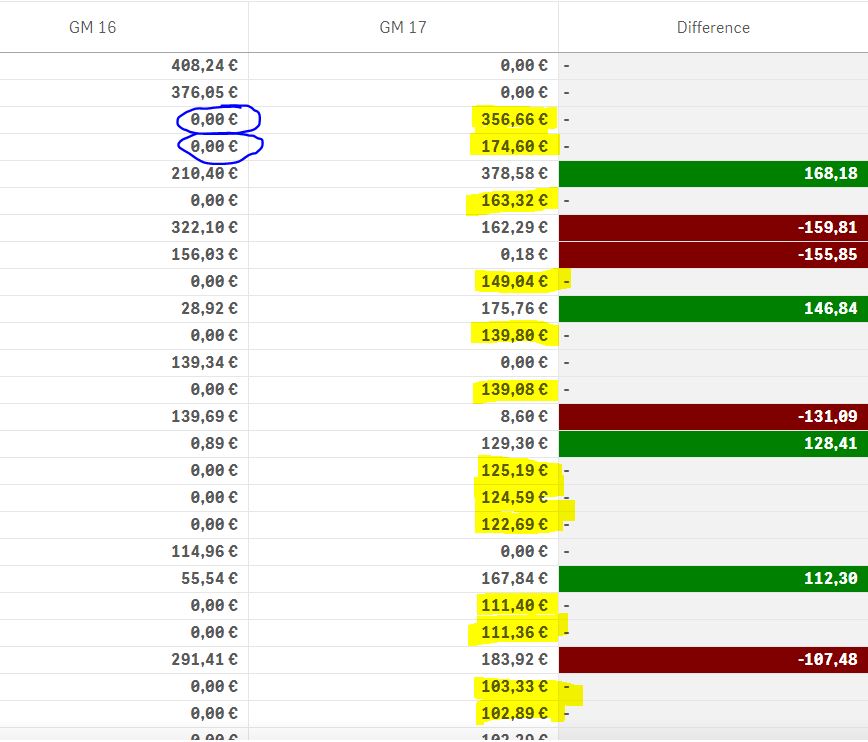
I tried to use this formula but i failed.
If(fabs(Sum({$<[Year]={"2016"}>}[Gross Margin Actual Year])) <> 0 , Sum({$<[Year]={"2017"}>}[Gross Margin Actual Year]) ,0)
Can you please help me in this,
Thank you
Sachin
sunny_talwar
- Mark as New
- Bookmark
- Subscribe
- Mute
- Subscribe to RSS Feed
- Permalink
- Report Inappropriate Content
May be this
If(fabs(Sum(TOTAL {$<[Year]={"2016"}>}[Gross Margin Actual Year])) = 0 , Sum({$<[Year]={"2017"}>}[Gross Margin Actual Year]), 0)
- Mark as New
- Bookmark
- Subscribe
- Mute
- Subscribe to RSS Feed
- Permalink
- Report Inappropriate Content
This doesnot work,
It gives all rows that are 0
sunny_talwar
- Mark as New
- Bookmark
- Subscribe
- Mute
- Subscribe to RSS Feed
- Permalink
- Report Inappropriate Content
Then this?
If(fabs(Sum(TOTAL {$<[Year]={"2016"}>}[Gross Margin Actual Year])) > 0 , Sum({$<[Year]={"2017"}>}[Gross Margin Actual Year]), 0)
- Mark as New
- Bookmark
- Subscribe
- Mute
- Subscribe to RSS Feed
- Permalink
- Report Inappropriate Content
No, i have tried this and this gives the results of both 2016 & 2017 non zero numbers.
- Mark as New
- Bookmark
- Subscribe
- Mute
- Subscribe to RSS Feed
- Permalink
- Report Inappropriate Content
also tried this
If(fabs(Sum(TOTAL [Gross Margin Actual Year])) <> 0 , Sum({$<[Year]={"2017"}>}[Gross Margin Actual Year]), 0)
and this gives all the values of 2017 (which are in 2016 & 2017, but the numbers of 2017). But what i need is the values of only 2017 that means it may be new row or 2016 = 0
sunny_talwar
- Mark as New
- Bookmark
- Subscribe
- Mute
- Subscribe to RSS Feed
- Permalink
- Report Inappropriate Content
Can you, once again, put it in words as to what you are looking to get?
- Mark as New
- Bookmark
- Subscribe
- Mute
- Subscribe to RSS Feed
- Permalink
- Report Inappropriate Content
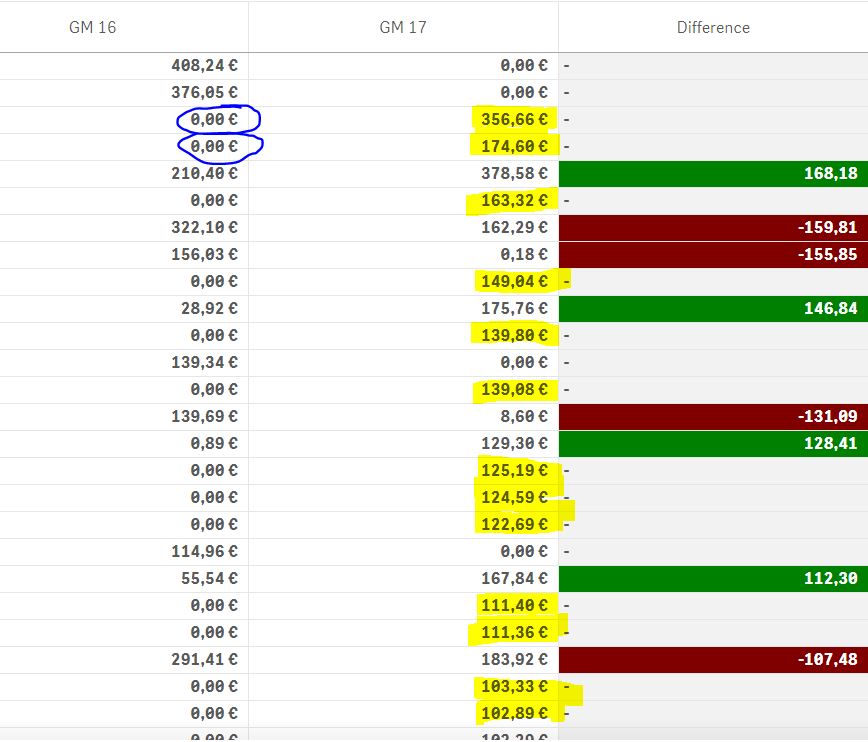
the column GM 16 & GM 17 are in one column in excel. so I want to a bar graph that shows only the numbers of GM 17 which are highlighted in yellow. The criteria here is that these numbers are zero in 2016. So I want thee numbers in graph not the ones that are in both the columns.
- « Previous Replies
-
- 1
- 2
- Next Replies »