Unlock a world of possibilities! Login now and discover the exclusive benefits awaiting you.

- Qlik Community
- :
- Forums
- :
- Analytics & AI
- :
- Products & Topics
- :
- Connectivity & Data Prep
- :
- Re: Joining tables
- Subscribe to RSS Feed
- Mark Topic as New
- Mark Topic as Read
- Float this Topic for Current User
- Bookmark
- Subscribe
- Mute
- Printer Friendly Page

 JJaky
JJaky
- Mark as New
- Bookmark
- Subscribe
- Mute
- Subscribe to RSS Feed
- Permalink
- Report Inappropriate Content
Joining tables
Hi all,
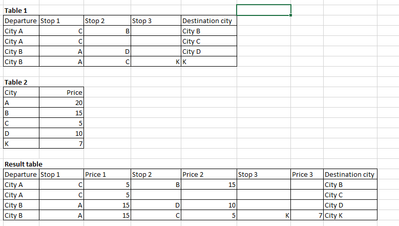
Any advice how can I combine two tables to get the result table below? Thanks in advance!
Accepted Solutions

 jwjackso
- Mark as New
- Bookmark
- Subscribe
- Mute
- Subscribe to RSS Feed
- Permalink
- Report Inappropriate Content
I would use the ApplyMap function.
mapTable2:
mapping
load City
,Price
From Table2:
Table1:
load Departure
,Stop1
,ApplyMap('mapTable2',Stop1,'') as Price1
,Stop2
,ApplyMap('mapTable2',Stop2,'') as Price2
,Stop3
,ApplyMap('mapTable2',Stop3,'') as Price3
,[Destination City]
From Table1;
jwjackso
- Mark as New
- Bookmark
- Subscribe
- Mute
- Subscribe to RSS Feed
- Permalink
- Report Inappropriate Content
I would use the ApplyMap function.
mapTable2:
mapping
load City
,Price
From Table2:
Table1:
load Departure
,Stop1
,ApplyMap('mapTable2',Stop1,'') as Price1
,Stop2
,ApplyMap('mapTable2',Stop2,'') as Price2
,Stop3
,ApplyMap('mapTable2',Stop3,'') as Price3
,[Destination City]
From Table1;
JJaky
- Mark as New
- Bookmark
- Subscribe
- Mute
- Subscribe to RSS Feed
- Permalink
- Report Inappropriate Content
Hi @jwjackso , I tried mapping load, but it doesnt show the correct values. Another thing is that I was trying also to join geographical coordinates, and I got empty fields after joining.
 shayd
shayd
- Mark as New
- Bookmark
- Subscribe
- Mute
- Subscribe to RSS Feed
- Permalink
- Report Inappropriate Content
Hi JJaky,
I tried Jwjackso solution and it works perfectly,
My script with Jwjackso solution:
Table1:
LOAD * Inline [
Departure, Stop1, Stop2, Stop3, Destination City
City A, C, B, '', City B
City A, C, '', '', City C
City B, A, D, '', City D
City B, A, C, K, K
];
Table2:
LOAD * Inline [
City, Price
A, 20
B, 15
C, 5
D, 10
K, 7
];
mapTable2:
mapping
load
City,
Price
Resident Table2;
Final:
load
Departure,
Stop1,
ApplyMap('mapTable2',Stop1,'') as Price1,
Stop2,
ApplyMap('mapTable2',Stop2,'') as Price2,
Stop3,
ApplyMap('mapTable2',Stop3,'') as Price3,
[Destination City]
Resident Table1;
Drop Tables Table1,Table2;
Result:

Give it another try maybe.
