Unlock a world of possibilities! Login now and discover the exclusive benefits awaiting you.

- Qlik Community
- :
- Forums
- :
- Analytics & AI
- :
- Products & Topics
- :
- Connectivity & Data Prep
- :
- Re: Qlik Sense rest connection returns error
- Subscribe to RSS Feed
- Mark Topic as New
- Mark Topic as Read
- Float this Topic for Current User
- Bookmark
- Subscribe
- Mute
- Printer Friendly Page

 heij1421
- Mark as New
- Bookmark
- Subscribe
- Mute
- Subscribe to RSS Feed
- Permalink
- Report Inappropriate Content
Qlik Sense rest connection returns error
Hi,
I'm trying to retrieve some data via de REST connector in Qlik Sense.
When I use the REST connector, I can retrieve the data. In this connection is also a hardcoded bearer token which should be retrieved for every connection. So I can't use this connector as I can't put a bearer token as variable in the connection.

So I don't want to use this connector because of the bearer token, but I want to make the connection within my script.
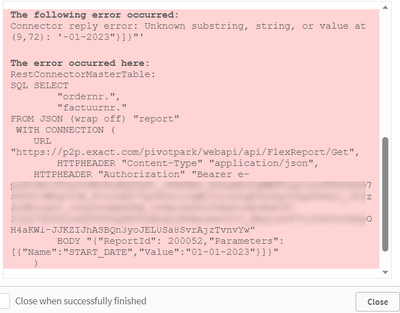
The script is:
Accepted Solutions
heij1421
- Mark as New
- Bookmark
- Subscribe
- Mute
- Subscribe to RSS Feed
- Permalink
- Report Inappropriate Content
The error was indeed due to the body.
When I changed the variable vRequestbody from
let vRequestBody = replace(vRequestBody,'"', chr(34));
to
let vRequestBody = replace(vRequestBody,'"', chr(34)&chr(34));
the error didn't occur anymore, as all double quotes are changed to double-double quotes.
So
LET vRequestBody ='{"ReportId": 200051,"Parameters":[{"Name":"START_DATE","Value":"01/01/2023"}]}';
Let vRequestBody = replace(vRequestBody,'"', chr(34)&chr(34));
OR
LET vRequestBody ='{""ReportId"": 200051,""Parameters"":[{""Name"":""START_DATE"",""Value"":""01/01/2023""}]}';
Also make sure that you create a (dummy) POST connection before this script, so Qlik is expecting a post request. I used the new REST api connection to 'https://jsonplaceholder.typicode.com/posts' with method POST as a dummy.

 henrikalmen
- Mark as New
- Bookmark
- Subscribe
- Mute
- Subscribe to RSS Feed
- Permalink
- Report Inappropriate Content
I don't believe the date is your problem, more likely it is the quotation encapsulation. This line is probably your problem:
BODY "$(vRequestBody)"
It renders to BODY "{"ReportId": 200052, "Para ...and so on. Observe the quotation marks, they don't add up. Try something like BODY '$(vRequestBody)' or BODY [$(vRequestBody)] instead, that might help. Or maybe the api you're calling can accept the body with single quotes instead, then you could alter the contents of vRequestBody to {'ReportId': 20...

 Vegar
Vegar
- Mark as New
- Bookmark
- Subscribe
- Mute
- Subscribe to RSS Feed
- Permalink
- Report Inappropriate Content
That is my conclusion as well when looking at your error. Your quotes are skewed hence you have a outer " " wrapper of the whole BODY together with sub " " within.
IF you fix that then you will most likely fix your error.
Qlik Community MVP
heij1421
- Mark as New
- Bookmark
- Subscribe
- Mute
- Subscribe to RSS Feed
- Permalink
- Report Inappropriate Content
The error was indeed due to the body.
When I changed the variable vRequestbody from
let vRequestBody = replace(vRequestBody,'"', chr(34));
to
let vRequestBody = replace(vRequestBody,'"', chr(34)&chr(34));
the error didn't occur anymore, as all double quotes are changed to double-double quotes.
So
LET vRequestBody ='{"ReportId": 200051,"Parameters":[{"Name":"START_DATE","Value":"01/01/2023"}]}';
Let vRequestBody = replace(vRequestBody,'"', chr(34)&chr(34));
OR
LET vRequestBody ='{""ReportId"": 200051,""Parameters"":[{""Name"":""START_DATE"",""Value"":""01/01/2023""}]}';
Also make sure that you create a (dummy) POST connection before this script, so Qlik is expecting a post request. I used the new REST api connection to 'https://jsonplaceholder.typicode.com/posts' with method POST as a dummy.
