Unlock a world of possibilities! Login now and discover the exclusive benefits awaiting you.

- Qlik Community
- :
- Forums
- :
- Analytics & AI
- :
- Products & Topics
- :
- Connectivity & Data Prep
- :
- REST Connector for Facebook
- Subscribe to RSS Feed
- Mark Topic as New
- Mark Topic as Read
- Float this Topic for Current User
- Bookmark
- Subscribe
- Mute
- Printer Friendly Page

- Mark as New
- Bookmark
- Subscribe
- Mute
- Subscribe to RSS Feed
- Permalink
- Report Inappropriate Content
REST Connector for Facebook
Hi,
I tried to use REST Connector in Qlik Sense to get data from my Facebook profile.I followed this steps Connecting to Facebook using Qlik REST Connector - YouTube but when I tried to Create connection, this error showed up:
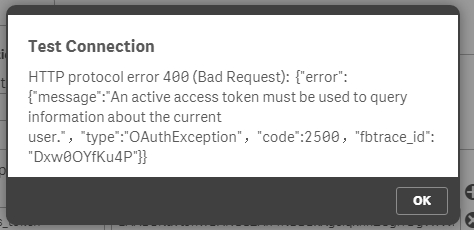
Does anyone know how to solve this problem?
- Mark as New
- Bookmark
- Subscribe
- Mute
- Subscribe to RSS Feed
- Permalink
- Report Inappropriate Content
i have the same issue
- Mark as New
- Bookmark
- Subscribe
- Mute
- Subscribe to RSS Feed
- Permalink
- Report Inappropriate Content
Hi Diana,
I got the same error when i try to connect.
Have you got any solution?
Please let me know.

 BalaBhaskar_Qli
- Mark as New
- Bookmark
- Subscribe
- Mute
- Subscribe to RSS Feed
- Permalink
- Report Inappropriate Content
Try like this:
To get around this I simply created two connections using the REST Connector, one for GET (LIB: Google Analytics API) and one for POST (LIB: Google Authorization) and used an open JSON server at jsonplaceholder.typicode.com wheen creating the connections (you cannot alter the Method GET/POST using WITH CONNECTION). I then followed the same process as above, and used WITH CONNECTION to alter the LIB settings and pointed the URL to the entry-points for Google APIs. Here's a small example script for Sense:
- IF vTokenExpires <= now() THEN
- LET vRequestBody ='';
- LET vRequestBody = vRequestBody & 'grant_type=refresh_token';
- LET vRequestBody = vRequestBody & '&client_id=' & '$(vClient_id)';
- LET vRequestBody = vRequestBody & '&client_secret=' & '$(vClient_secret)';
- LET vRequestBody = vRequestBody & '&refresh_token=' & '$(vRefresh_token)';
- LIB CONNECT TO 'Google Authorization';
- access_token:
- SQL SELECT
- "access_token",
- "token_type",
- "expires_in"
- FROM JSON (wrap on) "root"
- WITH CONNECTION (
- URL "https://www.googleapis.com/oauth2/v4/token",
- HTTPHEADER "Content-Type" "application/x-www-form-urlencoded",
- BODY "$(vRequestBody)"
- );
- LET vExpiresIn = peek('expires_in',0,'access_token');
- LET vAccessToken = peek('access_token',0,'access_token');
- LET vTokenExpires = timestamp(now() + $(vExpiresIn)/86400);
- ENDIF
Refer this:

 petter
- Mark as New
- Bookmark
- Subscribe
- Mute
- Subscribe to RSS Feed
- Permalink
- Report Inappropriate Content
The recipe you gave is for Google and not Facebook. The process is not similar as you can't get a USER ACCESS TOKEN in Facebook via an API-call. You *have* to have a user dialog interaction to retrieve it.
petter
- Mark as New
- Bookmark
- Subscribe
- Mute
- Subscribe to RSS Feed
- Permalink
- Report Inappropriate Content
While in the "facebook for developers" / Graph API Explorer page and you press the drop-down "Get Token" - make sure that you really select the "Get User Access Token" as it is different from the "Get App Token" which can't be used.
 Connecting to Facebook using Qlik REST Connector - YouTube.png)
Notice that the generated Access Token (User Access Token) is very long and much longer than the App Token.
This has to be used as a query parameter with the name access_token in the REST Connector dialog box.
NOTICE: The User Access Token expires after two hours - after that you will have to get a new one. Alternatively you can extend the User Access Token to have a two months/60 days expiration in the "Graph API Explorer".