Unlock a world of possibilities! Login now and discover the exclusive benefits awaiting you.

- Qlik Community
- :
- Forums
- :
- Analytics & AI
- :
- Products & Topics
- :
- Connectivity & Data Prep
- :
- Re: SurveyMonkey cannot authenticate
- Subscribe to RSS Feed
- Mark Topic as New
- Mark Topic as Read
- Float this Topic for Current User
- Bookmark
- Subscribe
- Mute
- Printer Friendly Page

 chris_johnson
- Mark as New
- Bookmark
- Subscribe
- Mute
- Subscribe to RSS Feed
- Permalink
- Report Inappropriate Content
SurveyMonkey cannot authenticate
Hi,
I'm trying out the SurveyMonkey beta connector and it fails straight away.
I can log in to SurveyMonkey fine on the server. When I try to authorise using the CanAuthenticate method in QWC it gives me an error saying:
An error occurred while trying to authenticate. (status code = 500,The remote server returned an error: (400) Bad Request., HttpStatusCode: BadRequest, StatusCode: 400, StatusDescription: Bad Request, Message: The remote server returned an error: (400) Bad Request., ResonseBody: {"error_description":"Invalid grant code","error":"invalid_grant"})
Not sure why it's failing here, maybe as it's a beta it's not working right?
Accepted Solutions

.png "Former Employee") drh
drh
- Mark as New
- Bookmark
- Subscribe
- Mute
- Subscribe to RSS Feed
- Permalink
- Report Inappropriate Content
Hi Adam,
Could you try authenticate again but first do this:
disconnect the application
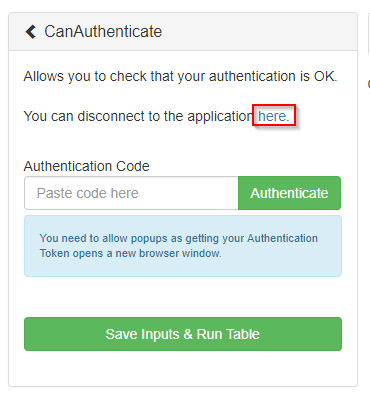
Click unlink button for this:
Application
Qlik Web Connectors (SurveyMonkey)
And then try to authenticate again.
/Adam
chris_johnson
- Mark as New
- Bookmark
- Subscribe
- Mute
- Subscribe to RSS Feed
- Permalink
- Report Inappropriate Content
A bit more digging gets me to this page: Creating a Private App | SurveyMonkey API Developer Portal which tells me that I need a Platinum account in order to be able to use their API privately. I only have a standard account at the moment.
Maybe this is the actual problem?

 Darren_Ball
- Mark as New
- Bookmark
- Subscribe
- Mute
- Subscribe to RSS Feed
- Permalink
- Report Inappropriate Content
Hi,
I'm sorry to hear that you're having some trouble with the connector.
We've made a change in the background, which may have affected you as a free Survey Monkey user, so could you please try it again and let me know how you get on?
Thanks,
Darren
Product Manager for Qlik Web Connectors
chris_johnson
- Mark as New
- Bookmark
- Subscribe
- Mute
- Subscribe to RSS Feed
- Permalink
- Report Inappropriate Content
Hi Darren,
Thanks for the reply. No change for me; I get the same message I'm afraid.
My authentication code looks like the below:
code=fzNHDzUZDlAqkdxks5u3MMLwuxseCDOBisSHdbaXATlJYFFOsUPH3s4sojwD.5mh5vpvwaOpvpMQ50nljB7TD9WYmXLLN1GccxU2M4-4Uhfa-LfRxIbHNImWz0qjhJb0RBMbGEPzdYoQy5JKMrJBiZOMYahk6svujsN9A0sZUEm0LRBo2-47Pq-08Q0J7sthrRkDJCA7KQ-cwBsZSNN-BB8Wsyw1z0iQ6b-ynEiZu3E=&state=L2ArxLcYza2nIwh3oeY12NPLmROcH0uZ&version=2
FYI - I'm doing this from a QWC instance installed on a network server.
drh
- Mark as New
- Bookmark
- Subscribe
- Mute
- Subscribe to RSS Feed
- Permalink
- Report Inappropriate Content
Hi Adam,
Could you try authenticate again but first do this:
disconnect the application
Click unlink button for this:
Application
Qlik Web Connectors (SurveyMonkey)
And then try to authenticate again.
/Adam
chris_johnson
- Mark as New
- Bookmark
- Subscribe
- Mute
- Subscribe to RSS Feed
- Permalink
- Report Inappropriate Content
Hi Adam,
That's sorted it thanks, I can now authenticate!
