Unlock a world of possibilities! Login now and discover the exclusive benefits awaiting you.

- Qlik Community
- :
- Blogs
- :
- Technical
- :
- Design
- :
- AND-Mode

 Jennell_Yorkman
- Subscribe to RSS Feed
- Mark as New
- Mark as Read
- Bookmark
- Subscribe
- Printer Friendly Page
- Report Inappropriate Content
Have you ever wished the QlikView list box used a logical AND instead of a logical OR when you made selections? Well, AND-Mode is a hidden QlikView gem that allows a list box to be changed from the default logical OR to a logical AND. By default, if one or more items are selected from a list box, the other fields will display data that is associated with any of the selections. When using AND-Mode, the other fields will display data associated with all the selections.
In order to add AND-Mode functionality to your QlikView application, you need to:
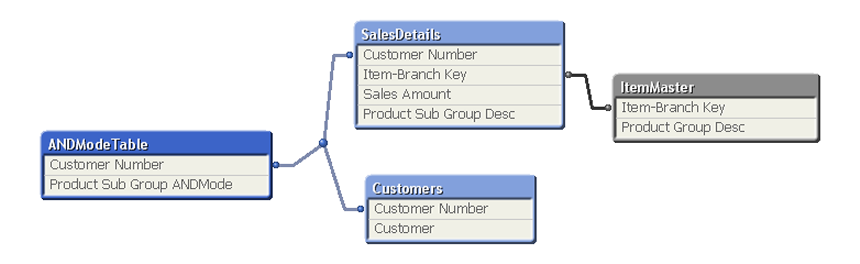
- First, include a table in the data model that stores the field that will be used in the AND-Mode list box. The records in this table must be distinct and the table can only have two fields, one of which is a key field and the other which is the field used in the AND-Mode list box. Here is an example of what this data model may look like:
- Second, in the user interface, add a list box and check the And mode checkbox on the General tab of the Properties window to enable the AND-Mode functionality.
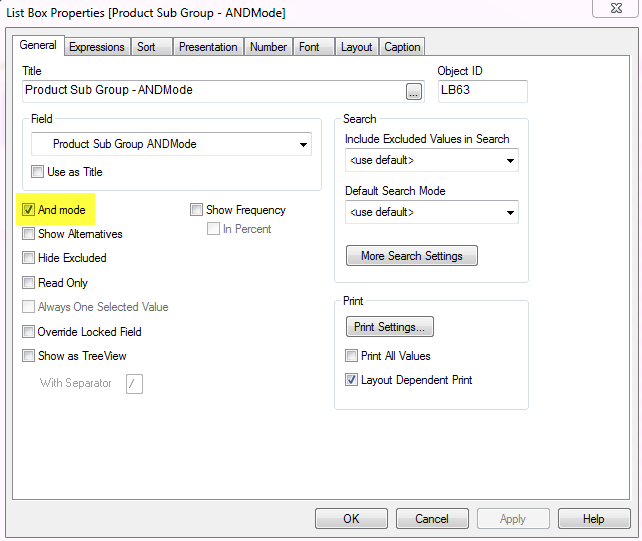
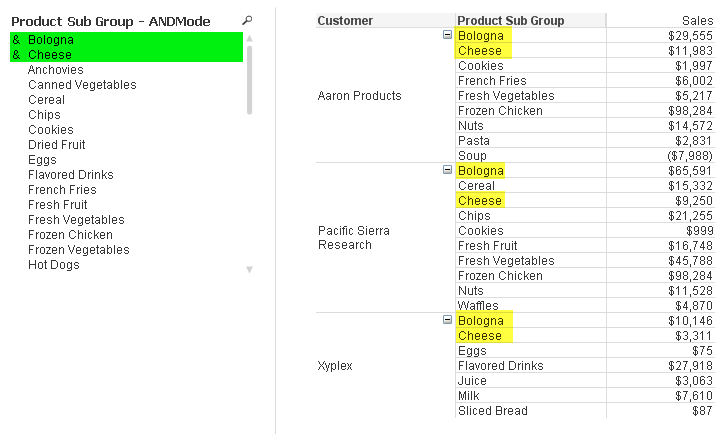
Now the list box will use AND logic versus OR logic. In the screenshot below, I can use the AND-Mode list box to view customers who purchased both Bologna and Cheese. Notice the amperstand (&) in front of the selected values indicating that we are using AND-Mode.
You can go one step further with the AND-Mode functionality and make NOT selections. For instance, I can see which customers purchased Bologna and Cheese and not Sliced Bread by also selecting Sliced Bread from the AND-Mode list box. To make a NOT selection, you need to click and hold the selection a moment until it turns red as seen in the image below.
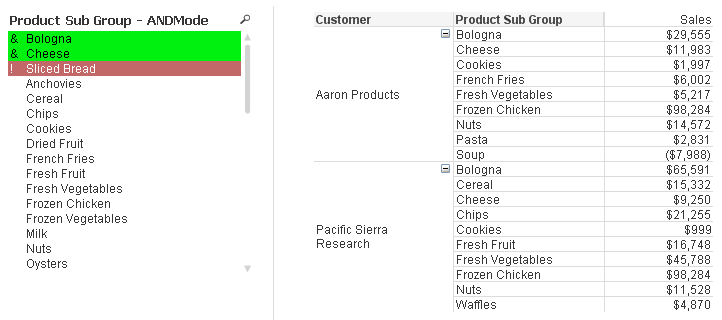
Now I can see customers who purchased Bologna and Cheese but did not purchase Sliced Bread. AND-Mode is quite powerful and can be added to any list box as long as the data model criteria are met.
Check out this technical brief for step-by-step details of how to implement AND-Mode functionality into your QlikView application.
Jennell
You must be a registered user to add a comment. If you've already registered, sign in. Otherwise, register and sign in.