There is however also a second case where you want to create reference dates, but the data model is quite different. It is when you have a list of contracts with validity periods: Rental contracts, Insurances policies, Healthcare commitments, etc.
Each contract has a begin day and an end day. The analysts of an insurance company would probably want to ask the question: “How many valid insurance policies did we have on this specific day?” In other words, he wants to click on a reference date to see the count of policies that are associated with this date – even though this date doesn't exist in the source data.
The solution is to first load all policies in one table. Then load a second table that has one record per policy and date (Policies_x_Dates). This second table can in turn link to a master calendar.
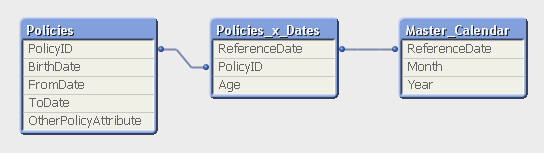
But the middle table does not exist in the source database. Instead, you must generate it using a While loop that loops over each record in the Policies table, i.e. each source record will be loaded several times. This way, you can load not only the “From” date and the “To” date, but also all dates in between:
Policies: LoadPolicyID, BirthDate, PolicyAmount, FromDate, ToDate, OtherPolicyAttribute From Policies;
Policies_x_Dates:
LoadPolicyID, Age( FromDate + IterNo() – 1, BirthDate ) as Age, PolicyAmount / (ToDate - FromDate + 1) as DailyAmount, Date( FromDate + IterNo() – 1 ) as ReferenceDate Resident Policies While IterNo() <= ToDate - FromDate + 1 ;
Note that the Policies table has exactly one record per insurance policy, and the newly created Policies_x_Dates table has exactly one record per combination of policy and date. Note also that there are other fields that should be put in the Policies_x_Dates table, e.g., the age of the insured person, since this depends on the reference date. Further, it is possible to break up a cost or an income into daily amounts, which is useful when you want to show the correct amount distributed over the year.
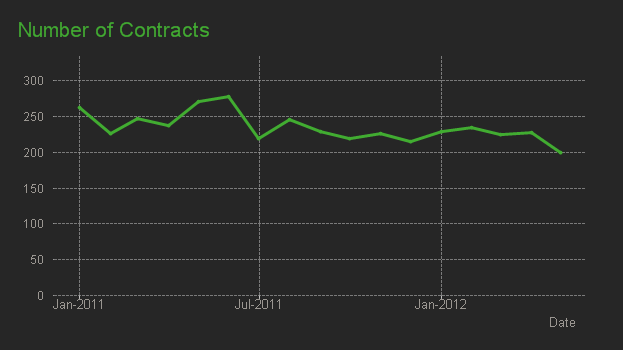
The While loop is a very useful tool whenever you need to create additional tables in the data model. It is often a better option than the IntervalMatch.
I think you can develop a solution similar to the one described in the blog post.
Use the script below, but replace the Holidays table and the Tickets table with your data. The time spent on each ticket is found through Sum(Duration).
Good Luck
HIC
Holidays: Load Date(Date#(Holiday,'YYYY-MM-DD')) as Holiday Inline [Holiday 2019-12-24 2019-12-25 2019-12-26];
Tickets: Load TimeStamp(OpeningTime+15*Rand()) as ClosingTime, *; Load RecNo() as TicketID, TimeStamp(MakeDate(2019,12)+15*Rand()) as OpeningTime Autogenerate 10;
ReferenceDates: Load TicketID, ReferenceDate, DayStart, DayEnd, Interval(DayEnd-DayStart) as Duration ; Load TimeStamp( RangeMin(ClosingTime,RangeMax(OpeningTime,ReferenceDate + NominalDayStart)) ) as DayStart, TimeStamp( RangeMax(OpeningTime,RangeMin(ClosingTime,ReferenceDate + NominalDayEnd)) ) as DayEnd, *; Load If( Exists(Holiday, ReferenceDate), MakeTime(12), // Holidays If(Match(Num(WeekDay(ReferenceDate)),5,6), MakeTime(10), // WeekEnds MakeTime(7)) // Work days ) as NominalDayStart, If( Exists(Holiday, ReferenceDate), MakeTime(12), // Holidays If(Match(Num(WeekDay(ReferenceDate)),5,6), MakeTime(16), // WeekEnds MakeTime(23)) // Work days ) as NominalDayEnd, *; Load Date(OpeningDate + IterNo() - 1) as ReferenceDate, * While OpeningDate + IterNo() - 1 <= ClosingDate; Load Date(Floor(OpeningTime)) as OpeningDate, Date(Floor(ClosingTime)) as ClosingDate, * Resident Tickets;
The Holidays table and the Tickets table are just mock-up data. Use your own instead.
The ReferenceDates table is the interesting one. I use a lot of preceding Loads, so you should read it from the bottom and upwards.
The bottom Load loads from the Tickets table, and creates two new fields: OpeningDate and ClosingDate.
The first preceding load uses the new fields in a while-loop and creates the ReferenceDate, which holds all dates between the opening and the closing of the ticket.
The second preceding Load looks at the ReferenceDate to see if it is a holiday, a weekend or a working day, and assigns when the work starts and ends: For Work days 7:00-23:00, for weekends 10:00-16:00, and for holidays 12:00-12:00 (no work).
The third preceding Load compares the opening times and the closing times with the work hours, and picks the appropriate day-start and day-end.
The last preceding load calculates the duration of the day that is relevant to this specific ticket.
Run the script and investigate the fields, and you will see how it works. If you use my script unchanged, you can see how it works for mock-up data.
Thanks for your quick revert and you help. that's what exactly I want thank you again .
I just missed one thing , if both start and end dates are weekdays then I have to exclude the weekend in between then . weekend I have to include only if one of the date start or end date is weekend .
I want a same situation , in my fact table (Contrat) , i have two date (begin_date and end_date) which mean begin en end of contrat identify by Contrat_ID.
I want when a user choose one date (month , year or complete data) , application show a contrat that selected date is between begin_date and end_date contrat.
Contrat: load * inline [ Contrat_ID ,Home_Contrat_ID, begin_dade , end_date 1,1,'01/01/2017','01/01/2018' 2,2,'01/01/2014','01/01/2016' 3,3,'01/11/2014','01/12/2014' 4,4,'01/11/2014','01/12/2014' 5,5,'02/09/2019','' ]; // '' means blanck space, when the contrat is active // Contrat_ID = Home_Contrat_ID Resident: load * inline [ Resident_ID ,Contrat_ID , first_enter_dade , out_date 1,1,'01/01/2017','01/01/2018' 2,5,'02/09/2019','' 3,4,'01/01/2014','01/12/2014' 4,2,'01/01/2014','01/12/2016' 5,3,'01/11/2014','01/12/2014' ];
Change the second table dates name like first table (First_enter_date as begin_date and out_date as end_date) , concatenate both the table and then perform interval match with your calendar date to get the desire result .
I have a couple of suggestions to allow you to use Henric's solution above.
1. The easiest way, I found, to count active employees is at a single point in time - say the first day of each month. To do this, your calendar table for this count should only contain the first day of every month.
2. Many of your employees don't have an end date, so you need to fill them in with a dummy date - I would use today().
After you have completed these two steps, you should be able to apply Henric's technique.
If you look at @hic 's code above, you can see that he iterates from the FromDate to the ToDate (While IterNo() <= ToDate - FromDate + 1 ;). That code will only work if you have valid date in the ToDate column - for you that is [Date Resigned]. So if the employee has not resigned, then you need to iterate up to today to show that they are still employed up to today.
