Unlock a world of possibilities! Login now and discover the exclusive benefits awaiting you.

- Qlik Community
- :
- Blogs
- :
- Technical
- :
- Design
- :
- Data Reduction – Yes, but How?

.png "Former Employee") hic
hic
- Subscribe to RSS Feed
- Mark as New
- Mark as Read
- Bookmark
- Subscribe
- Printer Friendly Page
- Report Inappropriate Content
I recently wrote a blog post about authorization using Section Access and data reduction. In the example, a person was associated with a country and this entry point in the data model determined whether a record was visible or not: Records associated with the country were visible. “Country” was the reducing field.
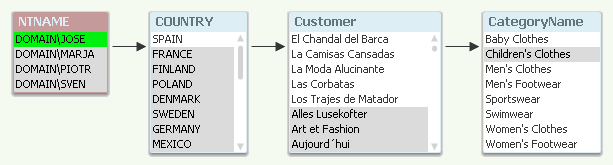
The data reduction was made using row-level security. But there are other ways of limiting access to data. This post is about how you limit access to the data:
Row-level access: You have a reducing field that determines whether a user can see a specific piece of data. If you use Country as reducing field and the user is allowed to see ‘Spain’, this will mean that only rows associated with Spain will be visible: E.g. sales transactions to customers in other countries will not be visible.
Aggregation-level access: This is similar to the above, however with the difference that all data are in principle visible but the aggregation level changes depending on country: A user that is allowed to see ‘Spain’ will see the detailed information about Spain, but only high-level aggregated information about other countries. For other countries detailed information will be hidden.
Column based access: Instead of limiting per row, you can limit per column. Here you can define that only some users are allowed to see specific fields, typically fields like Salary or Bonus.
Object based access: You can also limit access to a specific sheet, graph or pivot table depending on which user it is.
An application can use a combination of the four different methods.
Both Section Access and the loop-and-reduce in publisher use row-level access to allow one single (master) file to be used in different security scopes. It is by far the best way to limit access to data, and should be the one you normally aim for.
It is difficult to achieve aggregation-level access within one single application, so it is better to solve this problem using two applications: One with detailed data that you reduce using a reducing field, and a second unreduced with aggregated data for all countries.
The column-based access can be achieved using two applications, one that includes the sensitive fields and the other that doesn’t. It can also be achieved in one single application using the OMIT field in Section Access.
Finally, the object based access: This method has in my mind very little to do with security: If a chart is hidden for a specific user, he can still see the same data through other objects. Or even worse – if you allow collaboration, he can create an object that shows the same thing. A show condition could be convenient to use anyway, but it is a poor tool for security.
Bottom line: If you want security, you should use Section Access or the loop-and-reduce of the Publisher. You should also consider having your data in several applications. But you should not use show conditions for security purposes.
Further reading related to this topic:
- « Previous
- Next »
You must be a registered user to add a comment. If you've already registered, sign in. Otherwise, register and sign in.