Unlock a world of possibilities! Login now and discover the exclusive benefits awaiting you.


 Jennell_Yorkman
- Subscribe to RSS Feed
- Mark as New
- Mark as Read
- Bookmark
- Subscribe
- Printer Friendly Page
- Report Inappropriate Content
Did you know that you can hide fields in your data model from appearing in a field list? Similar to how we have the ability to show and hide system fields, we can also show and hide fields that we create in the script. When the Show System Fields checkbox is checked, system fields and all fields created in the script are listed. When the Show System Fields is not checked, the system fields and any fields hidden using HidePrefix or HideSuffix will not be displayed in the list.
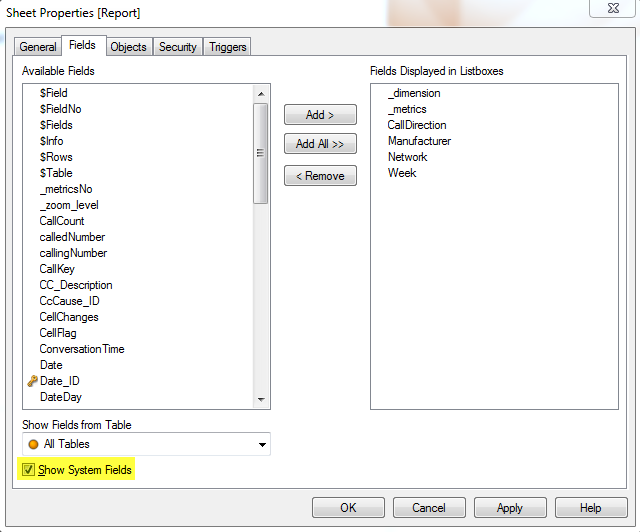
It is very easy to do. In the script, you set the user defined variable HidePrefix to the text that will prefix fields that you would like to hide. In the Call Detail Record Analysis demo, I created a sheet that acted as a report giving the user the ability to select the dimensions and measures they wanted to see in the table.
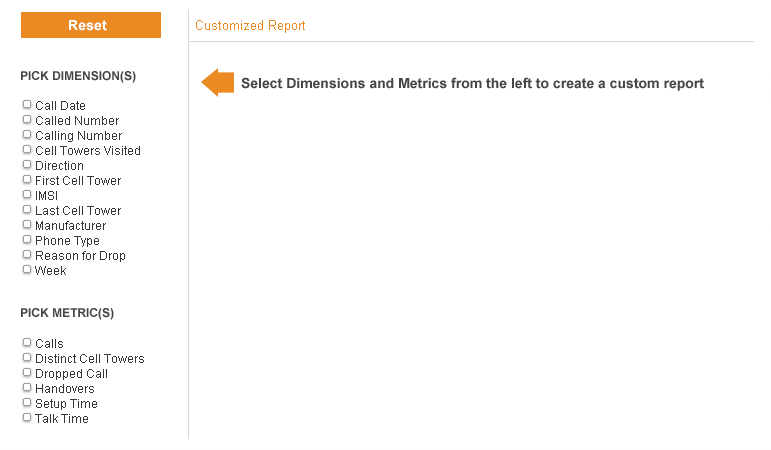
To create the list of dimensions and measures that I wanted to make available to the user, I created two new fields: _dimension and _metrics. You can find details on how to create a customizable report in this blog. These fields are used solely on the report sheet to display the dimensions and measures so I decided to hide them so that they did not clutter up my field list. To do this, I set the HidePrefix variable in my script.
SET HidePrefix = '_';
This means that any field that starts with the underscore (_) character will be hidden from the field list. I then created my new fields with the underscore prefix.
Dimensions:
LOAD * INLINE [_dimension
Call Date
Calling Number
Called Number
Cell Towers Visited
IMSI
Direction
First Cell Tower
Last Cell Tower
Manufacturer
Phone Type
Reason for Drop
Week
];
Metrics:
LOAD * INLINE [_metricsNo, _metrics
1, Calls
2, Distinct Cell Towers
3, Dropped Call
4, Handovers
5, Setup Time
6, Talk Time
];
So now when I view the field list with the Show System Field checkbox unchecked, I cannot see the fields I created using the underscore character in the Available Fields list.
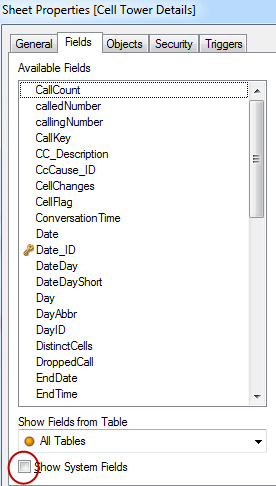
This keeps the available fields list shorter and removes fields that I know the user will not need to use anywhere else in the application. Users also have the ability to use HideSuffix as well which does the same thing as HidePrefix except this looks at the ending of the field name for the text that is set in the HideSuffix variable. HidePrefix is an easy way to keep the field list in your application clean and hides fields that you may not want the user to use or that you may want to hide to eliminate confusion.
Thanks,
Jennell
You must be a registered user to add a comment. If you've already registered, sign in. Otherwise, register and sign in.