Do not input private or sensitive data. View Qlik Privacy & Cookie Policy.
Skip to main content

Announcements
April 13–15 - Dare to Unleash a New Professional You at Qlik Connect 2026: Register Now!
hic
Former Employee
Former Employee

A common problem in business intelligence is when you want to link a number to a range. It could be that you have a date in one table and an interval – a “From” date and a “To” date – in another table, and you want to link the two tables. In SQL, you would probably join them using a BETWEEN clause in the comparison.
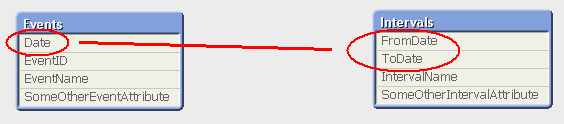
 

Events and Intervals with links.png


But how do you solve this in QlikView, where you should avoid joins?


The answer is to use IntervalMatch.


IntervalMatch is a prefix that can be put in front of either a Load or a SELECT statement. The Load/SELECT statement needs to contain two fields only: the “From” and the “To” fields defining the intervals. The IntervalMatch will generate all the combinations between the loaded intervals and a previously loaded numeric field.


Typically, you would first load the table with the individual numbers (The Events), then the table with the Intervals, and finally an intervalmatch that creates a third table that bridges the two first tables.


Events:
Load * From Events;

Intervals:
Load * From Intervals;

IntervalMatch:
IntervalMatch (Date)
Load distinct FromDate, ToDate resident Intervals;
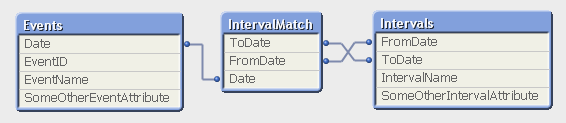
 

Intervalmatch.png


The resulting data model contains three tables:

  1. The Events table that contains exactly one record per event.
  2. The Intervals table that contains exactly one record per interval.
  3. The IntervalMatch table that contains exactly one record per combination of event and interval, and that links the two previous tables.


Note that this means that an event may belong to several intervals, if the intervals are overlapping. And an interval can of course have several events belonging to it.


This data model is optimal, in the sense that it is normalized and compact. All QlikView calculations operating on these tables e.g. Count(EventID) will work and will be evaluated correctly. This means that it is not necessary to join the intervalmatch table onto one of the original tables. Joining it onto another table may even cause QlikView to calculate aggregations incorrectly, since the join can change the number of records in a table.


Further, the data model contains a composite key (the FromDate and ToDate fields) which will manifest itself as a QlikView synthetic key. But have no fear. This synthetic key should be there; not only is it correct, but it is also optimal given the data model. You do not need to remove it.


IntervalMatch can also be used with an additional key between the tables – i.e. when you have Slowly Changing Dimensions. But more about that in a later post.


HIC


For more on IntervalMatch and some script examples, see the technical brief IntervalMatch and Slowly Changing Dimensions.

41 Comments
Not applicable

Wow - that was FAST!

Thanks Henric for your help, I'll follow your advise to correct the date interpretation and be able to fix the issues I'm having.

Thanks again for all your help !!!!

Carlos

0 Likes
1,042 Views
Not applicable

Hello Hic - Would IntervalMatch be useful if I am trying to group rows by consecutive date ranges? In the table below person 001 has consecutive date ranges in the first three rows, so that counts as a single hospital admission (for which I would calculate a single total Length of Stay, LOS=41). They would have a second admission based on rows 4 and 5 (another two consecutive date ranges), total LOS = 20 days. Person 002 has only one row with a single date range, which is counted as one admission with a single LOS of 8. 

IDSTARTENDLOS
0012016-08-242016-08-317
0012016-09-012016-09-3029
0012016-10-012016-10-065
0012016-12-032016-12-1916
0012016-12-202016-12-244
0022016-02-122016-02-208
0 Likes
1,042 Views
Lauri
Specialist
Specialist

Hello, is there any way to do the equivalent of IntervalMatch where the values are text instead of numbers? I have TableA with alphanumeric medical codes (CPT), and TableB with ranges of those codes, along with a Procedure Group Name field.

For example:

TableA

Field CPT contains value '0274T'

TableB

Field Low contains value '0274T'

Field High contains value '0275T'

Field Proc_Grp_Name contains value 'Laminectomy'

Given that '0274T' falls between '0274T' and '0275T' (alphabetically), it should map to 'Laminectomy' in TableB.

I have had success performing the mapping in SQL with BETWEEN.

Thanks very much.

0 Likes
1,042 Views
hic
Former Employee
Former Employee

No, IntervalMatch cannot do this out-of-the-box. That is probably something we (Qlik) should fix...

A work-around is to interpret your CPT codes as numbers using Radix 36 (See Base36 - Wikipedia). The following will most likely work:

TableA:

Load   Num#(CPT,'(R36)') as CPT, A Inline
[CPT, A
0274T, X
0284T, Y
0294T, Z]
;

TableB:
Load  Num#(Low,'(R36)') as Low, Num#(High,'(R36)') as High, Proc_Grp_Name Inline
[Low, High, Proc_Grp_Name
0274T, 0275T, Laminectomy
0284T, 0285T, Y
0264T, 0265T, T]
;

IntervalMatch:
IntervalMatch (CPT) Load Low, High Resident TableB;

1,042 Views
Lauri
Specialist
Specialist

Many thanks. This does indeed work! I visually scanned through many rows of data and all seems correct.

It's interesting that the transformed values (using the Num# function) are identical to the original values. I expected to see some sort of hex-like values.

0 Likes
1,042 Views
hic
Former Employee
Former Employee

The Num#() function returns dual values, where the textual component is the original string and the numeric component is the number obtained from the interpretation. So it keeps the formatting. Also, in your case, the original text IS the hex-like value.

If you want to see the numbers, try Num(Num#(...),'0')

You may however run into problems if your CPT codes contain anything else than 0..9 and A..Z. If so, you might want to try

Num#(KeepChar(Upper(CPT),'0123456789ABCDEGHIJKLMNOPQRSTUVWXYZ'),'(R36)')

HIC

0 Likes
1,042 Views
ysj
Creator
Creator

Very Useful document...

0 Likes
1,168 Views
nishanthi_8
Creator
Creator

Does it mean when IntervalMatch() is being used , synthetic keys will be formed and it can be ignored ?

0 Likes
1,168 Views
hic
Former Employee
Former Employee

Yes, you can ignore the synthetic keys.

In fact, you can ignore the synthetic keys in many other situations also. The crucial point is whether the data model is OK or not. If the data model is correct, you can leave the synthetic keys. But if the data model is wrong, then you should start by removing the synthetic keys.

See Synthetic Keys

HIC

1,168 Views
nishanthi_8
Creator
Creator

Thank you for the response. It is very useful indeed

0 Likes
1,168 Views
