Unlock a world of possibilities! Login now and discover the exclusive benefits awaiting you.

- Qlik Community
- :
- Blogs
- :
- Technical
- :
- Design
- :
- Loops in the Script

.png "Former Employee") hic
hic
- Subscribe to RSS Feed
- Mark as New
- Mark as Read
- Bookmark
- Subscribe
- Printer Friendly Page
- Report Inappropriate Content
First of all, the Load statement is in itself a loop: For each record in the input table, the field values are read and appended to the output table. The record number is the loop counter, and once the record is read, the loop counter is increased by one and the next record is read. Hence – a loop.
But there are cases where you want to create other types of iterations – in addition to the Load statement.
 For - Next Loops
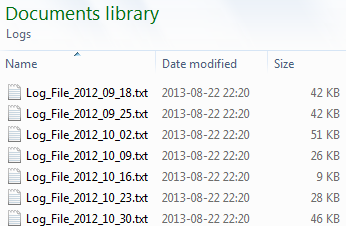
Often you want a loop outside the Load statement. In other words; you enclose normal script statements with a control statement e.g. a "For…Next" to create a loop. An enclosed Load will then be executed several times, once for each value of the loop counter or until the exit condition is met.
The most common case is that you have several files with the same structure, e.g. log files, and you want to load all of them:
For each vFileName in Filelist ('C:\Path\*.txt')
Load *,
'$(vFileName)' as FileName
From [$(vFileName)];
Next vFileName
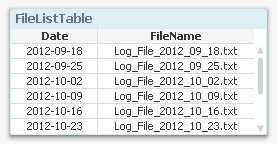 Another common case is that you already have loaded a separate table listing the files you want to load. Then you need to loop over the rows in this table, fetch the file name using the Peek() function, and load the listed file:
For vFileNo = 1 to NoOfRows('FileListTable')
Let vFileName = Peek('FileName',vFileNo-1,'FileListTable');
Load *,
'$(vFileName)' as FileName
From [$(vFileName)];
Next vFileNo
Looping over the same record
You can also have iterations inside the Load statement. I.e. during the execution of a Load statement the same input record is read several times. This will result in an output table that potentially has more records than the input table. There are two ways to do this: Either by using a While clause or by calling the Subfield() function.
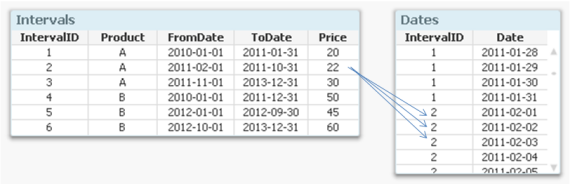
One common situation is that you have a table with intervals and you want to generate all values between the beginning and the end of the interval. Then you would use a While clause where you can set a condition using the loop counter IterNo() to define the number of values to generate, i.e. how many times this record should be loaded:
Dates:
Load
IntervalID,
Date( FromDate + IterNo() - 1 ) as Date
Resident Intervals
While IterNo() <= ToDate - FromDate + 1 ;
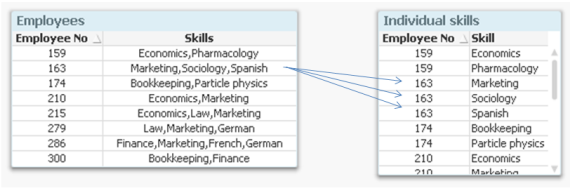
Another common situation is that you have a list of values within one single field. This is a fairly common case when e.g. tags or skills are stored, since it then isn’t clear how many tags or skills one object can have. In such a situation you would want to break up the skill list into separate records using the Subfield() function. This function is, when its third parameter is omitted, an implicit loop: The Load will read the entire record once per value in the list.
[Individual Skills]:
Load
[Employee No],
SubField(Skills, ',') as Skill
Resident Employees;
Bottom line: Iterations are powerful tools that can help you create a good data model. Use them.
- « Previous
- Next »
You must be a registered user to add a comment. If you've already registered, sign in. Otherwise, register and sign in.