Unlock a world of possibilities! Login now and discover the exclusive benefits awaiting you.


.png "Former Employee") hic
hic
- Subscribe to RSS Feed
- Mark as New
- Mark as Read
- Bookmark
- Subscribe
- Printer Friendly Page
- Report Inappropriate Content
A QlikView feature that is poorly known and brilliant in its simplicity is the Preceding Load.
If you don’t know what it is, then I strongly suggest that you read this blog post and find out. Because it will help you in your QlikView scripting.
So what is it?
It is a way for you to define successive transformations and filters so that you can load a table in one pass but still have several transformation steps. Basically it is a Load statement that loads from the Load/SELECT statement below.
Example: you have a database where your dates are stored as strings and you want to use the QlikView date functions to interpret the strings. But the QlikView date functions are not available in the SELECT statement. The solution is to put a Load statement in front of the SELECT statement: (Note the absence of “From” or “Resident”.)
Load Date#(OrderDate,’YYYYMMDD’) as OrderDate;
SQL SELECT OrderDate FROM … ;
What happens then is that the SELECT statement is evaluated first, and the result is piped into the Load statement that does the date interpretation. The fact that the SELECT statement is evaluated before the Load, is at first glance confusing, but it is not so strange. If you read a Preceding Load as
Load From ( Select From ( DB_TABLE ) )
then it becomes clearer. Compare it with nested functions: How would you evaluate “Round( Exp( x ) )”. You would of course evaluate the Exp() function first and then the Round() function. That is, you evaluate it from right to left.
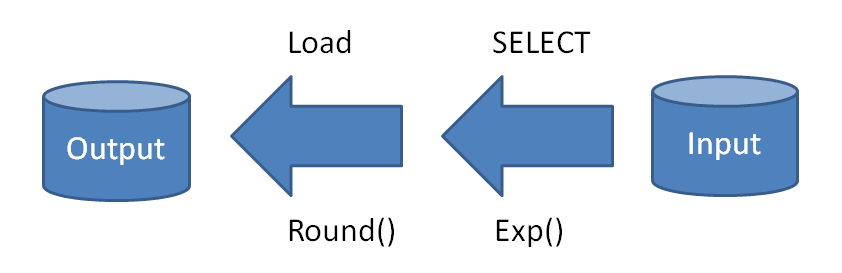
The reason is that the Exp() function is closest to the source data, and therefore should be evaluated first. It’s the same with the Preceding Load: The SELECT is closest to the source data and should therefore be evaluated first. In both cases, you can look at it as a transformation that has an input and an output and to do it correctly, you need to start with the part of the transformation closest to the input.
Any number of Loads can be “nested” this way. QlikView will start from the bottom and pipe record by record to the closest preceding Load, then to the next, etc. And it is almost always faster than running a second pass through the same table.
With preceding Load, you don’t need to have the same calculation in several places. For instance, instead of writing
Load ... ,
Age( FromDate + IterNo() – 1, BirthDate ) as Age,
Date( FromDate + IterNo() – 1 ) as ReferenceDate
Resident Policies
While IterNo() <= ToDate - FromDate + 1 ;
where the same calculation is made for both Age and ReferenceDate, I would in real life define my ReferenceDate only once and then use it in the Age function in a Preceding Load:
Load ..., ReferenceDate,
Age( ReferenceDate, BirthDate ) as Age;
Load *,
Date( FromDate + IterNo() – 1 ) as ReferenceDate
Resident Policies
While IterNo() <= ToDate - FromDate + 1 ;
The Preceding Load has no disadvantages. Use it. You’ll love it.
You must be a registered user to add a comment. If you've already registered, sign in. Otherwise, register and sign in.