Unlock a world of possibilities! Login now and discover the exclusive benefits awaiting you.

- Qlik Community
- :
- Blogs
- :
- Technical
- :
- Design
- :
- Recipe for a 4-4-5 Calendar

.png "Former Employee") hic
hic
- Subscribe to RSS Feed
- Mark as New
- Mark as Read
- Bookmark
- Subscribe
- Printer Friendly Page
- Report Inappropriate Content
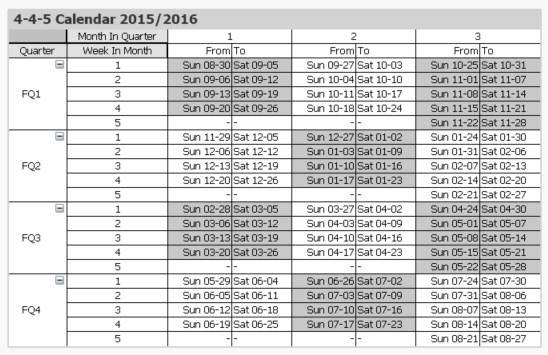
The 4-4-5 calendar is a week-based calendar, where the year is divided into 4 quarters, each with 3 months. The first month has 4 weeks, the second has 4 weeks, and the last has 5 weeks. Occasionally the 12th month has an additional week.
However, these quarters and months have nothing in common with the standard months. First, they are not in sync with the Gregorian calendar. The 4-4-5 year can for example start in the last week of August. Further, the 4-4-5 months do not have the same lengths as the Gregorian months.
One major advantage over a regular calendar is that the end date of the period is always the same day of the week, which is useful in planning. Similarly, the beginning of the year, the quarters and the months are all on the same day of the week. This means that different years start on different dates. In the table below this is clearly visible. The end of the year is blue and the beginning of the new year is green.
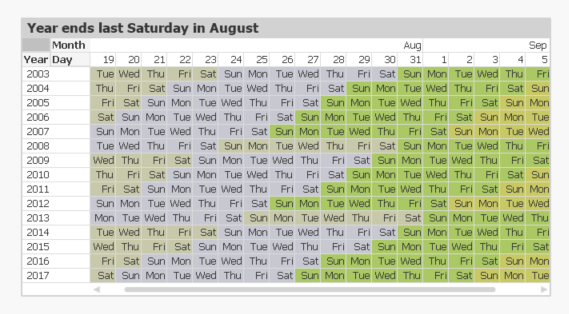
The definition of when the year starts is often described in a phrase like “the year ends on the last Saturday of August”. But this is the same as saying that
- All weeks start on Sundays.
- September 1st always belongs to week 1. This is the Reference Date.
These two bullets can be expressed as integer parameters, which can be used when generating the calendar in the Qlik script. For the first day of the week, 0 is used to denote Monday and 6 is used to denote Sunday. Further, the number of days between the reference date and the Dec 31st is used to define the beginning of the year.
Finding the reference day may sometimes take some thinking. To help you, I have compiled some examples:
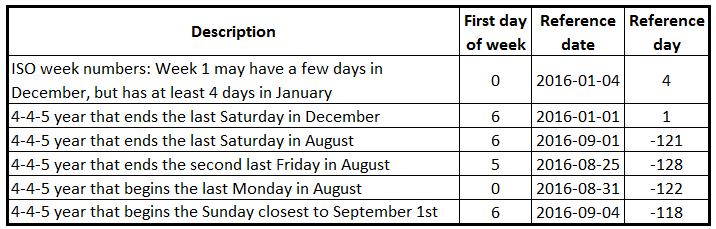
Once the two parameters have been defined, a calendar can be created using e.g. the script that is found on Calendars. This script also creates some other calendars, e.g. 4-5-4, 5-4-4 and Broadcast calendars.
The logic in the script has many steps, but is still fairly straightforward. For each date, the script needs to
- Find the week start of the date
- Use the week start to find the reference date of the input date. Note that the relevant reference date sometimes is after the date itself.
- Use the reference date to find which fiscal year the date belongs to. The start date of the year is also calculated.
- Use the start of the year to calculate the day number within the year
- Finally, the day number of the year can be used to calculate the remaining fields.
Summary: It is possible to create a script that generates a correct 4-4-5 calendar. Don’t hesitate to download the script example and modify it, if you need a 4-4-5 calendar.
Further reading related to this topic:
You must be a registered user to add a comment. If you've already registered, sign in. Otherwise, register and sign in.