Unlock a world of possibilities! Login now and discover the exclusive benefits awaiting you.

- Qlik Community
- :
- Blogs
- :
- Technical
- :
- Design
- :
- Search - But what shall you find?

.png "Former Employee") hic
hic
- Subscribe to RSS Feed
- Mark as New
- Mark as Read
- Bookmark
- Subscribe
- Printer Friendly Page
- Report Inappropriate Content
The search functionality is central to QlikView. You enter a string, and QlikView immediately searches in the active list box and displays the matches. But what really defines a match? For example, should you find strings containing ‘Š’ when your search string contains an ‘S’? Or ‘Ä’ when you search for ‘A’?
These may be odd questions for people with English as first language, but for the rest of us who use “strange” characters daily, these questions are important as the answers affect not just search results, but also sort orders.
It is called Collation.
A collation algorithm defines a process of how to compare two given character strings and decide if they match and also which string should come before the other. So, the collation affects everything from which search result you get in a query, to how the phone directory is sorted.
Basically the collation is defined differently in different languages. Examples:
- The English collation considers A, Å and Ä to be variants of the same letter (matching in searches and sorted together), but the Swedish collation does the opposite: it considers them to be different letters.
- The English collation considers V and W to be different letters (not matching, and not sorted together), but the Swedish collation does the opposite: it considers them to be variants of the same letter.
- Most Slavic languages consider S and Š to be different letters, whereas most other languages consider them to be variants of the same letter.
- In German, Ö is considered to be a variant of O, but in Nordic and Turkish languages it is considered a separate letter.
- In most western languages I is the upper case version of i, but in Turkish languages, I is the upper case of dotless ı, and İ (dotted) is the upper case of dotted i.
An example of how these differences affect sort orders and search results can be seen in the pictures below:
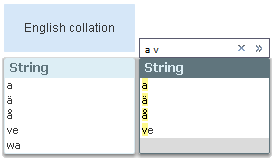
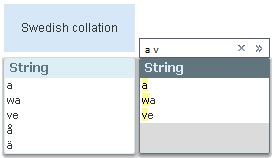
The search string is the same in both cases, and should match all field values that have words beginning with ‘a’ or ‘v’. Note that sort orders as well as search results differ.
Hence: A number of differences exist between languages that have special characters or characters with diacritic marks, e.g. Å, Ä Ö, Æ, Ø, Þ, Ś, Ł, Î, Č. Sometimes these characters are considered as separate letters, sometimes not. Some languages even have collation rules for letter combinations and for where in the word an accent is found. An overview can be found on Wikipedia.
So, how does QlikView handle this?
When QlikView is started, the collation information is fetched from the regional settings of the operating system. This information is then stored into the qvw file when the script is run.
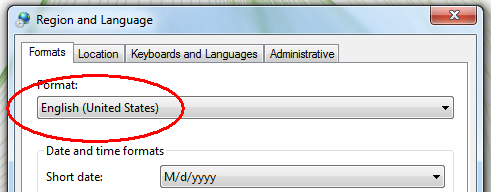
Usually you don’t need to think about this, but should you want to test it yourself, just change the regional settings in the control panel (the Formats tab – not the Location tab), restart QlikView, and run the script of your application.
Bottom line – should you need to change the collation, you should do it on the computer where the script is run.
Further reading related to this topic:
You must be a registered user to add a comment. If you've already registered, sign in. Otherwise, register and sign in.