Unlock a world of possibilities! Login now and discover the exclusive benefits awaiting you.

- Qlik Community
- :
- Blogs
- :
- Technical
- :
- Design
- :
- String Functions

 Jennell_Yorkman
- Subscribe to RSS Feed
- Mark as New
- Mark as Read
- Bookmark
- Subscribe
- Printer Friendly Page
- Report Inappropriate Content
QlikView is full of functions that can be used in expressions and/or the script to manipulate and parse the data. I decided to write about some common string functions that can be very helpful:
- Subfield()
- Len()
- Index()
- MinString()
- MaxString()
- Substringcount()
Subfield()
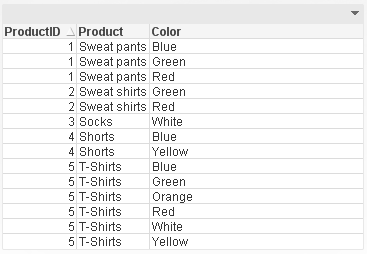
One of the most useful functions is the Subfield() function. From within the script, this function returns a specific substring from a larger delimited substring. This function allows you to transform a table like this:
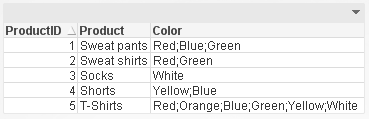
To a table like this parsing the Color field so that each product and color combination has its own row. This makes it easier to filter the data by color using list boxes.
Len()
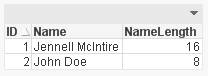
The Len() function returns the length of a string in either an expression (Len(Name)) or in the script providing the number of characters in in string like this:
Index()
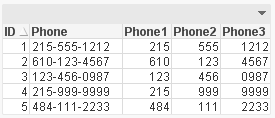
The Index() function returns the position of a substring within another string. This function may be overlooked but it can be very handy when parsing a string field like a phone number. Using the Index() function, I can determine where the ‘-‘ are in the phone number therefore capturing the parts correctly.
Phone:
NoConcatenate LOAD
ID,
Phone,
Left(Phone, Index(Phone, '-')-1) as Phone1,
Mid(Phone, Index(Phone, '-')+1, 3) as Phone2,
Right(Phone, Len(Phone)-Index(Phone, '-', 2)) as Phone3
Resident PhoneTemp;
MinString() and MaxString()
Next are the MinString() and MaxString() functions. I think everyone has used these functions at least once in QlikView. They return the first or last value over a dimension (in an expression) or over a group by clause (in a script). I find these functions most helpful in chart expressions when I need to see the first or last value across a dimension.
Substringcount()
The last function is the Substringcount() function. I think this is a hidden treasure – not many people know about it but once you do, you use it all the time. The Substringcount() function returns the number of times a substring is in a string. So, if the field String is “abcdefabcdef” then the expression Substringcount(String, ‘def’) will return 2. I find this helpful with a show condition when I want to determine is a value has been selected or is possible.
There are so many string functions in QlikView that can make your life easier. Browse through them the next time you are in the Help section to see what shortcuts you can use to manipulate your data.
I wrote a technical brief about these string functions with more detail.
You must be a registered user to add a comment. If you've already registered, sign in. Otherwise, register and sign in.