Do not input private or sensitive data. View Qlik Privacy & Cookie Policy.
Skip to main content

Announcements
Qlik and ServiceNow Partner to Bring Trusted Enterprise Context into AI-Powered Workflows. Learn More!
hic
Former Employee
Former Employee

QlikView has a very efficient, patented caching algorithm that effectively eliminates the calculation time for calculations that have been made before. In other words, if you use the “back” button in the toolbar, or if you happen to make a selection that you have made before, you usually get the result immediately. No calculation is necessary.

But how does it work? What is used as lookup ID?

For each object or combination of data set and selection or data sub-set and expression QlikView calculates a digital fingerprint that identifies the context. This is used as lookup ID and stored in the cache together with the result of the calculation.
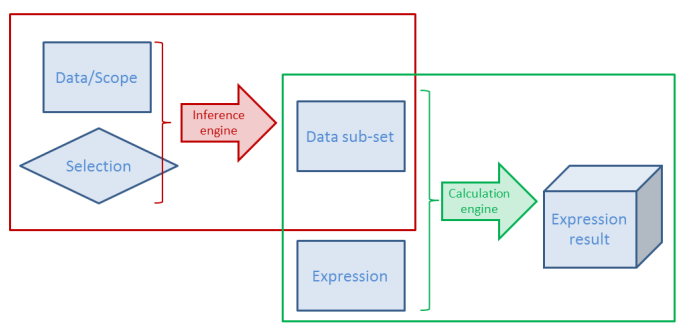
Image2.png

Here "calculation" means both the Logical Inference and Chart calculation - or in fact, any expression anywhere. This means that both intermediate and final results of a selection are stored.

There are some peculiarities you need to know about the cache…

  • The cache is global. It is used for all users and all documents. A cache entry does not belong to one specific document or one user only. So, if a user makes a selection that another user already has made, the cache is used. And if you have the same data in two different apps, one single cache entry can be used for both documents.
  • Memory is not returned, when the document is unloaded. Cache entries will usually not be purged until the RAM usage is close to or has reached the lower working set limit. QlikView will then purge some entries and re-use the memory for other cache entries. This behavior sometimes makes people believe there is a memory leak in the product. But have no fear – it should be this way. So, you do not need to restart the service to clear the cache.
  • The oldest cache entries are not purged first. Instead several factors are used to calculate a priority for each cache entry; factors like RAM usage, cost to calculate it again and time since the most recent usage. Entries with a combined low priority will be purged when needed. Hence, an entry that is cheap to calculate again will easily be purged, also if it recently was used. And another value that is expensive to recalculate or just uses a small amount of RAM will be kept for a much longer time.
  • The cache is not cleared when running macros which I have seen some people claim.
  • You need to write your expression exactly right. If the same expression is used in several places, it should be written exactly the same way – Capitalization, same number of spaces, etc. – otherwise it will not be considered to be the same expression. If you do, there should be no big performance difference between repeating the formula, referring to a different expression using the label of the expression or using the Column() function.

The cache efficiently speeds up QlikView. Basically it is a way to trade memory against CPU-time: If you put more memory in your server, you will be able to re-use more calculations and thus use less CPU-time.

HIC

Further reading on the Qlik engine internals:

Symbol Tables and Bit-Stuffed Pointers

Colors, States and State vectors

Logical Inference and Aggregations

72 Comments
rwunderlich
Partner Ambassador/MVP

To clarify the point 2 above:

"2. If the data refresh changes the data set, the old cache entries will not be used anymore and they will eventually be purged.".

Even if the document dataset changes, a subset may remain the same between reloads and therefore be a cache hit, correct?

For example, refreshing a Sales dashboard may add new transactions for 2014. But if the user selects 2013, the dataset and results may be in the cache -- cached there prior to the refresh.

Because cache is global, a cache hit for 2013 Sales by Customer could conceivably have been created by a completely different document, correct?

Did I get that right?

-Rob

1,019 Views
hic
Former Employee
Former Employee

Yes Rob, you got it right. If there are subsets that are unchanged, old cache entries may be re-used.

The beauty of it is, that it works no matter what: If a subset is unchanged, old cache entries will automatically be re-used. And if the changes are so large that there are no matching subsets, old cache entries cannot be used, and they will be purged eventually. We don't have to care. It just works.

HIC

1,019 Views
rbecher
Partner - Master III

How this can be discovered after a reload if the former data set is gone?

0 Likes
1,019 Views
ChristofSchwarz
Partner Ambassador
Partner Ambassador

Is there any tool / developer setting in QlikView Desktop to "see" the cache entries? The question is aiming to identify the root cause when as in one of my apps, the expected caching doesn't happen (a simple "back" in the navigation to the previous selection triggers a full calculation time of the objects) to get any clue.why.
thank you

1,019 Views
datanibbler
Champion
Champion

Hi Henric,

great post! So, this basically tells me two things:

- When we decide to roll out QlikView beyond this branch, we need to put more RAM into our servers, not
   more CPUs - more RAM will make everything run faster

- It is a good idea to have programming standards - like writing all commands in Caps always - and to have
   more complex formulas in qvs files so they can be reused and there will be no differences in writing.

<=> However, it does not answer one particular question, maybe you can answer it:

We have been experiencing - seldom, but on a regular basis - QlikView "going haywire" on the server insofar as memory_usage can start to rise uncontrolled until virtually all the working_memory the server has - which is a lot - is in use. We have then had to restart the QV_server. Is that a bug in the re-use of memory, relating to the fact that memory is not returned - also the apps are virtually never unloaded on our server, they are always open and reloaded on a regular basis.

0 Likes
1,035 Views
Anonymous
Not applicable

Thanks for birging this subject.

It has been written in a very interesting and simplufied manner. Kudos.

0 Likes
1,035 Views
IAMDV
Master II
Master II

Thanks Alvin. I recommend changing "QuikView" & "Qlickview" to "QlikView".

Funny post on this subject: http://qlikshare.com/bi-humour-different-spelling-qlikview/

Cheers,

DV

0 Likes
1,035 Views
TK_
Partner - Creator
Partner - Creator

Hi Henric Cronström

Great post, it was new to me that the cache is global across documents.

Does this also apply to documents created by loop and reduce?

We do a loop and reduce on region and we also have users with a "total" model with all regions. Will a selection on one region in the total model benefit the users in the corresponding reduced model?

(all models have identical GUI)

Thanks

Regards

Terje Knappen

0 Likes
1,035 Views
hic
Former Employee
Former Employee

A selection in the total model that corresponds to (exactly) the model in the loop-and-reduce document will probably re-use the cache entry, yes.

HIC

1,035 Views
vgutkovsky
Master II
Master II

Hi, Henric. I had a followup question to the section access discussion above. I'm assuming your reply (which makes complete sense) applies to Initial Reduction section access. If you have Initial Selection section access, however, would utilizing a common cache still work? For instance, I am interested in logging on as an admin and creating a macro that would make every possible selection in a field that is then used for section access initial selections for regular users (in order to pre-cache some stuff for them). Would that work?

Thanks,

Vlad

0 Likes
1,035 Views
