Unlock a world of possibilities! Login now and discover the exclusive benefits awaiting you.

- Qlik Community
- :
- Blogs
- :
- Technical
- :
- Design
- :
- The QlikView Cache

.png "Former Employee") hic
hic
- Subscribe to RSS Feed
- Mark as New
- Mark as Read
- Bookmark
- Subscribe
- Printer Friendly Page
- Report Inappropriate Content
QlikView has a very efficient, patented caching algorithm that effectively eliminates the calculation time for calculations that have been made before. In other words, if you use the “back” button in the toolbar, or if you happen to make a selection that you have made before, you usually get the result immediately. No calculation is necessary.
But how does it work? What is used as lookup ID?
For each object or combination of data set and selection or data sub-set and expression QlikView calculates a digital fingerprint that identifies the context. This is used as lookup ID and stored in the cache together with the result of the calculation.
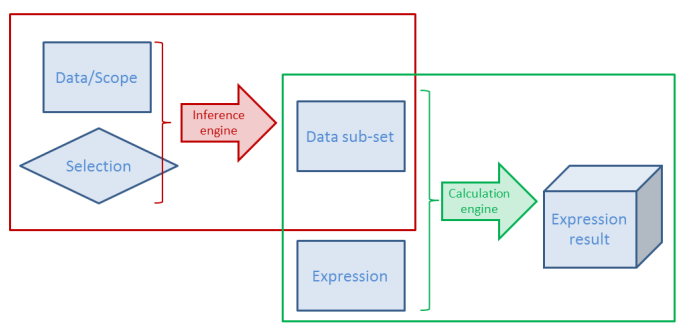
Here "calculation" means both the Logical Inference and Chart calculation - or in fact, any expression anywhere. This means that both intermediate and final results of a selection are stored.
There are some peculiarities you need to know about the cache…
- The cache is global. It is used for all users and all documents. A cache entry does not belong to one specific document or one user only. So, if a user makes a selection that another user already has made, the cache is used. And if you have the same data in two different apps, one single cache entry can be used for both documents.
- Memory is not returned, when the document is unloaded. Cache entries will usually not be purged until the RAM usage is close to or has reached the lower working set limit. QlikView will then purge some entries and re-use the memory for other cache entries. This behavior sometimes makes people believe there is a memory leak in the product. But have no fear – it should be this way. So, you do not need to restart the service to clear the cache.
- The oldest cache entries are not purged first. Instead several factors are used to calculate a priority for each cache entry; factors like RAM usage, cost to calculate it again and time since the most recent usage. Entries with a combined low priority will be purged when needed. Hence, an entry that is cheap to calculate again will easily be purged, also if it recently was used. And another value that is expensive to recalculate or just uses a small amount of RAM will be kept for a much longer time.
- The cache is not cleared when running macros which I have seen some people claim.
- You need to write your expression exactly right. If the same expression is used in several places, it should be written exactly the same way – Capitalization, same number of spaces, etc. – otherwise it will not be considered to be the same expression. If you do, there should be no big performance difference between repeating the formula, referring to a different expression using the label of the expression or using the Column() function.
The cache efficiently speeds up QlikView. Basically it is a way to trade memory against CPU-time: If you put more memory in your server, you will be able to re-use more calculations and thus use less CPU-time.
Further reading on the Qlik engine internals:
Symbol Tables and Bit-Stuffed Pointers
You must be a registered user to add a comment. If you've already registered, sign in. Otherwise, register and sign in.