Unlock a world of possibilities! Login now and discover the exclusive benefits awaiting you.

- Qlik Community
- :
- Forums
- :
- Analytics & AI
- :
- Products & Topics
- :
- Integration, Extension & APIs
- :
- Access extension properties panel values dynamical...
Options
- Subscribe to RSS Feed
- Mark Topic as New
- Mark Topic as Read
- Float this Topic for Current User
- Bookmark
- Subscribe
- Mute
- Printer Friendly Page
Turn on suggestions
Auto-suggest helps you quickly narrow down your search results by suggesting possible matches as you type.
Showing results for

 datawizards1234
Partner - Contributor
2018-11-19
10:23 AM
- Mark as New
- Bookmark
- Subscribe
- Mute
- Subscribe to RSS Feed
- Permalink
- Report Inappropriate Content
Access extension properties panel values dynamically
Hello
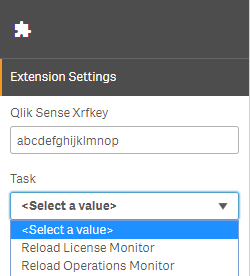
I'm building an extension in which settings I need to insert xrfkey to communicate with the server. My problem is that I would like to generate a dropdown list with reload tasks but to do that I need to send a request to that server containing that xrfkey previously entered by user. How can I achieve building that list dynamically based on provided parameters instead of hardcoding it as in below file with properties panel code? Also attached screenshot of I would like to achieve dynamically
define([], function () {
    'use strict'

    return {
        type: "items",
        component: "accordion",
        items: {
            extensionSettings: {
                type: "items",
                label: "Extension Settings",
                items: {
                    xrfkey: {
                        ref: "props.xrfkey",
                        label: "Qlik Sense Xrfkey",
                        type: "string"
                    },
                    tasksDropdown: {
                        type: "string",
                        component: "dropdown",
                        label: "Task",
                        ref: "props.taskId",
                        options: function () {
                            return $.ajax({
                                type: "GET",
                                url: "https://serveraddress/hdr/qrs/task/full?Xrfkey=abcdefghijklmnop",
                                headers: {
                                    "X-Qlik-Xrfkey": "abcdefghijklmnop",
                                    "hdr-usr": "domain\\username"
                                }
                            }).then(function (response) {
                                return response.map(function (item) {
                                    return {
                                        value: item.id,
                                        label: item.name
                                    }
                                })
                            })
                        },
                        defaultValue: ""
                    }
                }
            }
        }
    }
})
1,161 Views
1 Reply

 ErikWetterberg
Master
2018-11-19
12:16 PM
- Mark as New
- Bookmark
- Subscribe
- Mute
- Subscribe to RSS Feed
- Permalink
- Report Inappropriate Content
Try callRepository in capabilities API. It Will generade the xrfKey for you.
1,149 Views
