Unlock a world of possibilities! Login now and discover the exclusive benefits awaiting you.

Announcements
Want to see what's currently in public preview? We've pulled it all together in one place. Check it out here
- Qlik Community
- :
- Forums
- :
- Analytics & AI
- :
- Products & Topics
- :
- Integration, Extension & APIs
- :
- Button Extension Action
Options
- Subscribe to RSS Feed
- Mark Topic as New
- Mark Topic as Read
- Float this Topic for Current User
- Bookmark
- Subscribe
- Mute
- Printer Friendly Page
Turn on suggestions
Auto-suggest helps you quickly narrow down your search results by suggesting possible matches as you type.
Showing results for

 Keto
Keto
Partner - Contributor III
2021-12-29
05:44 AM
- Mark as New
- Bookmark
- Subscribe
- Mute
- Subscribe to RSS Feed
- Permalink
- Report Inappropriate Content
Button Extension Action
Hello everyone,
I would like to be able to call a JS function thanks to a button of a qliksense visualization that i created. (My goal is to export the whole of the current page in pdf format)
When I am locally it works fine but using a QlikSense extension nothing happens ...
Do you have any ideas or do you see something wrong ?
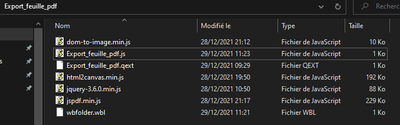
here is a preview of the code and architecture :
define(["//html2canvas.hertzen.com/dist/html2canvas.min.js", "//code.jquery.com/jquery-3.6.0.min.js", "//cdnjs.cloudflare.com/ajax/libs/dom-to-image/2.6.0/dom-to-image.min.js", "//cdnjs.cloudflare.com/ajax/libs/jspdf/2.5.0/jspdf.umd.min.js"], () => {
    $('#export-qs').click(function() {
        domtoimage.toPng(document.getElementById('grid-wrap'))
            .then(function(blob) {
                var pdf = new jsPDF('l', 'pt', [$('#grid-wrap').width(), $('#grid-wrap').height()]);

                pdf.addImage(blob, 'PNG', 0, 0, $('#grid-wrap').width(), $('#grid-wrap').height());
                pdf.save("feuille_qliksense.pdf");
            });
    });

    return {
        paint: function($element, layout) {
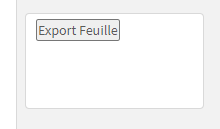
            var bouton = '<button id="export-qs">Export Feuille</button>';
            $element.html(bouton);
        }
    }
})
thanks in advance 🙂
I promise i try my best, motivation is the key !
1,870 Views
1 Reply
Keto
Partner - Contributor III
2021-12-30
02:56 AM
Author
- Mark as New
- Bookmark
- Subscribe
- Mute
- Subscribe to RSS Feed
- Permalink
- Report Inappropriate Content
It is impossible to call a JS function when clicking on a button 😞 ?
I promise i try my best, motivation is the key !
1,804 Views
