Unlock a world of possibilities! Login now and discover the exclusive benefits awaiting you.

- Qlik Community
- :
- Forums
- :
- Analytics & AI
- :
- Products & Topics
- :
- Integration, Extension & APIs
- :
- Column width in pivot created as a visualization o...
- Subscribe to RSS Feed
- Mark Topic as New
- Mark Topic as Read
- Float this Topic for Current User
- Bookmark
- Subscribe
- Mute
- Printer Friendly Page

 _jespers_
- Mark as New
- Bookmark
- Subscribe
- Mute
- Subscribe to RSS Feed
- Permalink
- Report Inappropriate Content
Column width in pivot created as a visualization on the fly
I'm having a problem with the column width for a pivot table created as a visualization on the fly. The same problem also occurs when I'm creating the pivot table with the standard Qlik Sense pivot table chart, but my guess was that I could have more control over how the data was being displayed if I created the pivot table as an extension.
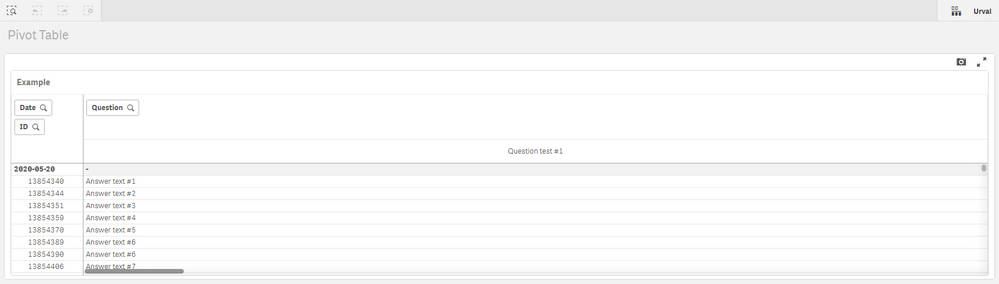
In the pivot table I have the dimensions Date and ID to the left and the dimension Question and the measure Answers to the right. The problem is that the dimension Question is only displaying 1 question at the time, so I need to scroll to the right to see the rest of the questions.
How I want it to behave is that multiple questions is being displayed next to each other so I don't have to scroll to the right.
There is a property called columnWidths (link) that you can set in the qHyperCubeDef, but I don't get it to work and I'm actually not even sure what it does or if it will solve my problem.
Any ideas how I can get this to work or how I can achieve multiple questions, side by side?
app.visualization.create(
  'pivot-table',
  [
    'Date',
    'ID',
    'Question',
    '=Only(Answers)'
  ],
  {
    "showTitles": true,
    "title": "Example",
    "qHyperCubeDef": {
    	qNoOfLeftDims: 2,
    	qAlwaysFullyExpanded: true
    }
  }
).then(function(vis){
  	vis.show("QV01");
});
Thank you!
 linnakry
- Mark as New
- Bookmark
- Subscribe
- Mute
- Subscribe to RSS Feed
- Permalink
- Report Inappropriate Content
I have not tried with pivot-table, but for straight table, you can include columnWidths properties in the qHyperCubeDef,
...,
  {
    "showTitles": true,
    "title": "Example",
    "qHyperCubeDef": {
    	"qNoOfLeftDims": 2,
    	"qAlwaysFullyExpanded": true,
        "columnWidths":[100,100, 100, 100]
    }
  }
...
