Unlock a world of possibilities! Login now and discover the exclusive benefits awaiting you.

- Qlik Community
- :
- Forums
- :
- Analytics & AI
- :
- Products & Topics
- :
- Integration, Extension & APIs
- :
- Filter Pane Popover width
- Subscribe to RSS Feed
- Mark Topic as New
- Mark Topic as Read
- Float this Topic for Current User
- Bookmark
- Subscribe
- Mute
- Printer Friendly Page

 Raf67
Raf67
- Mark as New
- Bookmark
- Subscribe
- Mute
- Subscribe to RSS Feed
- Permalink
- Report Inappropriate Content
Filter Pane Popover width
Hello world,
i need to change the width of the popover displayed when you are searching a value in a list box... (view image)
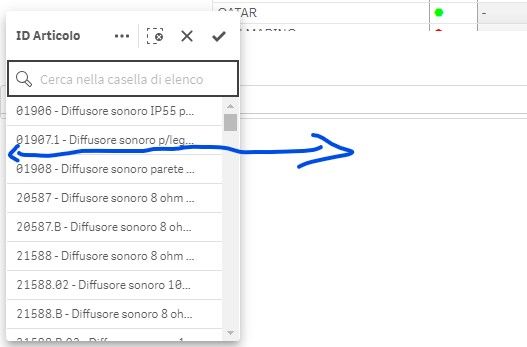
Any idea?
Thanks in advance
Raffaele
Accepted Solutions

 alex_colombo
- Mark as New
- Bookmark
- Subscribe
- Mute
- Subscribe to RSS Feed
- Permalink
- Report Inappropriate Content
Hey @Raf67 , the only thing you can do is to inject custom css properties (you can use a multi kpi object or a Qlik theme) for changing filter pane width. If you are using Qlik SaaS, you have to apply the new width to highlighted css classes in below screenshot.
Keep in mind that this is a workaround and css classes might change in future and you have to fix your custom css. Furthermore this solution not a supported.

alex_colombo
- Mark as New
- Bookmark
- Subscribe
- Mute
- Subscribe to RSS Feed
- Permalink
- Report Inappropriate Content
Hey @Raf67 , the only thing you can do is to inject custom css properties (you can use a multi kpi object or a Qlik theme) for changing filter pane width. If you are using Qlik SaaS, you have to apply the new width to highlighted css classes in below screenshot.
Keep in mind that this is a workaround and css classes might change in future and you have to fix your custom css. Furthermore this solution not a supported.

 Mat_A
Mat_A
- Mark as New
- Bookmark
- Subscribe
- Mute
- Subscribe to RSS Feed
- Permalink
- Report Inappropriate Content
Hi @alex_colombo ,
i am also looking for a solution to this.
When i try using the css class you have highlighted, it changes the width of the collapsed listboxes within the filterpane, but it does not increase the width of the "expanded" dropdown list of values, as shown in the original post screenshot.
@Raf67 did you find an exact solution for this please?
Any help appreciated, i've tried lots of options with no success.
Thanks.
Raf67
- Mark as New
- Bookmark
- Subscribe
- Mute
- Subscribe to RSS Feed
- Permalink
- Report Inappropriate Content
Hi @Mat_A
I have created a custo Theme to enlarge the width of the popover menu.
Upload the theme i have attached using QMC and apply this theme to your Qsense Application.
Let me know if it works right.
Have a nice day
Raffaele
Mat_A
- Mark as New
- Bookmark
- Subscribe
- Mute
- Subscribe to RSS Feed
- Permalink
- Report Inappropriate Content
YES!! i copied the CSS and it works, thankyou very much @Raf67 .
