Unlock a world of possibilities! Login now and discover the exclusive benefits awaiting you.

Announcements
Share your agentic AI experience, learn from others, and earn a new badge: Put Agentic AI to Work
- Qlik Community
- :
- Forums
- :
- Analytics & AI
- :
- Products & Topics
- :
- Integration, Extension & APIs
- :
- Images in angular Extension
Options
- Subscribe to RSS Feed
- Mark Topic as New
- Mark Topic as Read
- Float this Topic for Current User
- Bookmark
- Subscribe
- Mute
- Printer Friendly Page
Turn on suggestions
Auto-suggest helps you quickly narrow down your search results by suggesting possible matches as you type.
Showing results for

 PedroCunha
Contributor II
2019-05-06
06:47 AM
- Mark as New
- Bookmark
- Subscribe
- Mute
- Subscribe to RSS Feed
- Permalink
- Report Inappropriate Content
Images in angular Extension
Hello Qlik Sense experts,
I am currently developing an extension in angular and I am struggling to grasp where to place images that will be referenced in the template.
I am placing all the images in the same folder as the main javascript file , qext , template.html,...

But currently they are not being loaded when page is loaded:
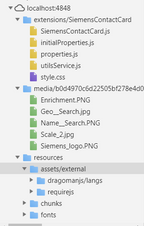
Do you know how should i proceed ?
Many thanks in advance,
Pedro
1,230 Views
1 Solution
Accepted Solutions
PedroCunha
Contributor II
2019-05-07
11:14 AM
Author
- Mark as New
- Bookmark
- Subscribe
- Mute
- Subscribe to RSS Feed
- Permalink
- Report Inappropriate Content
Hello again,
Meanwhile I found the solution . Source URLs in HTML of images stored in extension folder must be set to /extensions/[name of Qext & main js file]/[image file].
BR,
Pedro
Meanwhile I found the solution . Source URLs in HTML of images stored in extension folder must be set to /extensions/[name of Qext & main js file]/[image file].
BR,
Pedro
1,216 Views
1 Reply
PedroCunha
Contributor II
2019-05-07
11:14 AM
Author
- Mark as New
- Bookmark
- Subscribe
- Mute
- Subscribe to RSS Feed
- Permalink
- Report Inappropriate Content
Hello again,
Meanwhile I found the solution . Source URLs in HTML of images stored in extension folder must be set to /extensions/[name of Qext & main js file]/[image file].
BR,
Pedro
Meanwhile I found the solution . Source URLs in HTML of images stored in extension folder must be set to /extensions/[name of Qext & main js file]/[image file].
BR,
Pedro
1,217 Views
