Unlock a world of possibilities! Login now and discover the exclusive benefits awaiting you.

- Qlik Community
- :
- Forums
- :
- Analytics & AI
- :
- Products & Topics
- :
- Integration, Extension & APIs
- :
- Re: Programatically selecting range of data
- Subscribe to RSS Feed
- Mark Topic as New
- Mark Topic as Read
- Float this Topic for Current User
- Bookmark
- Subscribe
- Mute
- Printer Friendly Page

- Mark as New
- Bookmark
- Subscribe
- Mute
- Subscribe to RSS Feed
- Permalink
- Report Inappropriate Content
Programatically selecting range of data
Hey,
I am currently working on a project where I require the functionality to programmatically select data from a qlik object. I am doing this using the selectValues combined with the data from a field which works great for single items/strings, however, when I want to filter a list of dates, for example, I cannot get this to work.
Is there a way that I can use the selectValues method to query this data? I've tried building an array with the dates ['03/01/2018, 04/01/2018'] however this did not work.
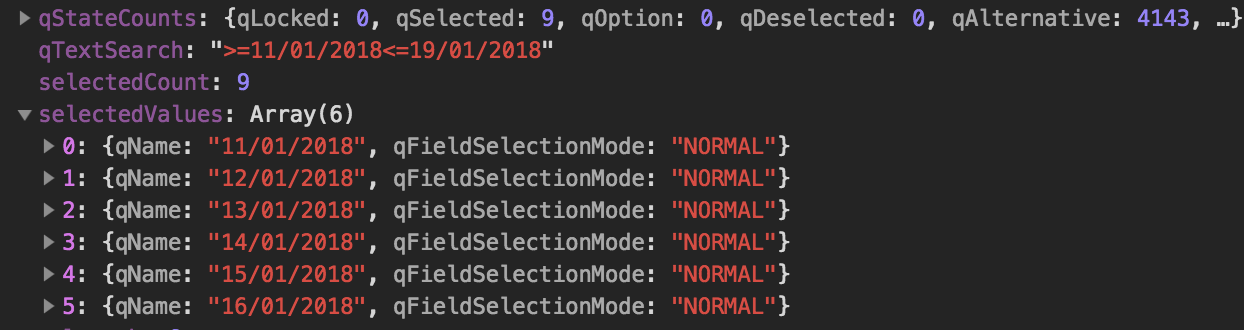
Alternatively, I am open to suggestions on how I can save the state of currentSelectionItems, I have looked over the documentation but cannot seem to find anything suitable.
Accepted Solutions

 ErikWetterberg
- Mark as New
- Bookmark
- Subscribe
- Mute
- Subscribe to RSS Feed
- Permalink
- Report Inappropriate Content
Hi Ian,
No, thats a text format. The numeric format is a number, as described here:
Erik Wetterberg
ErikWetterberg
- Mark as New
- Bookmark
- Subscribe
- Mute
- Subscribe to RSS Feed
- Permalink
- Report Inappropriate Content
Hi Ian,
You could use selectValues and the numeric values for the dates. Or you could use search https://help.qlik.com/en-US/sense-developer/April2018/Subsystems/APIs/Content/BackendAPI/search-meth... and an expression using <= and >=. If you decide to use search you will also need to call acceotSearch https://help.qlik.com/en-US/sense-developer/April2018/Subsystems/APIs/Content/BackendAPI/acceptsearc....
Erik Wetterberg
- Mark as New
- Bookmark
- Subscribe
- Mute
- Subscribe to RSS Feed
- Permalink
- Report Inappropriate Content
Hey Erik thanks for your reply, it's much appreciated. I'm not at my computer at the moment but am I correct in thinking that I can use select values as so?
app.field('exampleDate').selectValues([{qNum: "15/01/2018"},{qNum:"18/01/2018"},{qNum:"29/01/2018"}], true, true);I am using JS
ErikWetterberg
- Mark as New
- Bookmark
- Subscribe
- Mute
- Subscribe to RSS Feed
- Permalink
- Report Inappropriate Content
Hi Ian,
No, thats a text format. The numeric format is a number, as described here:
Erik Wetterberg
- Mark as New
- Bookmark
- Subscribe
- Mute
- Subscribe to RSS Feed
- Permalink
- Report Inappropriate Content
Thanks, man  that worked a treat. I had to write a JS function to convert the date from
 "15/01/2018" format to the qlik / excel date format.
Gist to convert values here (requires moment and moment duration)