Unlock a world of possibilities! Login now and discover the exclusive benefits awaiting you.

- Qlik Community
- :
- Forums
- :
- Analytics & AI
- :
- Products & Topics
- :
- Integration, Extension & APIs
- :
- Re: QIB NLU Configuration Failed
- Subscribe to RSS Feed
- Mark Topic as New
- Mark Topic as Read
- Float this Topic for Current User
- Bookmark
- Subscribe
- Mute
- Printer Friendly Page

 Imran_Arshad
- Mark as New
- Bookmark
- Subscribe
- Mute
- Subscribe to RSS Feed
- Permalink
- Report Inappropriate Content
QIB NLU Configuration Failed
Hi Qlik Community,
I am posting QIB-NLU inquiry here as no thread is found in the drop-down list.
I have tried to connect QIB-NLU with the certificates issued by my QlikSense Server & also tried with SSL-Certificate (issued by Certified Authority) but in both cases i am unable to connect both machines, please note that QIB & QS are installed on same machines.
Below are the logs taken from QIB-NLU-Configuration File:
}
2019-10-18 15:13:52.5062|INFO|Configuration|CreateAgent|Creating new agent for Qlik Insight Bot nlu
2019-10-18 15:13:52.5212|INFO|Configuration|SendRequest|Sending request with following parameter
2019-10-18 15:13:52.5322|INFO|Configuration|SendRequest|Method: Post
2019-10-18 15:13:53.4148|ERROR|Configuration|SendRequest|Error while sending request with following parameter
2019-10-18 15:13:53.4289|ERROR|Configuration|SendRequest|The remote server returned an error: (401) Unauthorized.
2019-10-18 15:13:53.4419|ERROR|Configuration|SendRequest|{
"status": "error",
"message": "NLU configuration failed."
}
2019-10-18 15:13:53.4549|ERROR|Configuration|CreateAgent|Error while creating agent
2019-10-18 15:13:53.4689|ERROR|Configuration|CreateAgent|{
"status": "error",
"message": "NLU configuration failed."
}
2019-10-18 15:13:53.4830|ERROR|Component Configuration|ConfigureNLU|{
"status": "error",
"message": "NLU configuration failed."
}
- « Previous Replies
- Next Replies »

 treysmithdev
- Mark as New
- Bookmark
- Subscribe
- Mute
- Subscribe to RSS Feed
- Permalink
- Report Inappropriate Content
I would try the following:
- docker-compose down
- reconvert the .pfx cert to the .pem pair.
- delete the certificates in /home/
- copy new certificates to the /home/ directory
- docker-compose up
I am not sure what is going wrong, but the correct directory is /home/.
 marcos_herrera
- Mark as New
- Bookmark
- Subscribe
- Mute
- Subscribe to RSS Feed
- Permalink
- Report Inappropriate Content
Hi treysmithdev
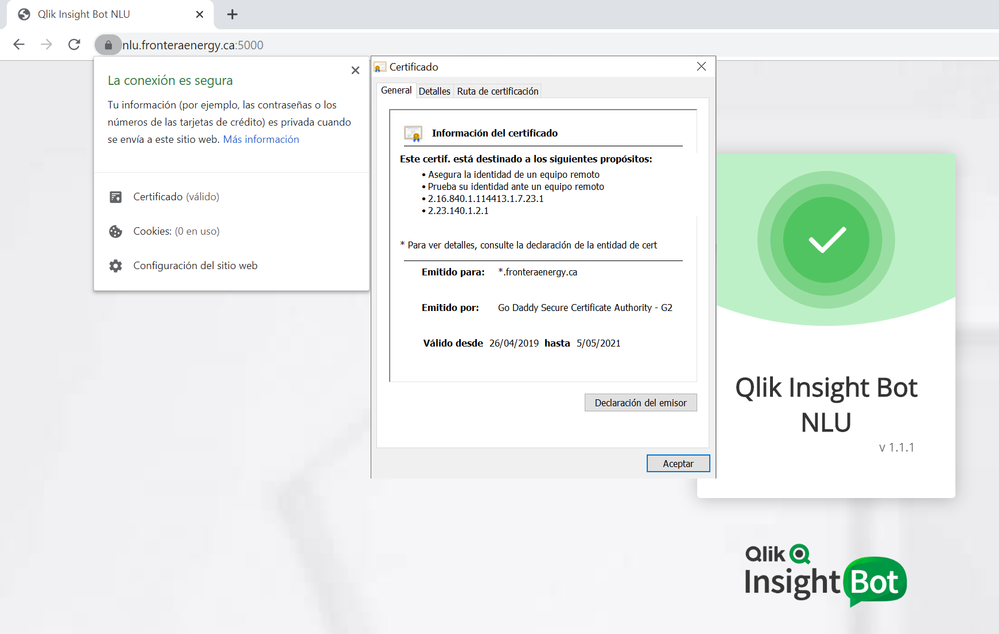
Thanks for all your help, i recreated the certificates and then stored con correct folder, now worked for me Thank yo so much
 marcos_herrera
- Mark as New
- Bookmark
- Subscribe
- Mute
- Subscribe to RSS Feed
- Permalink
- Report Inappropriate Content
Hi Friends Treysmithdev and Imranarshad81
I solved the issue with certificate, when i test the URL
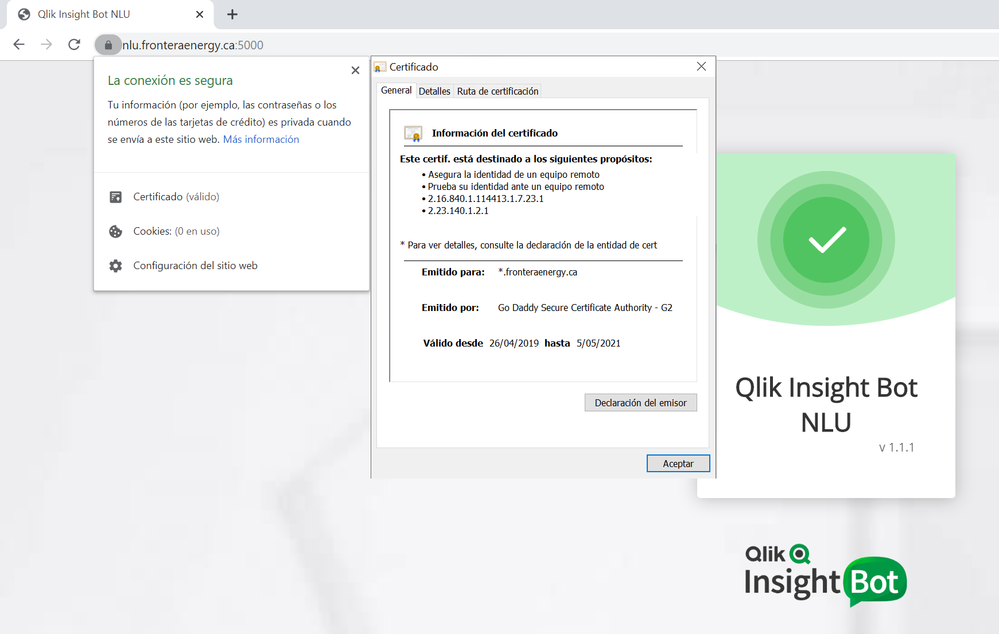
Now i have a the same problem of this post, but i don't how can i solve if i have a CA certificate?
2019-11-13 15:02:21.9188|WARN|Configuration|GetConfigParameter|BotAppSettings section not found in system configuration file.
2019-11-13 15:02:21.9188|WARN|Configuration|GetConfigParameter|BotAppSettings section not found in system configuration file.
2019-11-13 15:02:21.9345|WARN|Configuration|GetConfigParameter|BotAppSettings section not found in system configuration file.
2019-11-13 15:02:21.9345|INFO|Configuration|CreateAgent|Creating new agent for Qlik Insight Bot nlu
2019-11-13 15:02:21.9345|INFO|Configuration|SendRequest|Sending request with following parameter
2019-11-13 15:02:21.9345|INFO|Configuration|SendRequest|Method: Post
2019-11-13 15:02:25.8101|ERROR|Configuration|SendRequest|Error while sending request with following parameter
2019-11-13 15:02:25.8101|ERROR|Configuration|SendRequest|Error en el servidor remoto: (401) No autorizado.
2019-11-13 15:02:25.8101|ERROR|Configuration|SendRequest|{
"status": "error",
"message": "NLU configuration failed."
}
2019-11-13 15:02:25.8101|ERROR|Configuration|CreateAgent|Error while creating agent
2019-11-13 15:02:25.8101|ERROR|Configuration|CreateAgent|{
"status": "error",
"message": "NLU configuration failed."
}
2019-11-13 15:02:25.8101|ERROR|Component Configuration|ConfigureNLU|{
"status": "error",
"message": "NLU configuration failed."
Imran_Arshad
- Mark as New
- Bookmark
- Subscribe
- Mute
- Subscribe to RSS Feed
- Permalink
- Report Inappropriate Content
@marcos_herrera Good to hear that you had configured SSL-Certificate with NLU-Machine as per shared screenshot, now the only thing is to check with your License as everything seems to be perfect.
I was facing the same issue before but after changing to my new license (provided by Qlik), i was able to connect to NLU-Machine.
marcos_herrera
- Mark as New
- Bookmark
- Subscribe
- Mute
- Subscribe to RSS Feed
- Permalink
- Report Inappropriate Content
Hi Dear Imranarshad81
Thanks for your answer tried to change the license via Update License on QIB Configuraiton App, the System show me error messagge "Error while updating Qlik Insight Bot nlu License" and the Log register the following lines
2019-11-19 21:47:36.4844|ERROR|Configuration|SendRequest|{
"status": "error",
"message": "Agent does not exist."
}
2019-11-19 21:47:36.4844|ERROR|Configuration|updateNLULicense|Error while updating Qlik Insight Bot nlu License
2019-11-19 21:47:36.4994|ERROR|Configuration|updateNLULicense|{
"status": "error",
"message": "Agent does not exist."
}
2019-11-19 21:47:36.4994|ERROR|Configuration|updateNLULicense|System.Exception: {
"status": "error",
"message": "Agent does not exist."
}
en Qlik_Insight_Bot_Configuration.Utility.HttpRequests.SendRequest(String url, String sendMethod, String body, Boolean isAlreadySerialized)
en Qlik_Insight_Bot_Configuration.Utility.NLUUtility.updateNLULicense(String token, String projectName, String nluUrl)
2019-11-19 21:47:36.4994|INFO|License Configuration|UpdateLicense|Qlik Insight Bot NLU license updatation failed.
2019-11-19 21:47:36.4994|ERROR|License Configuration|UpdateLicense|Agent does not exist.
Then i deleted the Token on C:\Program Files (x86)\Qlik Insight Bot\Qlik Insight Bot Configuration\Qlik Insight Bot Configuration.exe.config file, the license was cleared and i tried to apply again but i received this error, the NLU (Linux) server and Windows QIB Configuration Server has full internet access
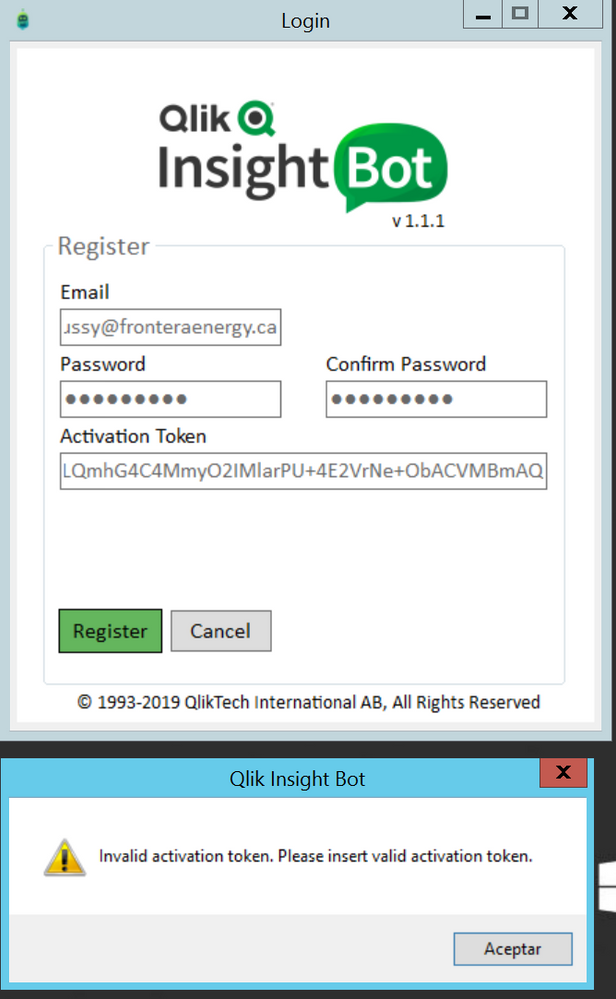
2019-11-19 21:54:03.6629|ERROR|Configuration|Register Qlik Insight Bot|Exception caught (while registering Qlik Insight Bot).
2019-11-19 21:54:03.6629|ERROR|Configuration|Register Qlik Insight Bot|System.Exception: Invalid activation token: System Error - Please try again later.
en Qlik_Insight_Bot_Configuration.MainForm.btn_register_Click(Object sender, EventArgs e)
2019-11-19 21:54:39.6952|INFO|Configuration|SendRequest|Sending request with following parameter
2019-11-19 21:54:39.6952|INFO|Configuration|SendRequest|Method: Post
2019-11-19 21:54:40.2260|INFO|Configuration|SendRequest|Request executed successfully
Imran_Arshad
- Mark as New
- Bookmark
- Subscribe
- Mute
- Subscribe to RSS Feed
- Permalink
- Report Inappropriate Content
Following steps can be help for you dear.
- Please recheck your "Activation Token".
- I believe you had already tried your license before for configurations (As per the logs shared)
- You have to use the same Email-ID for which this license is issued (Email-ID will be mentioned in your license details).
Thanks & best of luck
Regards,
M.Imran
marcos_herrera
- Mark as New
- Bookmark
- Subscribe
- Mute
- Subscribe to RSS Feed
- Permalink
- Report Inappropriate Content


- « Previous Replies
- Next Replies »