Unlock a world of possibilities! Login now and discover the exclusive benefits awaiting you.

- Qlik Community
- :
- Forums
- :
- Analytics & AI
- :
- Products & Topics
- :
- Integration, Extension & APIs
- :
- Qlik Sense error: Can not use internal module
- Subscribe to RSS Feed
- Mark Topic as New
- Mark Topic as Read
- Float this Topic for Current User
- Bookmark
- Subscribe
- Mute
- Printer Friendly Page

- Mark as New
- Bookmark
- Subscribe
- Mute
- Subscribe to RSS Feed
- Permalink
- Report Inappropriate Content
Qlik Sense error: Can not use internal module
I wonder, is it possible to change the logic of checking internal module path?
Im building framework based on d3.js, and would like to use require.paths shortcuts for my modules:
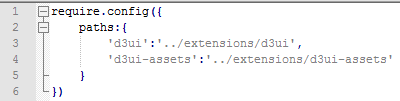
It works fine in Mashup, but in extensions I get this error:

I would like to have same namespace in all my projects (extensions / mashups / QlikView extensions / web-apps outside Qlik), so changing shortcut is not the case
I did some research about this error, it happens because “d3” is listed in internal modules array:

And every module that starts with “d3” is forbidden:
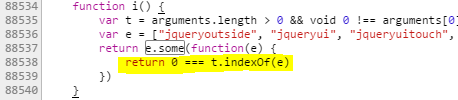
This logic should be fine:
88538: return t[t.length-1] === '/' || t[t.length-1] === '.'?0 === i.indexOf(e):t === e
If Qlik Sense R/D reading this, can you update this line in next release? Thanks!
- Mark as New
- Bookmark
- Subscribe
- Mute
- Subscribe to RSS Feed
- Permalink
- Report Inappropriate Content
I mean e[e.length-1] === '/' || e[e.length-1] === '.'?0 === t.indexOf(e):t === e


 morenoju
- Mark as New
- Bookmark
- Subscribe
- Mute
- Subscribe to RSS Feed
- Permalink
- Report Inappropriate Content
Hi, this is interesting. I'm having an error saying "Can not use the internal module 'd3'" when trying an extension I'm writing.
I opened this thread about it: Extension D3.js - Loading js files
How did you solve your issue? Is it a matter of renaming the js so they don't start by “d3”?
Thanks,
Juan