Unlock a world of possibilities! Login now and discover the exclusive benefits awaiting you.

- Qlik Community
- :
- Forums
- :
- Analytics & AI
- :
- Products & Topics
- :
- Integration, Extension & APIs
- :
- Rest connector: With connection + Authentication s...
- Subscribe to RSS Feed
- Mark Topic as New
- Mark Topic as Read
- Float this Topic for Current User
- Bookmark
- Subscribe
- Mute
- Printer Friendly Page

 mikebumamv
- Mark as New
- Bookmark
- Subscribe
- Mute
- Subscribe to RSS Feed
- Permalink
- Report Inappropriate Content
Rest connector: With connection + Authentication scheme
Hello all,
I've a question about the with connection statement. I want the connection variable, so I have to use the with connection statement. In my rest connection I use the authentication scheme basic with an username and password. I need to know how to write this scheme in the with connection!?!?
I loaded the normal rest conn table and instead of the conn string I used a dummy conn. In addition I add (FROM JSON (wrap on) "root" PK "__KEY_root") to the FROM Clause. Thereafter the with connection statement. Here is an example of what I reached so far:
LIB CONNECT TO 'Dummyconnection';
RestConnectorMasterTable:
SQL SELECT
"__KEY_reportAssessments_v2_0s",
(SELECT
"ALL_FIELDS",
"__FK_ReportAssessment_v2_0"
FROM "ReportAssessment_v2_0" FK "__FK_ReportAssessment_v2_0")
FROM XML "reportAssessments_v2_0s" PK "__KEY_reportAssessments_v2_0s"
FROM JSON (wrap on) "root" PK "__KEY_root"
WITH CONNECTION(
Url "$(URL)",
HTTPHEADER "Authorization: Basic $(username):$(password)"
);
Please let my know what I have to change, because it's not working now. Qlik support told me I could possible use this: Authorization: Basic <credentials>, where credentials is the base64 encoding of id and password joined by a single colon :.
Thanks in advance!!

 Mehrnaz
- Mark as New
- Bookmark
- Subscribe
- Mute
- Subscribe to RSS Feed
- Permalink
- Report Inappropriate Content
Hi,
What I had to use is different, but I had double quote around "Authorization" and double quote around the entire value of it. Maybe try to assign the whole value part of it to a variable and use it that way and see if it helps:
LET vAuthorization = 'Basic ' & '$(username)' & ':' & '$(password)';

SQL Select ...

HTTPHEADER "Authorization" "$(vAuthorization)"
Mehrnaz

- Mark as New
- Bookmark
- Subscribe
- Mute
- Subscribe to RSS Feed
- Permalink
- Report Inappropriate Content
I have the same issue and your solution doesn't work. It is so frustrating that you can't loop through URLs with a single connection if basic authentication is required...
Mehrnaz
- Mark as New
- Bookmark
- Subscribe
- Mute
- Subscribe to RSS Feed
- Permalink
- Report Inappropriate Content
Hi JeromeHoen, my authorization wasn't basic , so, it shouldn't work for basic authentication. I had to pass in bearer token and stuff like that and it works fine.
What would happen if you create a simple connection through the wizard:
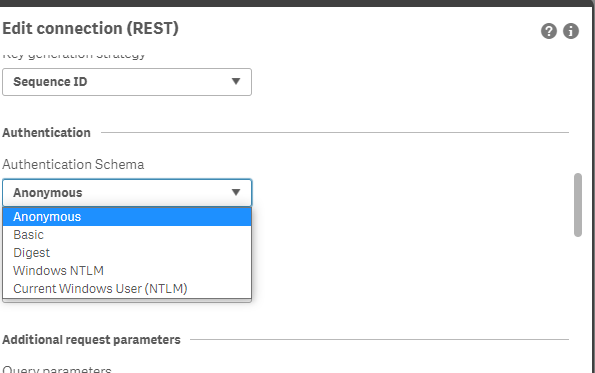
and choose "Basic" from the dropdown and in script, and in your loop, you only change the url or body (or whatever you need to modify o each loop) and run it? I haven't done that as my scenario was very different, but it's worth a try.
Best of luck though!

 jptneumann
- Mark as New
- Bookmark
- Subscribe
- Mute
- Subscribe to RSS Feed
- Permalink
- Report Inappropriate Content
To do a Basic Authentication, it is necessary that the username and password be converted to Base64 concatenated the Username & ':' & Password and then convert to Base64. The resulting String you then pass in the Header by WITH CONNECTION as follows:
HTTPHEADER "Autorization" "Basic $ (vBase64String)"
To convert to Base64, see excelent article at https://spivey.world/qlik%20sense/2020/10/08/base64-encode-qlik-script.html
It works for me and I believe it will works for you too.
 Chotana2
- Mark as New
- Bookmark
- Subscribe
- Mute
- Subscribe to RSS Feed
- Permalink
- Report Inappropriate Content