Unlock a world of possibilities! Login now and discover the exclusive benefits awaiting you.

- Qlik Community
- :
- Forums
- :
- Analytics & AI
- :
- Products & Topics
- :
- Integration, Extension & APIs
- :
- Splunk Connector for Qlik Sense
- Subscribe to RSS Feed
- Mark Topic as New
- Mark Topic as Read
- Float this Topic for Current User
- Bookmark
- Subscribe
- Mute
- Printer Friendly Page

- Mark as New
- Bookmark
- Subscribe
- Mute
- Subscribe to RSS Feed
- Permalink
- Report Inappropriate Content
Splunk Connector for Qlik Sense
I'm a Qlik Luminary and owner of a consulting firm that specializes in data analytics with Qlik and Splunk. We have developed a connector for QlikView & QlikSense that directly streams data out of Splunk into Qlik.
The Splunk Connector for Qlik developed by Analytica Consulting provides an easy, robust integration between the two platforms.
Features include:
- Any easy to use interface which allows you to enter a Splunk Search or select a Saved Search to use with your Qlik application
- Streams data directly from Splunk into Qlik’s in-memory model
- Can use direct data discovery to allow Splunk to do the heavy lifting
- Works with both QlikView and QlikSense
For more information please visit our site or the Qlik Market. Links below:
- Splunk Connector for Qlik – Analytica Consulting
- http://market.qlik.com/solutions/Splunk_Connector_for_Qlik
Thanks,
Steve
- Tags:
- splunk

 manojkumar121
- Mark as New
- Bookmark
- Subscribe
- Mute
- Subscribe to RSS Feed
- Permalink
- Report Inappropriate Content
Hi @Anonymous Team,
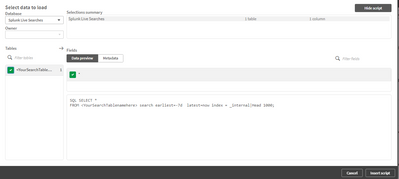
I'm using your Splunk connector for Qliksense and I'm stuck at writing script using this connector.
Could you please tell me what to be replaced with <YourSearchTablenamehere>?
My Splunk query is something like below:
index=abasyslog source="/var/log/httpd/service-gateway-ssl-access.log" RQ="/abc*Processing/*"
SQL SELECT *
FROM <YourSearchTablenamehere> search earliest=-7d latest=now index = _internal|Head 1000;


 tmackay2015
- Mark as New
- Bookmark
- Subscribe
- Mute
- Subscribe to RSS Feed
- Permalink
- Report Inappropriate Content
Hi Manouj,
please try something like:
SomePreferredTableName:
SQL SELECT *
FROM <SomePreferredTableName>
search earliest=-7d latest=now index=abasyslog source="/var/log/httpd/service-gateway-ssl-access.log" RQ="/abc*Processing/*";
You can remove the earliest/ latest time limits if needed , they are included to avoid an excessively long query.
The Table Tag <SomePreferredTableName> is any name you would like to use for the semi anonymous query to Splunk, this will show up in the Access logs.
Regarding the table Tag The '<' and '>' are used as a special delimiter for the connector to pick up on the name
That name must also not contain spaces.
if your Query is also stored in Splunk as a saved report you can access that report like so:
SELECT * FROM
<Report_Name_With_any_Spaces_Replaced_with_underscores>;
Keep in mind the credentials used to access Splunk must have permission in Splunk to access the named report.
manojkumar121
- Mark as New
- Bookmark
- Subscribe
- Mute
- Subscribe to RSS Feed
- Permalink
- Report Inappropriate Content
Thanks Thomas! This is very helpful