Unlock a world of possibilities! Login now and discover the exclusive benefits awaiting you.

- Qlik Community
- :
- Forums
- :
- Analytics & AI
- :
- Products & Topics
- :
- Management & Governance
- :
- Re: Active Directory several groups (User director...
- Subscribe to RSS Feed
- Mark Topic as New
- Mark Topic as Read
- Float this Topic for Current User
- Bookmark
- Subscribe
- Mute
- Printer Friendly Page

 martinr_
- Mark as New
- Bookmark
- Subscribe
- Mute
- Subscribe to RSS Feed
- Permalink
- Report Inappropriate Content
Active Directory several groups (User directory connectors)
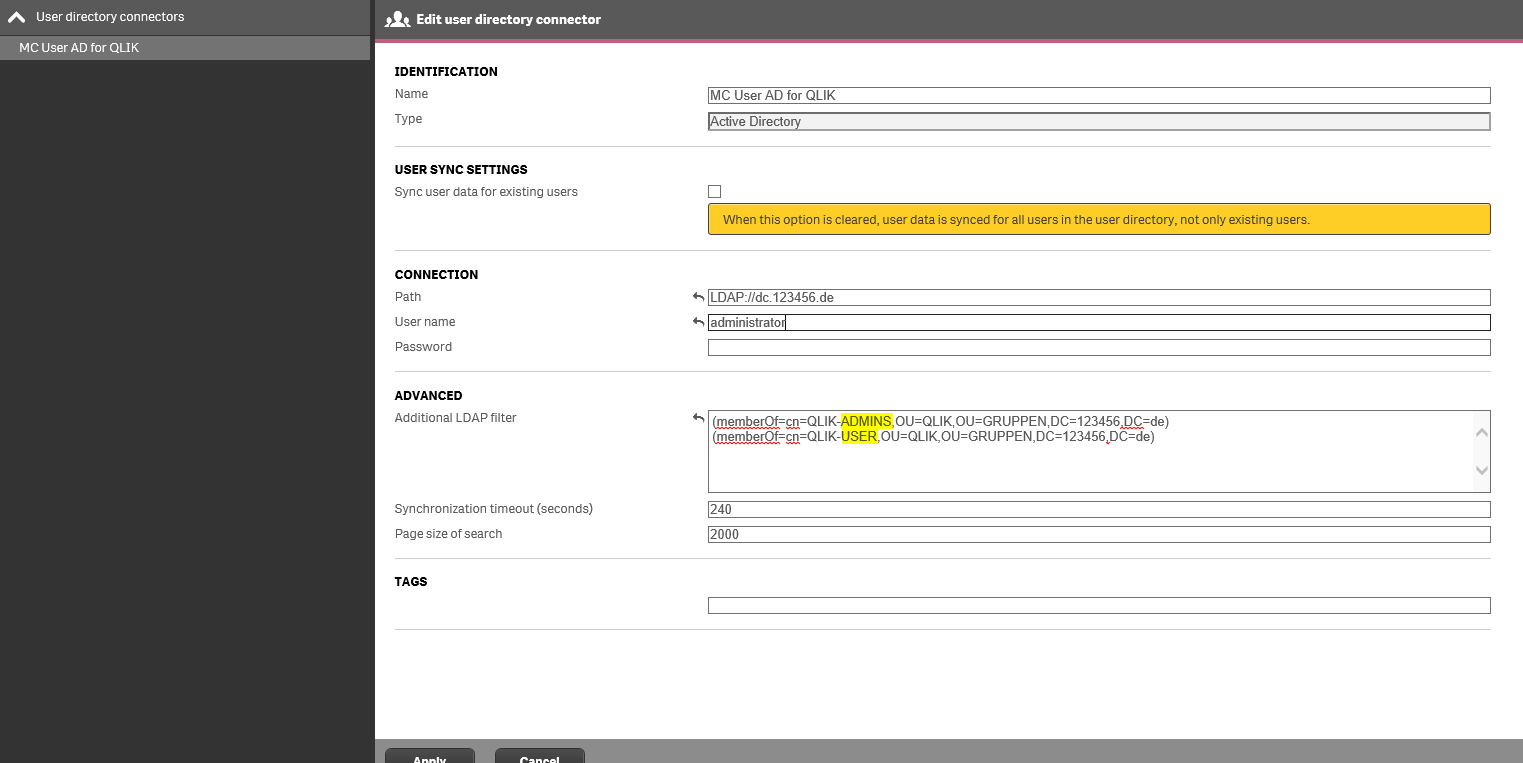
I have created in the active directory several groups, with which I want to control rights.
The user should now be import via the user directory connector.
How can I import the groups QLIK-ADMINS and QLIK-USER together.
Have already & and | Tried, but without success.
Accepted Solutions

 barry_stevens
- Mark as New
- Bookmark
- Subscribe
- Mute
- Subscribe to RSS Feed
- Permalink
- Report Inappropriate Content
Does something like this work (&(objectCategory=person)(objectClass=user)(&memberOf=CN=QLIK-ADMINS,ou=***,ou=***,ou=***,DC=***,DC=***)(&memberOf=CN=QLIK-USER,ou=***,ou=***,ou=***,DC=***,DC=***))) - replace the *** with your AD structure
However, another way is to have a single Group (QLIK-ALL) that contains those two groups and use the rules within qlik to control access. When you bring a user in it brings in all the groups it is a member of so you can then use the Admin and user group in qlik rules. In this case you could use the following
(&(objectCategory=person)(objectClass=user)(&memberOf=CN=QLIK-ALL,ou=***,ou=***,ou=***,DC=***,DC=***)))
martinr_
- Mark as New
- Bookmark
- Subscribe
- Mute
- Subscribe to RSS Feed
- Permalink
- Report Inappropriate Content
hello. can anyone help me, i need it for several groups?

 Vincenzo_Esposi
- Mark as New
- Bookmark
- Subscribe
- Mute
- Subscribe to RSS Feed
- Permalink
- Report Inappropriate Content
Hi Martin,
UDC supports only users as object type, groups are a user attrib. So if you import users belonging to the s QLIK-ADMINS and/or QLIK-USER group, you will see in their attribs
barry_stevens
- Mark as New
- Bookmark
- Subscribe
- Mute
- Subscribe to RSS Feed
- Permalink
- Report Inappropriate Content
Does something like this work (&(objectCategory=person)(objectClass=user)(&memberOf=CN=QLIK-ADMINS,ou=***,ou=***,ou=***,DC=***,DC=***)(&memberOf=CN=QLIK-USER,ou=***,ou=***,ou=***,DC=***,DC=***))) - replace the *** with your AD structure
However, another way is to have a single Group (QLIK-ALL) that contains those two groups and use the rules within qlik to control access. When you bring a user in it brings in all the groups it is a member of so you can then use the Admin and user group in qlik rules. In this case you could use the following
(&(objectCategory=person)(objectClass=user)(&memberOf=CN=QLIK-ALL,ou=***,ou=***,ou=***,DC=***,DC=***)))
martinr_
- Mark as New
- Bookmark
- Subscribe
- Mute
- Subscribe to RSS Feed
- Permalink
- Report Inappropriate Content
Thank you Barry.
The upper example did not work.
I have tracked your solution approach and to import the user a group QLIK-ALL created.
