Unlock a world of possibilities! Login now and discover the exclusive benefits awaiting you.

- Qlik Community
- :
- Forums
- :
- Analytics & AI
- :
- Products & Topics
- :
- Management & Governance
- :
- Problems with Qlik Sense Installation
- Subscribe to RSS Feed
- Mark Topic as New
- Mark Topic as Read
- Float this Topic for Current User
- Bookmark
- Subscribe
- Mute
- Printer Friendly Page

- Mark as New
- Bookmark
- Subscribe
- Mute
- Subscribe to RSS Feed
- Permalink
- Report Inappropriate Content
Problems with Qlik Sense Installation
Hi There,
I am not able to install Qlik Sense. There seems to be an Postgres/Database Issue:
Password validation failed.
CustomAction CA_ValidateSuperUserPassword returned actual error code 1603
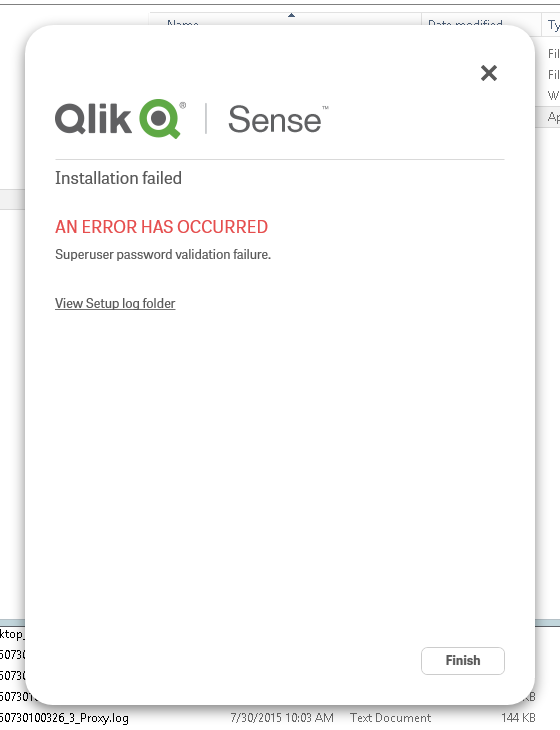
What can I do to make it work? I attached the postgres log file.
Thank you,
Christian
- Mark as New
- Bookmark
- Subscribe
- Mute
- Subscribe to RSS Feed
- Permalink
- Report Inappropriate Content
I solved this problem by deleting the qlik installation folder.
Thank you. 

 Allardata
- Mark as New
- Bookmark
- Subscribe
- Mute
- Subscribe to RSS Feed
- Permalink
- Report Inappropriate Content
Thanks that fixed it! Was getting worried that I forgot the password...

 sschulz1986
- Mark as New
- Bookmark
- Subscribe
- Mute
- Subscribe to RSS Feed
- Permalink
- Report Inappropriate Content
When saying you deleted the Qlik installation folder. Is this the C:\program files directory? I am attempting to apply the February 2022 update and i keep getting this same error no matter what i try and i know the password is correct.