Unlock a world of possibilities! Login now and discover the exclusive benefits awaiting you.

- Qlik Community
- :
- Forums
- :
- Analytics & AI
- :
- Products & Topics
- :
- Management & Governance
- :
- QlikView Converter Not Working
- Subscribe to RSS Feed
- Mark Topic as New
- Mark Topic as Read
- Float this Topic for Current User
- Bookmark
- Subscribe
- Mute
- Printer Friendly Page

.png "Former Employee") Sarah_Miller
Sarah_Miller
- Mark as New
- Bookmark
- Subscribe
- Mute
- Subscribe to RSS Feed
- Permalink
- Report Inappropriate Content
QlikView Converter Not Working
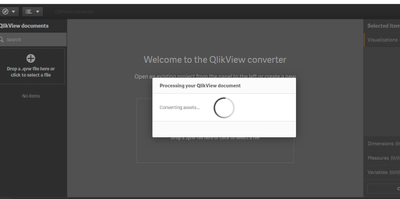
I'm trying to use QlikView Converter but it just keeps spinning. I haven't received an error messages, its just not working. I keep closing it and trying again but nothing...
trying to convert a QlikView app from 2016....
- Tags:
- qlikview converter
Accepted Solutions
 Eugene_Sleator
- Mark as New
- Bookmark
- Subscribe
- Mute
- Subscribe to RSS Feed
- Permalink
- Report Inappropriate Content
Hi @Sarah_Miller the issue is most likely that the version of QlikView is simply too old.
As QlikView 9 has not been supported in a long time. It is recommend to resave the applications, that are old or generated from an old version of QlikView, in a much newer i.e. a supported version of QlikView before uploading it to cloud. QlikView Supported Versions

 rohitk1609
- Mark as New
- Bookmark
- Subscribe
- Mute
- Subscribe to RSS Feed
- Permalink
- Report Inappropriate Content
Probably Due to size it is taking that much time. Is it Desktop version of Qlik Sense?
Eugene_Sleator
- Mark as New
- Bookmark
- Subscribe
- Mute
- Subscribe to RSS Feed
- Permalink
- Report Inappropriate Content
Hi @Sarah_Miller the issue is most likely that the version of QlikView is simply too old.
As QlikView 9 has not been supported in a long time. It is recommend to resave the applications, that are old or generated from an old version of QlikView, in a much newer i.e. a supported version of QlikView before uploading it to cloud. QlikView Supported Versions
 philipp_ebner
- Mark as New
- Bookmark
- Subscribe
- Mute
- Subscribe to RSS Feed
- Permalink
- Report Inappropriate Content
We are facing the exact same issue?
We're having Qlik Sense february 2023 release installed. The QlikView document is being created with a May 2022 realease.
No section Access, no Macros, no big data....Any suggestions?
philipp_ebner
- Mark as New
- Bookmark
- Subscribe
- Mute
- Subscribe to RSS Feed
- Permalink
- Report Inappropriate Content
Found the issue on our side.
The converter service logs (C:\ProgramData\Qlik\Sense\Log\ConverterService )indicated a missing subdirectory "content" that seemed to be causing the MKDIR command to fail.

after adding the"content"-Folder to the path ("C:\Users\<serviceaccount>\AppData\Local\Temp\content") it worked...
