Unlock a world of possibilities! Login now and discover the exclusive benefits awaiting you.

- Qlik Community
- :
- Forums
- :
- Analytics & AI
- :
- Products & Topics
- :
- Management & Governance
- :
- Re: Right click Qlikview Icon Help
- Subscribe to RSS Feed
- Mark Topic as New
- Mark Topic as Read
- Float this Topic for Current User
- Bookmark
- Subscribe
- Mute
- Printer Friendly Page

 Ricardo_Gerhard
- Mark as New
- Bookmark
- Subscribe
- Mute
- Subscribe to RSS Feed
- Permalink
- Report Inappropriate Content
Right click Qlikview Icon Help
Hello,
When openned Qlikview Desktp, and Qlik Help > About then right click in the Qlik Icon, are showed a few options as below.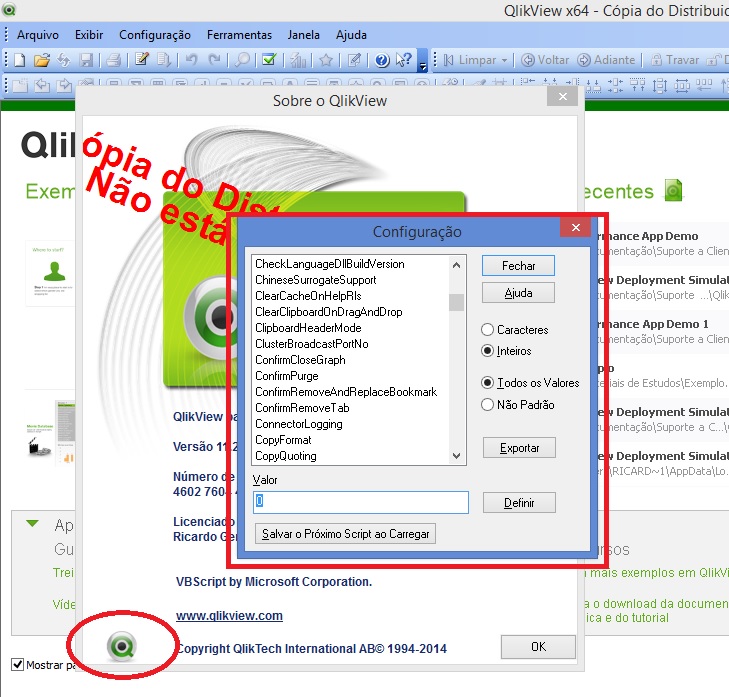
Is there a documentation that explain how this options works? This options only works to Qlikview Desktop Document ou Qlikview Server?
Help Me
OEM Solution Architect
LATAM

Accepted Solutions

 rwunderlich
- Mark as New
- Bookmark
- Subscribe
- Mute
- Subscribe to RSS Feed
- Permalink
- Report Inappropriate Content
As far as I know there is not a publicly available list of these options. This interface is considered a "back door" and is not the "supported" or preferred way to set options. Many of those options are set in the User Preferences Dialog. When they appear in that dialog, they are documented in the Help.
-Rob
rwunderlich
- Mark as New
- Bookmark
- Subscribe
- Mute
- Subscribe to RSS Feed
- Permalink
- Report Inappropriate Content
As far as I know there is not a publicly available list of these options. This interface is considered a "back door" and is not the "supported" or preferred way to set options. Many of those options are set in the User Preferences Dialog. When they appear in that dialog, they are documented in the Help.
-Rob
Ricardo_Gerhard
- Mark as New
- Bookmark
- Subscribe
- Mute
- Subscribe to RSS Feed
- Permalink
- Report Inappropriate Content
Thanks Rob.
OEM Solution Architect
LATAM
