Unlock a world of possibilities! Login now and discover the exclusive benefits awaiting you.

- Qlik Community
- :
- Forums
- :
- Analytics & AI
- :
- Products & Topics
- :
- Management & Governance
- :
- Why Do Web Connectors Need Encryption Key?
- Subscribe to RSS Feed
- Mark Topic as New
- Mark Topic as Read
- Float this Topic for Current User
- Bookmark
- Subscribe
- Mute
- Printer Friendly Page

 mbespartochnyy
- Mark as New
- Bookmark
- Subscribe
- Mute
- Subscribe to RSS Feed
- Permalink
- Report Inappropriate Content
Why Do Web Connectors Need Encryption Key?
While trying to create a data connection for GitHub, I got an error message saying that ENCRYPTION_KEY_MISSING:
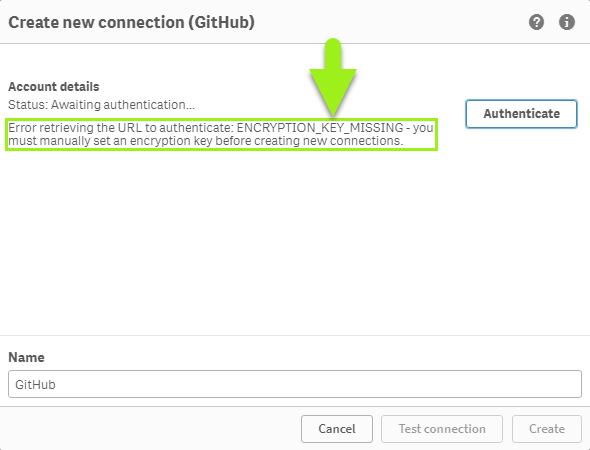
I figured out the problem, got an encryption key generated, and data connection created. What I can't figure out is why was encryption key needed.
Does anyone know?
Accepted Solutions
 howdash
- Mark as New
- Bookmark
- Subscribe
- Mute
- Subscribe to RSS Feed
- Permalink
- Report Inappropriate Content
Short answer is "to encrypt access tokens and, possibly, refresh tokens that are used to access data."
Context
For context, and continuing to use GitHub as an example, when an employee creates a new data connection to GitHub using Qlik's web connector, the web connector obtains an Access token from GitHub that it can use to access that employee's GitHub data on behalf of employee.
Role of Access Token
Qlik Sense will need to access that employee's GitHub data each time the employee or service account reloads the app that is using the GitHub data connection to pull data from GitHub. GitHub won't allow Qlik Sense access employee's GitHub repository without the web connector having the access token.
Example
So, if 10 employees each create a connection to their own GitHub repository to use in apps they are creating, GitHub issues 10 unique access tokens - one per connection. When any of those apps reloads, Qlik Sense uses the matching employee's access token to pull their data. Without the correct token, GitHub rejects the request.
Access Token Security
Since the access tokens are used by Qlik web connector to access employee's GitHub data, these access tokens must be protected. They can't just be laying around on the server in plaintext.
To protect access tokens, an encryption key is created and installed. The encryption key is used to encrypt access tokens before they are written to your Qlik Sense server's hard drive. This ensures that even if someone will get access to the access tokens, they still won't be able to connect to and read employees' GitHub data.

 Alan_Slaughter
- Mark as New
- Bookmark
- Subscribe
- Mute
- Subscribe to RSS Feed
- Permalink
- Report Inappropriate Content
Hi, An encryption key is required for several important reasons:
-
Data Protection: It transforms sensitive data into unreadable cipher text, safeguarding it from unauthorized access and potential breaches.
-
Compliance: Encryption is often recommended or required to comply with various data protection laws and regulations.
-
Security for Web Storage Provider Connectors: Many Qlik Web Storage Provider Connectors specifically require an encryption key to function securely.
-
Access Control: The encryption key ensures that only authorized users can decrypt and access the protected data.
-
Risk Reduction: In big data environments where large volumes of data are collected and stored, encryption helps mitigate the risk of internal or external data leakage.
-
Asset Protection: It safeguards your organization's and customers' sensitive information from potential threats.
-
Secure Authentication: For certain connectors, the encryption key is necessary to authenticate and establish secure connections.
Without a proper encryption key, you may encounter errors such as "ENCRYPTION_KEY_MISSING" when trying to create new connections or access protected data. It's crucial to generate and manage encryption keys securely, following your organization's best practices and security protocols.
https://help.qlik.com/en-US/connectors/Content/Connectors_Home/Setting-encryption-key.htm
howdash
- Mark as New
- Bookmark
- Subscribe
- Mute
- Subscribe to RSS Feed
- Permalink
- Report Inappropriate Content
Short answer is "to encrypt access tokens and, possibly, refresh tokens that are used to access data."
Context
For context, and continuing to use GitHub as an example, when an employee creates a new data connection to GitHub using Qlik's web connector, the web connector obtains an Access token from GitHub that it can use to access that employee's GitHub data on behalf of employee.
Role of Access Token
Qlik Sense will need to access that employee's GitHub data each time the employee or service account reloads the app that is using the GitHub data connection to pull data from GitHub. GitHub won't allow Qlik Sense access employee's GitHub repository without the web connector having the access token.
Example
So, if 10 employees each create a connection to their own GitHub repository to use in apps they are creating, GitHub issues 10 unique access tokens - one per connection. When any of those apps reloads, Qlik Sense uses the matching employee's access token to pull their data. Without the correct token, GitHub rejects the request.
Access Token Security
Since the access tokens are used by Qlik web connector to access employee's GitHub data, these access tokens must be protected. They can't just be laying around on the server in plaintext.
To protect access tokens, an encryption key is created and installed. The encryption key is used to encrypt access tokens before they are written to your Qlik Sense server's hard drive. This ensures that even if someone will get access to the access tokens, they still won't be able to connect to and read employees' GitHub data.
