Unlock a world of possibilities! Login now and discover the exclusive benefits awaiting you.

- Qlik Community
- :
- Support
- :
- Support
- :
- Knowledge
- :
- Support Articles
- :
- Upgrading and unbundling the Qlik Sense Repository...
- Subscribe to RSS Feed
- Mark as New
- Mark as Read
- Bookmark
- Subscribe
- Printer Friendly Page
- Report Inappropriate Content
Upgrading and unbundling the Qlik Sense Repository Database using the Qlik PostgreSQL Installer

 Mario_Petre
- Mark as New
- Bookmark
- Subscribe
- Mute
- Subscribe to RSS Feed
- Permalink
- Report Inappropriate Content
Upgrading and unbundling the Qlik Sense Repository Database using the Qlik PostgreSQL Installer
Apr 10, 2026 6:37:59 AM
May 24, 2022 2:40:49 AM
In this article, we walk you through the requirements and process of how to upgrade and unbundle an existing Qlik Sense Repository Database (see supported scenarios) as well as how to install a brand new Repository based on PostgreSQL. We will use the Qlik PostgreSQL Installer (QPI).
For a manual method, see How to manually upgrade the bundled Qlik Sense PostgreSQL version to 12.5 version.
Using the Qlik Postgres Installer not only upgrades PostgreSQL; it also unbundles PostgreSQL from your Qlik Sense Enterprise on Windows install. This allows for direct control of your PostgreSQL instance and facilitates maintenance without a dependency on Qlik Sense. Further Database upgrades can then be performed independently and in accordance with your corporate security policy when needed, as long as you remain within the supported PostgreSQL versions. See How To Upgrade Standalone PostgreSQL.
Index
- Supported Scenarios
- Upgrades
- New installs
- Requirements
- Known limitations
- Installing anew Qlik Sense Repository Database using PostgreSQL
- Qlik PostgreSQL Installer - Download Link
- Upgrading an existing Qlik Sense Repository Database
- The Upgrade
- Next Steps and Compatibility with PostgreSQL installers
- How do I upgrade PostgreSQL from here on?
- Troubleshooting and FAQ
- Related Content
Video Walkthrough
Video chapters:
- 01:02 - Intro to PostgreSQL Repository
- 02:51 – Prerequisites
- 03:24 - What is the QPI tool?
- 05:09 - Using the QPI tool
- 09:27 - Removing the old Database Service
- 11:27 - Upgrading a stand-alone to the latest release
- 13:39 - How to roll-back to the previous version
- 14:46 - Troubleshooting upgrading a patched version
- 18:25 - Troubleshooting upgrade security error
- 21:15 - Additional config file settings
Supported Scenarios
Upgrades
The following versions have been tested and verified to work with QPI:
Qlik Sense February 2022 to Qlik Sense November 2024.
If you are on a Qlik Sense version prior to these, upgrade to at least February 2022 before you begin.
Qlik Sense November 2022 and later do not support 9.6, and a warning will be displayed during the upgrade. From Qlik Sense August 2023 a upgrade with a 9.6 database is blocked.
New installs
The Qlik PostgreSQL Installer supports installing a new standalone PostgreSQL database with the configurations required for connecting to a Qlik Sense server. This allows setting up a new environment or migrating an existing database to a separate host.
Requirements
- Review the QPI Release Notes before you continue
-
Using the Qlik PostgreSQL Installer on a patched Qlik Sense version can lead to unexpected results. If you have a patch installed, either:
- Uninstall all patches before using QPI (see Installing and Uninstalling Qlik Sense Patches) or
- Upgrade to an IR release of Qlik Sense which supports QPI
- The PostgreSQL Installer can only upgrade bundled PostgreSQL database listening on the default port 4432.
- The user who runs the installer must be an administrator.
- The backup destination must have sufficient free disk space to dump the existing database
- The backup destination must not be a network path or virtual storage folder. It is recommended the backup is stored on the main drive.
- There will be downtime during this operation, please plan accordingly
- If upgrading to PostgreSQL 14 and later, the Windows OS must be at least Server 2016
Known limitations
- (Limitation removed in QPI 2.1 | Release Notes) Cannot migrate a 14.17 embedded database to a standalone
- (Limitation removed in QPI 2.1 | Release Notes) Using QPI to upgrade a standalone database or a database previously unbundled with QPI is not supported.
- The installer itself does not provide an automatic rollback feature.
Installing a new Qlik Sense Repository Database using PostgreSQL
- Run the Qlik PostgreSQL Installer as an administrator
- Click on Install
- Accept the Qlik Customer Agreement
- Set your Local database settings and click Next. You will use these details to connect other nodes to the same cluster.
- Set your Database superuser password and click Next
- Set the database installation folder, default: C:\Program Files\PostgreSQL\14
Do not use the standard Qlik Sense folders, such as C:\Program Files\Qlik\Sense\Repository\PostgreSQL\ and C:\Programdata\Qlik\Sense\Repository\PostgreSQL\.
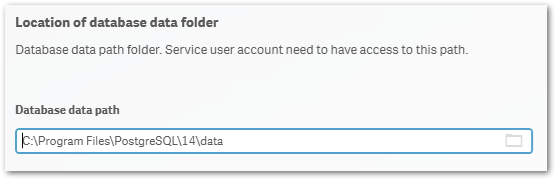
- Set the database data folder, default: C:\Program Files\PostgreSQL\14\data
Do not use the standard Qlik Sense folders, such as C:\Program Files\Qlik\Sense\Repository\PostgreSQL\ and C:\Programdata\Qlik\Sense\Repository\PostgreSQL\.
- Review your settings and click Install, then click Finish
- Start installing Qlik Sense Enterprise Client Managed. Choose Join Cluster option.
The Qlik PostgreSQL Installer has already seeded the databases for you and has created the users and permissions. No further configuration is needed. - The tool will display information on the actions being performed. Once installation is finished, you can close the installer.
If you are migrating your existing databases to a new host, please remember to reconfigure your nodes to connect to the correct host. How to configure Qlik Sense to use a dedicated PostgreSQL database
Qlik PostgreSQL Installer - Download Link
Download the installer here.

Qlik PostgreSQL installer Release Notes
Upgrading an existing Qlik Sense Repository Database
The following versions have been tested and verified to work with QPI (1.4.0):
February 2022 to November 2023.
If you are on any version prior to these, upgrade to at least February 2022 before you begin.
Qlik Sense November 2022 and later do not support 9.6, and a warning will be displayed during the upgrade. From Qlik Sense August 2023 a 9.6 update is blocked.
The Upgrade
- Stop all services on rim nodes
- On your Central Node, stop all services except the Qlik Sense Repository Database
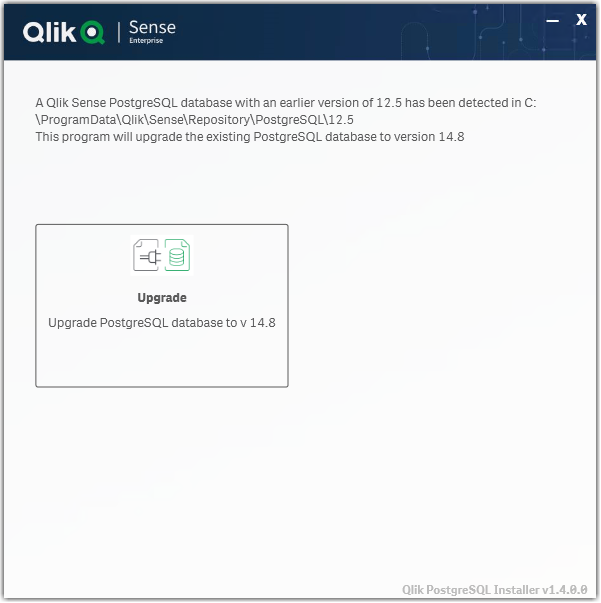
- Run the Qlik PostgreSQL Installer. An existing Database will be detected.
- Highlight the database and click Upgrade
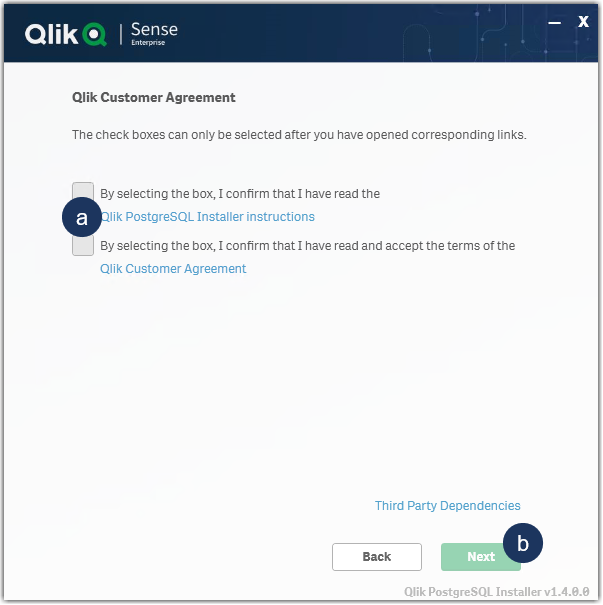
- Read and confirm the (a) Installer Instructions as well as the Qlik Customer Agreement, then click (b) Next.
- Provide your existing Database superuser password and click Next.
- Define your Database backup path and click Next.
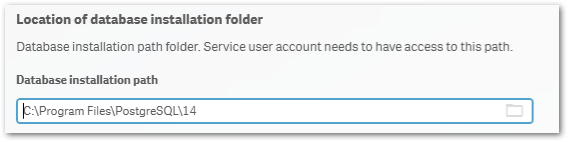
- Define your Install Location (default is prefilled) and click Next.
- Define your database data path (default is prefilled) and click Next.
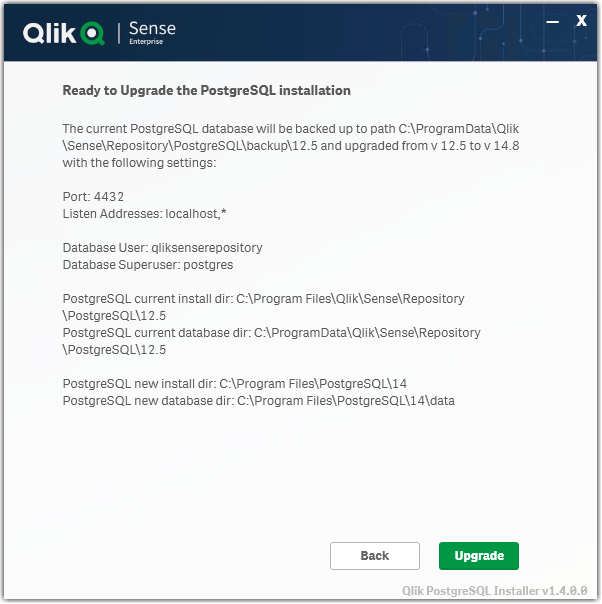
- Review all properties and click Upgrade.
The review screen lists the settings which will be migrated. No manual changes are required post-upgrade. - The upgrade is completed. Click Close.
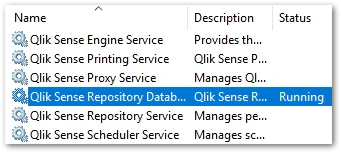
- Open the Windows Services Console and locate the Qlik Sense Enterprise on Windows services.
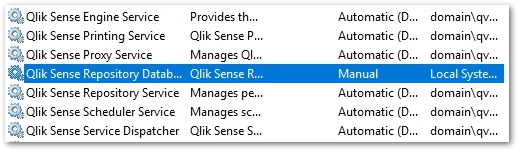
You will find that the Qlik Sense Repository Database service has been set to manual. Do not change the startup method.
You will also find a new postgresql-x64-14 service. Do not rename this service.
- Start all services except the Qlik Sense Repository Database service.
- Start all services on your rim nodes.
- Validate that all services and nodes are operating as expected. The original database folder in C:\ProgramData\Qlik\Sense\Repository\PostgreSQL\X.X_deprecated
-
Uninstall the old Qlik Sense Repository Database service.
This step is required. Failing to remove the old service will lead the upgrade or patching issues.
- Open a Windows File Explorer and browse to C:\ProgramData\Package Cache
- From there, search for the appropriate msi file.
If you were running 9.6 before the upgrade, search PostgreSQL.msi
If you were running 12.5 before the upgrade, search PostgreSQL125.msi - The msi will be revealed.
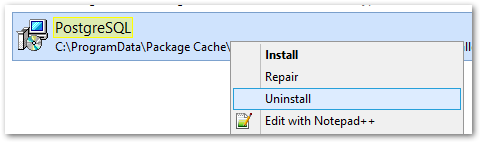
- Right-click the msi file and select uninstall from the menu.
- Open a Windows File Explorer and browse to C:\ProgramData\Package Cache
- Re-install the PostgreSQL binaries. This step is optional if Qlik Sense is immediately upgraded following the use of QPI. The Sense upgrade will install the correct binaries automatically.
Failing to reinstall the binaries will lead to errors when executing any number of service configuration scripts.
If you do not immediately upgrade:
- Open a Windows File Explorer and browse to C:\ProgramData\Package Cache
- From there, search for the .msi file appropriate for your currently installed Qlik Sense version
For Qlik Sense August 2023 and later: PostgreSQL14.msi
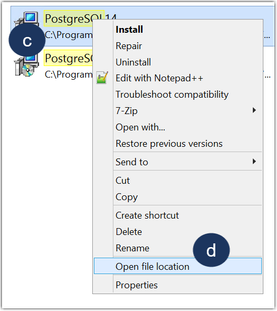
Qlik Sense February 2022 to May 2023: PostgreSQL125.msi - Right-click the file
- Click Open file location
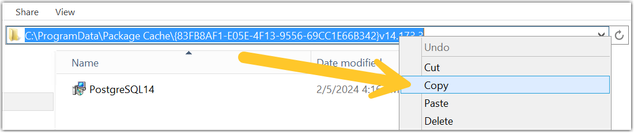
- Highlight the file path, right-click on the path, and click Copy
- Open a Windows Command prompt as administrator
- Navigate to the location of the folder you copied
Example command line:
cd C:\ProgramData\Package Cache\{GUID}
Where GUID is the value of the folder name. - Run the following command depending on the version you have installed:
Qlik Sense August 2023 and later
msiexec.exe /qb /i "PostgreSQL14.msi" SKIPINSTALLDBSERVICE="1" INSTALLDIR="C:\Program Files\Qlik\Sense"
Qlik Sense February 2022 to May 2023
msiexec.exe /qb /i "PostgreSQL125.msi" SKIPINSTALLDBSERVICE="1" INSTALLDIR="C:\Program Files\Qlik\Sense"
This will re-install the binaries without installing a database. If you installed with a custom directory adjust the INSTALLDIR parameter accordingly. E.g. you installed in D:\Qlik\Sense then the parameter would be INSTALLDIR="D:\Qlik\Sense".
- Open a Windows File Explorer and browse to C:\ProgramData\Package Cache
- Finalize the process by updating the references to the PostgreSQL binaries paths in the SetupDatabase.ps1 and Configure-Service.ps1 files. For detailed steps, see Cannot change the qliksenserepository password for microservices of the service dispatcher: The syst....




If the upgrade was unsuccessful and you are missing data in the Qlik Management Console or elsewhere, contact Qlik Support.
Next Steps and Compatibility with PostgreSQL installers
Now that your PostgreSQL instance is no longer connected to the Qlik Sense Enterprise on Windows services, all future updates of PostgreSQL are performed independently of Qlik Sense. This allows you to act in accordance with your corporate security policy when needed, as long as you remain within the supported PostgreSQL versions.
Your PostgreSQL database is fully compatible with the official PostgreSQL installers from https://www.enterprisedb.com/downloads/postgres-postgresql-downloads.
How do I upgrade PostgreSQL from here on?
See How To Upgrade Standalone PostgreSQL, which documents the upgrade procedure for either a minor version upgrade (example: 14.5 to 14.8) or a major version upgrade (example: 12 to 14). Further information on PostgreSQL upgrades or updates can be obtained from Postgre directly.
Troubleshooting and FAQ
- If the installation crashes, the server reboots unexpectedly during this process, or there is a power outage, the new database may not be in a serviceable state. Installation/upgrade logs are available in the location of your temporary files, for example:
C:\Users\Username\AppData\Local\Temp\2
A backup of the original database contents is available in your chosen location, or by default in:
C:\ProgramData\Qlik\Sense\Repository\PostgreSQL\backup\X.X
The original database data folder has been renamed to:
C:\ProgramData\Qlik\Sense\Repository\PostgreSQL\X.X_deprecated - Upgrading Qlik Sense after upgrading PostgreSQL with the QPI tool fails with:
This version of Qlik Sense requires a 'SenseServices' database for multi cloud capabilities. Ensure that you have created a 'SenseService' database in your cluster before upgrading. For more information see Installing and configuring PostgreSQL.
See Qlik Sense Upgrade fails with: This version of Qlik Sense requires a _ database for _.
To resolve this, start the postgresql-x64-XX service.
The information in this article is provided as-is and to be used at own discretion. Depending on tool(s) used, customization(s), and/or other factors ongoing support on the solution below may not be provided by Qlik Support. The video in this article was recorded in a earlier version of QPI, some screens might differ a little bit.
Related Content
Qlik PostgreSQL installer version 1.3.0 Release Notes
Techspert Talks - Upgrading PostgreSQL Repository Troubleshooting
Backup and Restore Qlik Sense Enterprise documentation
Migrating Like a Boss
Optimizing Performance for Qlik Sense Enterprise
Qlik Sense Enterprise on Windows: How To Upgrade Standalone PostgreSQL
How-to reset forgotten PostgreSQL password in Qlik Sense
How to configure Qlik Sense to use a dedicated PostgreSQL database
Troubleshooting Qlik Sense Upgrades
- Tags:
- account
- admin
- back-up
- backup
- best practices
- central
- command line
- data
- database
- down
- download
- editor
- error
- fail
- fix
- help
- install
- node
- password
- PGadmin
- port
- postgres
- postgresql
- prompt
- qlik
- qlik support
- Qlik Webinar
- recommendation
- restore
- security
- service
- sql
- stt
- support
- Support Expert
- support techspert thursdays
- Talks
- Techspert
- test
- thursday
- tool
- troubleshooting
- until
- upgrade
- utility
- video
- webinar


 Tool_Tip
- Mark as Read
- Mark as New
- Bookmark
- Permalink
- Report Inappropriate Content
Also,
all of our configure.service.ps1 files showing old postgres path as highlighed instead of
New path :C:\Program Files\PostgreSQL\14

 Sebastian_Linse
- Mark as Read
- Mark as New
- Bookmark
- Permalink
- Report Inappropriate Content
@Tool_Tip that path is the standard path which exist on every Qlik Sense node with the 14 binary package installed (step 16/17 under upgrade). There is nothing wrong with the Configure-Service.ps1 script.
Best regards Sebastian
Tool_Tip
- Mark as Read
- Mark as New
- Bookmark
- Permalink
- Report Inappropriate Content
Dear sebastian,
Okay. If I agree that this path is standard path with postgres 14 binary package...
My question is after upgrading with unbundle postgres with abother path on same server, is it not required to update postgre path into service.configure file?

 Mahamed_Qlik
- Mark as Read
- Mark as New
- Bookmark
- Permalink
- Report Inappropriate Content
All Experts,
With reference to above post about upgrading postgres from 12 to unbundled 14. We have successfully upgraded postgres from 12 to unbundled 14 version using QPI tool. The environment is running well and without any failure.
After few days later we also have upgraded Qlik sense from feb2024 IR to feb2024 patch 14.
Now we realized that we had forgot to perform step 17 [Re-install the PostgreSQL binaries] so we need to confirm if can we perform it now directly? what are all things we need to make sure before doing this step 17?
Kindly suggest.
Sebastian_Linse- Mark as Read
- Mark as New
- Bookmark
- Permalink
- Report Inappropriate Content
@Mahamed_Qlik you can apply the step at that point too, so just apply step 17.
Mahamed_Qlik
- Mark as Read
- Mark as New
- Bookmark
- Permalink
- Report Inappropriate Content
Thank you Sebastian.
We have feb2024 patch 14 installed now..so can we perform step 17 directly or we need degrade to feb2024 IR first and then need to perform step 17?
Mahamed_Qlik
- Mark as Read
- Mark as New
- Bookmark
- Permalink
- Report Inappropriate Content
Dear Sebestian,
Awaiting for your confirmation
Mahamed_Qlik
- Mark as Read
- Mark as New
- Bookmark
- Permalink
- Report Inappropriate Content
??
 Sonja_Bauernfei
- Mark as Read
- Mark as New
- Bookmark
- Permalink
- Report Inappropriate Content
Hello @Mahamed_Qlik
There is no need to roll back your Qlik Sense upgrade.
Mahamed_Qlik
- Mark as Read
- Mark as New
- Bookmark
- Permalink
- Report Inappropriate Content
Dear Sebastian,
As suggested in your video we have performed replaced in notepad++ for below 8hits and after we got message saying all the 8 files has been replaced. Then we have restarted our server.
After we have checked configure-service ps files randomly and we found line no 13 did no updated with the line postgres14 path but it is showing same as old





