Unlock a world of possibilities! Login now and discover the exclusive benefits awaiting you.

- Qlik Community
- :
- All Forums
- :
- Qlik NPrinting
- :
- Re: How to create multiple slides on a PowerPoint ...
- Subscribe to RSS Feed
- Mark Topic as New
- Mark Topic as Read
- Float this Topic for Current User
- Bookmark
- Subscribe
- Mute
- Printer Friendly Page

 cliff_clayman
- Mark as New
- Bookmark
- Subscribe
- Mute
- Subscribe to RSS Feed
- Permalink
- Report Inappropriate Content
How to create multiple slides on a PowerPoint file using NPrinting
I am creating a PowerPoint file using NPrinting. I am using PowerPoint 2007 and NPrinting version 15.2.0.3. I have a PowerPoint already created that I would like to add another slide to. I can't seem to figure out how to add another slide to an existing template. Can someone please explain?
Accepted Solutions

 Lech_Miszkiewic
- Mark as New
- Bookmark
- Subscribe
- Mute
- Subscribe to RSS Feed
- Permalink
- Report Inappropriate Content
Could you please share screenshot of an edited in NPrinting PowerPoint Template?
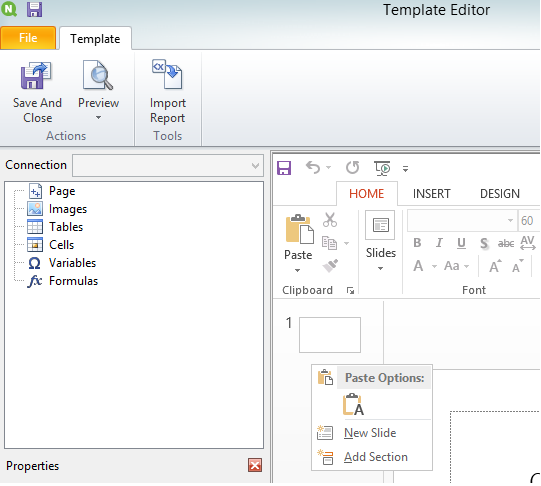
You are referring to quite old version, but still - from what i remember it was as simple as right-clicking below 1st slide in PowerPoint (opened in NPrinting Template Editor) and choosing New Slide.
regards
Lech
Lech_Miszkiewic- Mark as New
- Bookmark
- Subscribe
- Mute
- Subscribe to RSS Feed
- Permalink
- Report Inappropriate Content
Could you please share screenshot of an edited in NPrinting PowerPoint Template?
You are referring to quite old version, but still - from what i remember it was as simple as right-clicking below 1st slide in PowerPoint (opened in NPrinting Template Editor) and choosing New Slide.
regards
Lech

 avinashelite
- Mark as New
- Bookmark
- Subscribe
- Mute
- Subscribe to RSS Feed
- Permalink
- Report Inappropriate Content
2 ways
In NPrinting
Open the template and add the slide from the power point option
OR
Directly go to the template path and open with Power point and add a slide and save ...Later you could go to NPrinting and edit slide with required format and values
