Unlock a world of possibilities! Login now and discover the exclusive benefits awaiting you.

- Qlik Community
- :
- All Forums
- :
- Qlik NPrinting
- :
- How to force verify page or level
- Subscribe to RSS Feed
- Mark Topic as New
- Mark Topic as Read
- Float this Topic for Current User
- Bookmark
- Subscribe
- Mute
- Printer Friendly Page

- Mark as New
- Bookmark
- Subscribe
- Mute
- Subscribe to RSS Feed
- Permalink
- Report Inappropriate Content
How to force verify page or level
I have a excel report with sales data. I use the customer group dimension as a Page parameter so that each customer group gets their own sheet in the report.
Occationally, some Qlikview tables will not have data for every customer group (tables have separate filters). If this is the case, Qlikview will deselect the customer group and show data for every customer group in the "missing customer group" sheet.
This is VERY BAD since its difficult to identify if the actual customer group is the base of the data.
I need to use the "verify filter" option on the Page parameter to ensure that data exists.
Thanks in advance!

 Frank_S
- Mark as New
- Bookmark
- Subscribe
- Mute
- Subscribe to RSS Feed
- Permalink
- Report Inappropriate Content
Your solution is correct when distributing user specific reports with a page or level filter. Using the verify filter option will prevent reports going to all users when data is empty for a specific user and for a specific dimension value.
To all community members: you may access verify filter in the 'Filters' screen of the NPrinting Designer as per below:
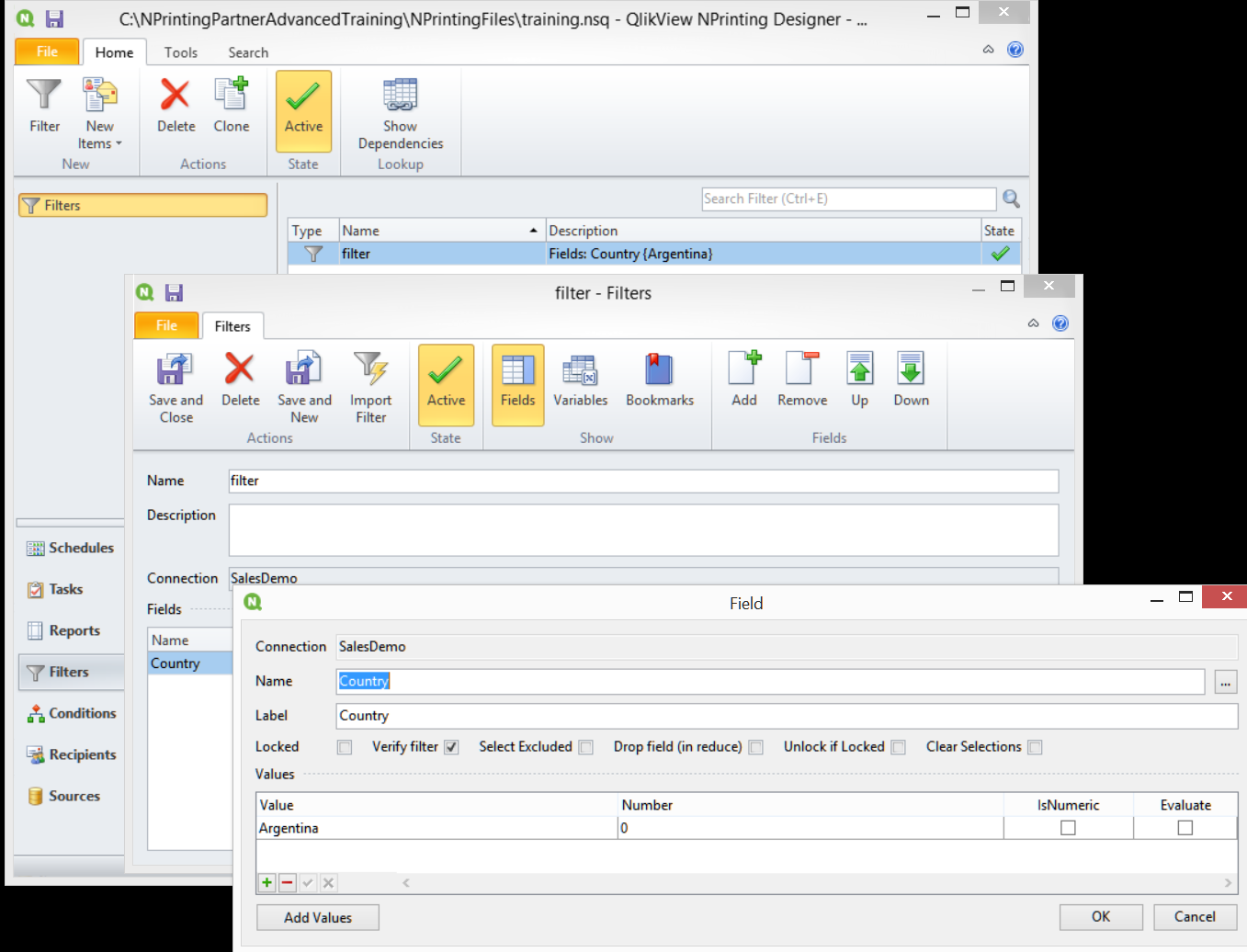
Filter Definitions may be found at the link below:
Filter Syntax, Parameters, and Options for Importing Recipients – Customer Feedback for Vizubi
Other helpful links regarding Filtering:
How to Create Static and Dynamic Filters Based on Fields
How to Distribute User Specific QlikView Reports by E-mail